Showing posts with label Developer. Show all posts

Thursday, February 07, 2013

Syncfusion Succinctly Series of ebooks

I have been enjoying the SyncFusion suite of products for about 4 months now. Apart from a stellar set of UI tools, what I have liked about Syncfusion is the constant communication that they provide the developer community. One example of this is the Succintly series of e-books that they release periodically.

You can check out the list of books that they have at: http://www.syncfusion.com/resources/techportal

I found that the jQuery and Javascript books were useful for me as refreshers when I was getting back into Asp.Net MVC programming after spending a while in classic Asp.Net and Silverlight. In addition, I had provided the book on data-structures to a junior developer at work and he liked it very much (and actually noted that it better explained some concepts than his teacher did). I am also interested in looking at the books on Objective-C and GIS.

Just about the only thing I hate about the succintly series is that I need to enter my contact information each time I get download a book from the series. (especially since I have already logged into the site).

Oh! and while you are on their site, get their Metro Studio product for free. It’s the best free resource for metro style icons.

Disclaimer: I received a free copy of Syncfusion’s tools as a door prize at the Denver Visual Studio user group meeting and Syncfusion is also providing me a small cash compensation for this post. But, none of that influenced the comments in this post. I meant to post this as a resource long before I was contacted by Syncfusion.

Friday, April 13, 2012

Tools list 2012

I got a new computer at work and had to reinstall a bunch of software. Here is the list I made along the way.

General tools

  1. Chrome: http://www.google.com/chrome/
  2. GreenShot (Screen capture tool): http://www.getgreenshot.org/
  3. NotePad++ (replacement for notepad): http://notepad-plus-plus.org/
  4. Windows Live Writer: http://writer.live/com/
  5. Paint.Net (replacement for Paint): http://www.dotpdn.com/downloads/pdn.html
  6. Fences (Desktop management software): http://www.stardock.com/products/fences/
  7. Spotify (music!): http://www.spotify.com
  8. DisplayFusion (multiple monitor enhancements): http://www.displayfusion.com/
  9. TeraCopy (enhanced file copy): http://codesector.com/teracopy
  10. 7-Zip (archive file tool): http://www.7-zip.org/

Developer tools

  1. Visual Studio 2012 (msdn)
  2. NuGet: http://www.nuget.org/
  3. LinqPad: http://www.linqpad.net/
  4. Fiddler: http://www.fiddler2.com/
  5. WinMerge: http://winmerge.org/
  6. SoapUI: http://soapui.org/
  7. WCFStorm: http://www.wcfstorm.com/
  8. PowerGui: http://powergui.org/
  9. Sql Server (msdn)
  10. SqlComplete Express/Free: http://devart.com/dbforge/sql/sqlcomplete
  11. SSMS Tools: http://www.ssmstoolspack.com/download
  12. Balsamiq (Screen mock-ups): http://www.balsamiq.com/
  13. Hypermodel (UML modeling tool – great to visualize XSDs): http://www.xmlmodeling.com/hypermodel
  14. Oracle DataModeler: http://www.oracle.com/technetwork/developer-tools/datamodeler/overview/index.html
  15. Team Foundation Kicks: http://www.attrice.info/cm/tfs/
  16. Team Foundation Power Tools 2011: http://visualstudiogallery.msdn.microsoft.com/c255a1e4-04ba-4f68-8f4e-cd473d6b971f
  17. XML Notepad: http://www.microsoft.com/download/en/details.aspx?id=7973
  18. Expresso Regular Expression development tool: http://www.ultrapico.com/Expresso.htm

SDKs and such:

  1. Microsoft SDK for Windows 7 and .Net 4: http://www.microsoft.com/download/en/details.aspx?id=8279
  2. Silverlight SDK: (4.0): http://www.microsoft.com/download/en/details.aspx?id=7335
  3. Enterprise Library (5.0): http://msdn.microsoft.com/en-us/library/ff632023.aspx
  4. Prism: http://compositewpf.codeplex.com/

System tools:

  1. SysInternals Suite (awesome set of sys tools): http://technet.microsoft.com/en-us/sysinternals/bb842062
  2. Oracle VirtualBox (Virtual PC): https://www.virtualbox.org/
  3. Remote Desktop Connection Manager (manage multiple remote desktop connections): http://www.microsoft.com/download/en/details.aspx?displaylang=en&id=21101
  4. Virtual Clone Drive (mount ISO files): http://www.slysoft.com/en/virtual-clonedrive.html
  5. FileZilla FTP Client: http://filezilla-project.org/
  6. WinDirStat (graphically view disk space usage): http://windirstat.info/

Saturday, April 07, 2012

Smtp4dev–SMTP server for development

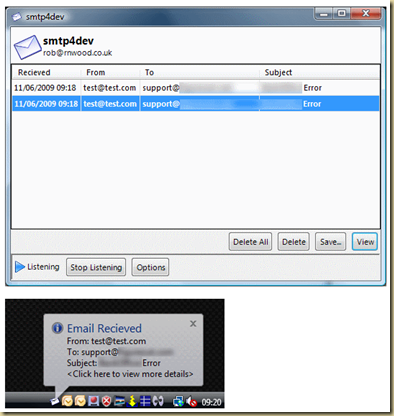
Came across “Smtp4dev” a CodePlex project that runs a local service that acts as an SMTP server. Extremely useful for testing sending of email messages (especially when you don’t have an SMTP server available for such testing).

Check it out at: http://smtp4dev.codeplex.com/

image

Monday, December 05, 2011

SqlComplete–A must have add-on for Sql-Server users

If you use Sql-Server, then you must get SqlComplete for its awesome intellisense that it provides within Sql Server Management Studio (SSMS).

One of the best things I like about it: Regular SSMS intellisense will not work in SqlCmd mode. SqlComplete works even in SqlCmd mode. (And for me that’s huge, because I open all my query windows by default in SqlCmd mode). In addition it provides you with the ability of formatting your entire t-sql document (awesome!).

SqlComplete has two editions: a free edition that has reduced functionality (Not as great document formatting capabilities) and a standard edition that costs $99 (edition differences). I really wished that they had a personal edition for $50, cause I would definitely buy this tool.

Also remember to install the other awesome SSMS add-on: SSMS Tools, which provides some other useful features that make SSMS a pleasure to work with.

More info:

SqlComplete – Alternative to SSMS intellisense: http://www.devart.com/dbforge/sql/sqlcomplete/alternative-to-ssms-intellisense.html

Downloads: http://www.devart.com/dbforge/sql/sqlcomplete/download.html

Saturday, October 08, 2011

Difference between composition and aggregation in terms of C#

Both composition and aggregations are types of associations.

An association is represented by an arrow:

An aggregation is represented by an hollow diamond:

And composition is represented by a filled in diamond:

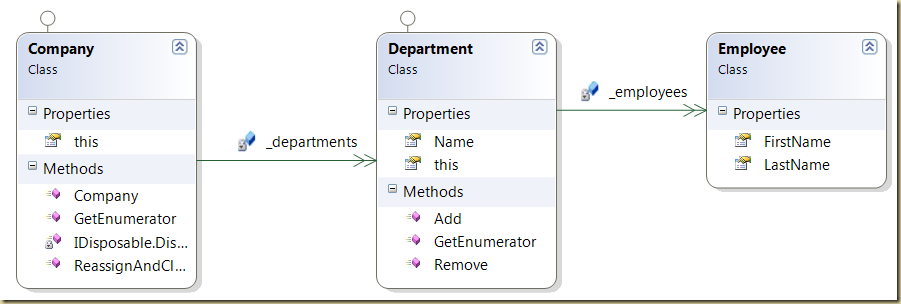
Lets look at it in terms of a diagram: (taken from Kenny Lee’s blog)

image

Department is a composition, because its lifetime is dictated by the lifetime of the company object. (if a company ceases to exist, then the department ceases to exist). But on the other hand an employee is an aggregation, as a department if made up of employees, but if the department is shut down, the employees do not cease to exist. (they could get reassigned to other departments).

Here is what the code would look like in C#

public class Employee
{
    public string FirstName { get; set; }
    public string LastName { get; set; }
}

public class Department : IEnumerable
{
    //employees is an agreggation of employees
    private List<Employee> _employees = new List<Employee>();

    public string Name { get; set; }

    public void Add(Employee employee)
    {
        _employees.Add(employee);
    }

    public void Remove(Employee employee)
    {
        _employees.Remove(employee);
    }

    public Employee this[int index]
    {
        get { return _employees[index]; }
    }

    public System.Collections.IEnumerator GetEnumerator()
    {
        foreach (Employee employee in _employees)
        {
            yield return employee;
        }
    }
}

public class Company : IEnumerable, IDisposable //implementing IDisposable just to show departments lifetime is the same as Company's lifetime
{
    //departments is a composition.
    //departments lifetime controlled by lifetime of Company
    private Dictionary<string, Department> _departments = new Dictionary<string, Department>();

public Company(string[] departmentsToCreate)
    {
        Console.WriteLine("Creating the company and its departments");
        foreach(string departmentToCreate in departmentsToCreate)
        {
            _departments.Add(departmentToCreate, new Department{Name = departmentToCreate});
        }
    }

    public Department this[string departmentName]
    {
        get { return _departments[departmentName]; }
    }

    public void ReassignAndCloseDepartmentEmployees(string departmentToCloseName, string reassignmentDepartmentName)
    {
        Department fromDepartment = this[departmentToCloseName];
        Department toDepartment = this[reassignmentDepartmentName];
        foreach (Employee employee in fromDepartment)
        {
            toDepartment.Add(employee);
        }
        _departments.Remove(departmentToCloseName);
    }

    public System.Collections.IEnumerator GetEnumerator()
    {
        foreach (KeyValuePair<string, Department> departmentKvp in _departments)
        {
            yield return departmentKvp.Value;
        }
    }

void IDisposable.Dispose()
    {
        Console.WriteLine("Company is being disposed, dispose departments too");
        _departments.Clear(); //company is dead, departments are being killed, but employees live on
        _departments = null;
    }

}

public class Test
{

    void Main()
    {
        using (Company company = new Company(new string[] { "EIS", "Sales" }))
        {
            company["EIS"].Add(new Employee { FirstName = "Raj", LastName = "Rao" });
            company["EIS"].Add(new Employee { FirstName = "Arnold", LastName = "Schwarzneger" });

            company["Sales"].Add(new Employee { FirstName = "Steve", LastName = "Jobs" });
            company["Sales"].Add(new Employee { FirstName = "Bill", LastName = "Gates" });

            company.ReassignAndCloseDepartmentEmployees("Sales", "EIS");
        }

    }
}

And here is what the output looks like (in LinqPad)

image

The class diagram from Visual Studio

image

Personal observations on the reliability of the Shuttle - R.P. Feynman

Here is a Kindle version (.mobi) format of Feynman’s essay that I created. Its a good read for anybody dealing with reliability of systems (especially developers)

Personal observations on reliability of the Shuttle (kindle format)

Saturday, August 13, 2011

Tasks that go into stabilizing a software product

Found this interesting page that describes all the stages that can be part of the stabilization phase of a software product: Chapter 10: Stabilizing Phase (Technet). Although the page is part of “UNIX Custom Application Migration Guide“, the information contained in the page is very pertinent to any software product that needs to be stabilized prior to being delivered.

Saturday, August 06, 2011

Create a Facebook app using Google Sites

Here is a really simple way to create a Facebook application using Google Sites.

Note: If you have your own web-page, you can use it instead of Google Sites. I am using Google Sites to host the page that will be shown as a Facebook app.

What you need:

  1. Google Sites subscription: http://sites.google.com/
  2. Facebook Developer app subscription: https://developers.facebook.com/apps
    1. You need to verify your account before you can create your Facebook app.

Steps:

  1. Create a Google site using the blank template:
    1. Click the “Create New Site” button
      image
    2. Choose the blank template and leave all other options at their default values.
      Click create site.
      image
    3. Once the site has been created, you need to set the width of the page:
      Go to the Manage Site option (under More Actions).
      image
    4. Select “Site Layout”
      Click the “Change site layout” button
      Change the site width to 700px (this is what I found was the optimum width for the site without any side-bars)
      Uncheck the “Sidebar” checkbox
      image
      Click Ok
      Click the Save Changes button.
    5. Click on the “Return to site” link (top left)
    6. Your home page should now display with the selected width. Add some content to this page.
      image
      Take note of the page url. This is the URL you will use as the canvas url when you setup the facebook app later. The url is typically of the format: https://sites.google.com/site/SITE-NAME/ (where SITE-NAME is the name choosen in step 2).
    7. Create a privacy information page (its required when you setup your Facebook App).
      Click the “Create Page” button
      image
    8. Name the page Privacy (or PrivacyInformation or something similar)
      Select the default options and click the Create Page button.
      image
    9. Add some basic privacy information on this page. (eg: No privacy information available).
    10. That’s it. You are done with the Google Sites portion.
  2. Create the Facebook app:
    1. Go to the Facebook Developer app: https://developers.facebook.com/apps
    2. Put in a name for your app
      image
    3. After a few seconds you will be taken to the Basic Info page.
    4. Fill in the basic info section (setting the category).
      image
      Fill in the contact info: (only email and privacy url’s are required. the Privacy URL is the url to the page created in step (1).(8) above.
      image
    5. Click the Save Changes button.
    6. Select the “On Facebook” link on the left and then the “Canvas Settings” button.
      image
    7. You need to enter the Canvas and Tab urls.
      image
      The Canvas and Tab url is the url to the Google sites home page you created in step (1).(6).
      For the Secure Canvas and Secure Tab url, just change the http to https (eg: http://sites.google.com/site/fbtestraj/ to https://sites.google.com/site/fbtestraj/)
      Also enter a name for the tab.
      Click on Save Changes.
    8. Next click on the “View App Profile Page” in the side bar.
    9. Add relevant information to your App’s Profile page.
    10. Finally, click on the “Go to App” button and the app will be added to your profile.

Here is what my test Facebook test app looks like (its called: Raj’s Test App: https://www.facebook.com/apps/application.php?id=211134738936140)
image

If you are a developer, then you can further customize this page using scripts (and if you are using your own website to host the page, then other web-application frameworks such as .Net). This done through the authorization mechanism.

Reference:
https://developers.facebook.com/docs/guides/canvas/

Wednesday, June 22, 2011

Wednesday, May 18, 2011

DotPeek from Jetbrains–replacement for .Net Reflector

DotPeek is the latest free replacement for .Net Reflector from JetBrains (the makers of ReSharper). (link)

image

What I like about DotPeek:

  • I use ReSharper, so the navigation features come naturally to me.
  • Many of the navigation features are not available in any of the other tools (eg: Find Usages)
    image
  • Displays resources embedded within the dll/exe
  • Allows you to load up v2.0 and v4.0 dlls
    image

What I don’t like:

  • Doesn’t seem to allow you to view the contents of the resources embedded within the module. (Probably will show up in a future release).

Overall – it works great. I like it.

Read about JustDecompile another replacement from Telerik (http://blog.aggregatedintelligence.com/2011/04/justdecompile-from-telerik-beta.html)

Thursday, January 13, 2011

Wednesday, September 22, 2010

The changing workspace of the software developer

Out: Cubicles, partitions

In: Team rooms, open spaces

Recently, I was trying to research how the workspace of the software developer was changing and how successful companies are setting up the space for their developers.

Here are some pictures that show the changing space:

Also, came across this article which has tons of information on Team Rooms: http://www.possibility.com/Cpp/SoftDevOfficeLayout.html

Tuesday, September 21, 2010

Fiddler–Capturing HTTP traffic for a WCF client running under an ASP.Net website

If you create a WCF client in an executable application (WinForm, Console, etc), then it is easy to capture the http traffic being exchanged between the client and the server.
But when your WCF client code is inside an Asp.Net website, then Fiddler does not automatically capture the traffic being generated between the client-code and the server.
To enable capturing the http traffic being exchanged by a WCF client implemented inside an ASP.Net website, you need to tell Asp.Net to use Fiddler’s proxy server. This is easily accomplished by adding the following to the web.config file :
<system.net>
    <defaultProxy>
        <proxy
            usesystemdefault="False"
            bypassonlocal="False"
            proxyaddress="http://127.0.0.1:8888"
            />
    </defaultProxy>
</system.net>
The above snippet should be added under the Configuration node (easiest to add it right before the closing Configuration tag).
Once you add the above code, you should be able to capture the http traffic in Fiddler.
Notes: Make sure that Fiddler is capturing for “All Processes” (set in the Fiddler status bar). Also you might have to restart both Fiddler and your Visual Studio (make sure you restart Fiddler before Visual Studio).

Saturday, September 18, 2010

Asp.Net Cryptographic Oracle Padding (COP) Vulnerability

On September 17, 2010, Microsoft issued an important bulletin regarding a major vulnerability that exists in Asp.Net that can allow a hacker to decrypt and encrypt data used by the Asp.Net application (data such as what is typically stored in the ViewState).

First off, watch this video of an attack run against a DotNetNuke Asp.Net web-site and see the level to which an attacker can gain access to the site: (super user, ability to upload modules and files, ability to run commands and ability to download files once the attack was successful and the cryptographic keys were extracted).

More information:

MS bulletin: Microsoft Security Advisory (2416728)

  • Called the "Cryptographic Oracle Padding"  (COP) or sometimes just the “Padding Oracle” vulnerability. (I like COP better!)
  • Exists in many web-platforms (asp.net, ruby on rails, etc). It looks like it exploits the fact that some web-platforms return different error messages depending on the type of errors in the encrypted text. By modifying the encrypted information and sending it repeatedly to the server the hacker can get enough information to be able to begin decrypting and encrypting data.
  • Some other systems that are vulnerable:
    JSF implementations such as: Apache MyFaces and SUN Mojarra.
    Ruby on Rails
    OWASP ESAPI for Java (up to version 2.0 RC2)
    Video of an attack on a website hosted using Apache (created by Netifera): http://www.youtube.com/watch?v=euujmKDxmC4
  • Most developers follow the best practice of never storing sensitive information in the view-state, but sometimes people end up using the view-state to store sensitive information, because they think it is secure as it is encrypted. In this case, sensitive information may get compromised.
  • Best practice: never pass sensitive information to a client if the client has no use for it - which normally makes the ViewState ineligible for storing secure data. Also, never store security related information in the ViewState (eg: user access level, etc.)
  • Microsoft has provided a basic vb script that allows you to quickly determine which web-sites might be vulnerable.
  • Shutting down the vulnerability is as simple as making sure the server does not provide error specific information and uses a single error page for all errors. (In addition, the single error page can use a random delay to make it even harder to exploit cryptographic vulnerabilities – there is an old one where one could use the time taken to respond to a request to slowly glean more information into the cryptographic keys). (Enable custom errors and use a single error page for all errors)

As the paper by concludes by paraphrasing Nate Lawson, so do I, as the thoughts are important:

If you find yourself needing to implement crypto, it’s likely you
can avoid it by thinking about the situation differently. For example, many web developers get seduced into designing their own crypto as a way to push state to the client instead of managing it on the server. This opens up a much wider attack surface on the server application since now every part of that blob needs to be considered malicious. As the saying goes, "... now you have two problems."

The reason all this is so hard is that crypto is fundamentally unsafe. People hear that crypto is strong and confuse that with safe. Crypto can indeed be very strong but is extremely unsafe.

More technical info and background on the vulnerability is available from Microsoft at this blog-post: http://blogs.technet.com/b/srd/archive/2010/09/17/understanding-the-asp-net-vulnerability.aspx

Information about the exploit can be found at the Netifera (I believe they are the guys who found the vulnerability): http://netifera.com/research/

Also, while at NetiFera read their paper: Practical Padding Oracle Attacks.


More videos of attacks against the COP vulnerability: http://www.youtube.com/results?search_query=Padding+oracle+attack&aq=f

A paper describing the attack in more detail:
A.K.L. Yau, K.G. Paterson and C.J. Mitchell, Padding oracle attacks on CBC-mode encryption with random and secret IVs. In H. Gilbert and H. Handschuh (eds.), FSE 2005, Lecture Notes in Computer Science Vol. 3557, pp. 299-319, Springer, 2005.

Tuesday, September 14, 2010

Developer traits: Hubris vs Humility

Worst developer trait: Hubris {belief that only your ideas make sense and only you understand the technology and your coding skills are better than everybody else’s} : You have reached a plateau.

Good developer trait: Humility {belief that your code is not always correct and that you can make mistakes and that you can learn better coding techniques from others} : You are always growing and learning.

There is a ton that can be said for the above two, and this post will probably grow as I can come up with examples of both as well as other traits that I think make a developer a good developer or a bad developer

Thursday, September 02, 2010

Wednesday, August 25, 2010

How many parameters is too many parameters

Maybe 49 arguments….. ?!!!

49Arguments

It was for a method that was generated using a tool against a database table with 49 fields! Anyways, thought it was way too funny!

Thursday, August 19, 2010

Tools–Entity Framework Profiler

If you work with Entity Framework (EF) then the EF Profiler can be an indispensible tool for you.

http://efprof.com/

It provides you with a way to inspect the sql statements that are being executed by EF.

Though, its not free and is a little pricey $305. (There is a 1 month trial for it).