Showing posts with label C#. Show all posts

Thursday, February 02, 2017

Headless Authentication against CRM 365 WebApi

Or how to authenticate against the CRM 365 web-api, without a user-name and password.
Background: We had to write a web-service that communicated with CRM. And because it was going to be a web-service that was communicating with CRM web-api, we didnt want to use a user-name and password and instead, we wanted to just use . And hence the name  “headless authentication”.
Create an Azure App Registration:
  1. Login to Azure portal: https://portal.azure.com
  2. Navigate to the “App Registrations” blade, and add an app
    1. Click on “Add”
    2. image
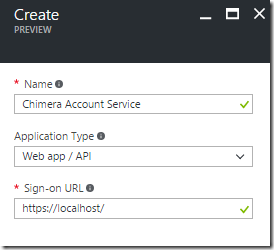
    3. Enter a value for name, set the application type to “Web App/API” and enter a sign-on URL (any value will do). Click Create
      image
    4. Return to the “App Registrations” blade and select the new app you created in step 3.
    5. You should now see the essential settings of the app:
      image
      You will need the Application ID later.
    6. Click on All Settings and then Choose “Required Permissions”. Click on Add
      image
      In “Select an API”, select the “Dynamics CRM Online” API and click Select.
      Next under “Select Permissions”, select “Access CRM Online as organization users” and then click Select.
      image
      Finally, click Done. The result should look like this:
      image
    7. Next, click on “Keys” and add a new row, where you set the Description value to “key” (this can be any value), Expires: Never and then click “Save”.
      image
      The value field will update. Copy the value and save it. Once you leave this view, you will not be able to retrieve this key again. This is the shared secret your application will use to authenticate.
Setup a CRM user for the application
  1. Go to the “Security” options
    image
  2. Choose the “Application Users” view
    image
  3. Click New (make sure the User type is set to “Application User”)
  4. Set the application id to the value you from step 5 of Create an Azure App Registration.
  5. Enter an email and a name for the application user.
  6. Click Save.
  7. Click on “Manage Roles” and assign a role to the user (note: you cannot use a system role and you will need to use a custom role).
Create a console app to test the code
  1. Test the code using the repo: https://github.com/rajrao/Crm365HeadlessAuthentication
  2. I have new code that shows how to use Microsoft Authentication Library (MSAL) to connect to CRM here: https://github.com/rajrao/Crm365HeadlessAuthentication/blob/master/MsalBasedCrmAuthenticationHeadless/Program.cs

Sunday, June 01, 2014

Please do not implement a finalizer willy-nilly!

I see many people implement the finalizer when they implement the dispose pattern in c#.

class MyDisposableClass : IDisposable
{
   public void Dispose()
   {
      Dispose(true);
      GC.SuppressFinalize(this);          
   }

   protected virtual void Dispose()
   {
   }

   ~MyDisposableClass()
   {
      Dispose();
   }
}

Please don’t do this (implement the finalizer)  unless your class uses unmanaged resources! One reason for this is that if you access managed resources in your Dispose method, they may have already been garbage collected if the Dispose method was called via the finalizer!

Here are some things to consider: (all pulled from MSDN documentation)

  1. The dispose pattern is used only for objects that access unmanaged resources, such as file and pipe handles, registry handles, wait handles, or pointers to blocks of unmanaged memory. This is because the garbage collector is very efficient at reclaiming unused managed objects, but it is unable to reclaim unmanaged objects. (http://msdn.microsoft.com/en-us/library/fs2xkftw(v=vs.110).aspx)
  2. Finalizers are notoriously difficult to implement correctly, primarily because you cannot make certain (normally valid) assumptions about the state of the system during their execution. (http://msdn.microsoft.com/en-us/library/b1yfkh5e(v=vs.110).aspx)
  3. If a type does override the Finalize method, the garbage collector adds an entry for each instance of the type to an internal structure called the finalization queue. The finalization queue contains entries for all the objects in the managed heap whose finalization code must run before the garbage collector can reclaim their memory. The garbage collector then calls the Finalize method automatically…. (http://msdn.microsoft.com/en-us/library/system.object.finalize(v=vs.110).aspx)

Remember: Finalizers are typically not needed and even when needed there are better patterns available that allow you to side-step implementing the finalizer (eg: SafeHandle).

Note:

  1. Even if you implement the Finalizer “correctly” such that when you call Dispose, it only cleans out unmanaged resources, if you don’t have unmanaged resources, you have introduced a tiny performance penalty into your app and allow someone else to introduce bugs. So if you see a finalizer, check to see if you REALLY need it and if you don’t, get rid of it (and maybe even the implementation of the IDisposable interface.
  2. Sometimes the Dispose pattern is implemented to free up managed memory being used by the class. Again if you have written your code well, you should be able to rely on the .Net garbage collector to free up the memory for you.

Correctly implemented Dispose pattern

class CorrectlyImplementedDisposableClass: IDisposable
{
   bool disposed = false;

   public void Dispose()
   { 
      Dispose(true);
      GC.SuppressFinalize(this);           
   }

   protected virtual void Dispose(bool disposing)
   {
      if (disposed)
         return; 

      if (disposing) {
         // Free any other managed objects here.  }

      // Only Free unmanaged objects here.  disposed = true;
   }
}
 
class CorrectlyImplementedFinalizedClass: CorrectlyImplementedDisposableClass
{
   ~CorrectlyImplementedDisposableClass()
   {
      Dispose(false);
   }
}

Thursday, February 13, 2014

Disabling ChromeDriver logging output

I was trying to figure out how to turn of the logging that the Selenium ChromeDriver was performing and had a hard time doing that.

Chrome Driver Logging Output

I finally figured out how to do it with the following code (the key line of code is highlighted):

		private IWebDriver CreateChromeDriver()
		{
			ChromeOptions chromeOptions = new ChromeOptions();
			chromeOptions.AddArgument("--log-level=3");
			return new ChromeDriver(chromeOptions);
		}
 

Monday, August 12, 2013

WPF–Creating a single instance application

I wanted to make my WPF application such that only a single instance of it could run at a time. I found that there were 2 main ways demonstrated on the internet:
1. Use “Microsoft.VisualBasic.ApplicationServices.WindowsFormsApplicationBase” and setup the “OnStartupNextInstance” to activate the first instance of the application. or
2. Use Mutex to ensure only a single instance of a program can be run at time. (Which is the accepted answer on StackOverflow. http://stackoverflow.com/a/522874/44815).
I wanted to use the Mutex method, though the article referenced in the StackOverflow answer - “C# .Net Single Instance Application” does not give all the details that one has to implement for a WPF application, so here is some more detailed info:

1. Add a Mutex to the “App” class
/// <summary>
/// Interaction logic for App.xaml
/// </summary>
public partial class App
{
 /// <summary>
 /// This should be a unique name which is used to determine if another instance of app is running
 /// </summary>
 private const string APP_UNIQUE_NAME = "UNIQUENAME_FOR_MY_APP or use a GUID";
  /// <summary>
  /// Initializes the Mutex class and make the calling thread have initial ownership of the mutex
 /// and a string that is the name of the mutex.
 /// </summary>
 static readonly Mutex _mutex = new Mutex(true, APP_UNIQUE_NAME);


2. Add a Main method to the “App” class, which will act as the entry point for the application and will signal the mutex to wait until its released
[STAThread]
static void Main()
{
//using TimeSpan.Zero as we want the mutex to test state of wait handle and return immediately
 if (_mutex.WaitOne(TimeSpan.Zero, true))
 {
 //calling waitone stops everyone else from entering the code in this block until the mutex is released
  try
  {
   App app = new App();
   app.InitializeComponent();
   app.Run();
  }
  finally
  {
   _mutex.ReleaseMutex(); 
  }
 }
 else
 {
  MessageBox.Show("Only one instance of the app can be run!","App Name",MessageBoxButton.OK, MessageBoxImage.Exclamation);
 }
}
3. Setup the WPF application to use the “Main” method as its entry point
a. Right click on the application’s project file and select properties. On the tab “Application”, set the “Startup object” to the name of the “App” class we modified above.
b. Right click on the “App.xaml” file in your project and select properties. Change the “Build Action” to “Page” from “ApplicationDefinition
4. Build and test the application!

Monday, July 01, 2013

NonSerializedAttribute cannot be applied to fields that are Events

I recently encountered a compiler error, where I could not apply the [NonSerialized] attribute on a field that was an event.

The error that I got was: Attribute 'NonSerialized' is not valid on this declaration type. It is only valid on 'field' declarations.   

I made the assumption that, the reason for that is that events are not serialized by the serializers and so went ahead and left the field without any serialization modification attribute. Alas, the next day, I got emails from a bunch of people at work that my checkin had broken the app! FIRE DRILL.

Apparently, on fields that are events, one needs to attribute them using [field:NonSerialized] attribute.That fixed the problem and life continued on as usual.

Friday, June 28, 2013

WCF Timeouts explained

Found this good explanation for the various timeouts in WCF and which ones get used on the client and which get used on server.

Brief summary of binding timeout knobs...

Client side:

  • SendTimeout is used to initialize the OperationTimeout, which governs the whole interaction for sending a message (including receiving a reply message in a request-reply case).  This timeout also applies when sending reply messages from a CallbackContract method.
  • OpenTimeout and CloseTimeout are used when opening and closing channels (when no explicit timeout value is passed).
  • ReceiveTimeout is not used.

Server side:

  • Send, Open, and Close Timeout same as on client (for Callbacks).
  • ReceiveTimeout is used by ServiceFramework layer to initialize the session-idle timeout.

From: http://social.msdn.microsoft.com/Forums/vstudio/en-US/84551e45-19a2-4d0d-bcc0-516a4041943d/explaination-of-different-timeout-types

Monday, June 24, 2013

Using the Adobe Pdf Reader control in WPF

Important: This will not work if your application targets 64 bit. It will only work as a 32bit app as the AcroPdf.dll is a 32 bit dll.

1. Create a WPF Control Library

2. Add a Windows Forms user control

3. Open the user-control form.

4. In the toolbox, right click and choose “Choose Items…”

5. On the “COM Components” tab, select “Adobe PDF Reader”

image

6. Drag the “Adobe PDF Reader” from the toolbox on the user-control.
Name the control that was added on to the form as "axAcroPdf”

7. Make sure the Anchors are set to “Top, Left” and that Dock is set to “Fill”
image

8. Add the following code to the code behind:

		private AxAcroPDFLib.AxAcroPDF AdobeAcrobatPDfControl
		{
			get
			{
				return this.axAcroPDF;
			}
		}
 
		public void LoadFile(string pdfFilePath)
		{
			AdobeAcrobatPDfControl.LoadFile(pdfFilePath);
		}

8. Create a WPF UserControl. Name it WpfAcrobatCtrl.

9. Drag a WindowsFormsHost WPF control onto the design surface.

10. Set the following properties on the WindowsFormsHost control:
Width and Height to Auto
HorizontalAlignment and VerticalAlignment to Stretch
Name: wpfWindowsFormsHostCtrl.

11. Add the following code to the code behind of the WPF control:

public static readonly DependencyProperty FilePathProperty
			= DependencyProperty.Register("FilePath", typeof(string), typeof(WpfAcrobatCtrl), (PropertyMetadata)new FrameworkPropertyMetadata((object)null, new PropertyChangedCallback(WpfAcrobatCtrl.FilePathChanged)));
 
 
		private string _filePath = string.Empty;
		private CustomAcrobatCtrl _customAcrobatCtrl;
	
		
		private static void FilePathChanged(DependencyObject d, DependencyPropertyChangedEventArgs e)
		{
			((WpfAcrobatCtrl)d).FilePathChanged((string)e.OldValue, (string)e.NewValue);
			CommandManager.InvalidateRequerySuggested();
		}
 
		public WpfAcrobatCtrl()
		{
			InitializeComponent();
			_customAcrobatCtrl = new CustomAcrobatCtrl();
			wpfWindowsFormsHostCtrl.Child = _customAcrobatCtrl;
 
		}
 
		public string FilePath
		{
			get
			{
				return _filePath;
			}
			set
			{
				this.SetValue(FilePathProperty, value);
			}
		}
 
 
		private void FilePathChanged(string oldFilePath, string newFilePath)
		{
			_filePath = newFilePath;
			_customAcrobatCtrl.LoadFile(_filePath);
		}

12. Create a new WPF Window.

13. Drag and drop the WpfAcrobatCtrl onto the design surface.

14. Set the file-path in XAML or code-behind.

Eg: wpfAcrobatCtrl.FilePath = "C:\\test.pdf";

or in XAML: <WpfAcrobat:WpfAcrobatCtrl x:Name="wpfAcrobatCtrl" Margin="0" FilePath="C:\\test.pdf"/>

That’s all!

Note: The above code adds a little extra stuff for the dependency property “FilePath”. This allows for setting the file path via XAML (which was important for me as I needed to be able bind to the property).

Note 2: If you try and use the AcroPdf.dll in a 64 bit app, you will get the following error: {"Class not registered (Exception from HRESULT: 0x80040154 (REGDB_E_CLASSNOTREG))"}

Tuesday, June 11, 2013

C# - Why you must never lock on this

You should never lock on “this” if this points to an instance of a publicly accessible class. The reason is that if the class is publicly accessible, then you have no control over whether someone else who uses your class, uses the instance for locking. And if they do lock an instance of your class, then you will end up in a dead-lock.

Here is some simple code to illustrate this:

using System.Threading.Tasks;

void Main()
{
    ClassTest test = new ClassTest();
    lock(test) //locking on the instance of ClassTest
    {
        Parallel.Invoke (new Action[]{() => test.DoWorkUsingThisLock(1)});
    }
}

public class ClassTest
{
    public void DoWorkUsingThisLock(int i)
    {
        Console.WriteLine("Before ClassTest.DoWorkUsingThisLock " + i);
        lock(this) //this is bad - this will never end - you have been deadlocked!
        {
            Console.WriteLine("ClassTest.DoWorkUsingThisLock " + i);
            Thread.Sleep(1000);
        }
        Console.WriteLine("ClassTest.DoWorkUsingThisLock Done " + i);
    }
}

From MSDN:

In general, avoid locking on a public type, or instances beyond your code's control. The common constructs lock (this), lock (typeof (MyType)), and lock ("myLock") violate this guideline:

  • lock (this) is a problem if the instance can be accessed publicly.

  • lock (typeof (MyType)) is a problem if MyType is publicly accessible.

  • lock("myLock") is a problem because any other code in the process using the same string, will share the same lock.

References:

Lock Statement (MSDN)

Monday, March 18, 2013

Convert an Anonymous type object to a dictionary

I wanted to write a method that would take an anonymous object and have it spit out key,value pairs from the properties defined on that anonymous object.

For example:

new {j="j1",k="k1"}

Should create a dictionary with 2 keys (j,k) which have corresponding values of (j1,k1).

A while back I had written about an helper method that would convert all the properties on an object into a dictionary: http://blog.aggregatedintelligence.com/2013/01/convert-objects-property-values-to.html

It turns out that the same method can be used even for anonymous types!

Monday, March 11, 2013

Did you know–XOR swap algorithm?

Did you know that you can use the XOR operator to swap the values in 2 variables without the use of a 3rd variable?

Check it out:

int x = 111;
int y = 3333;

x ^= y;
y ^= x;
x ^= y;

x.Dump();
y.Dump();

Outputs:

3333
111

Sunday, March 10, 2013

MemoryStream exception–Memory stream is not expandable

Just got hit by this exception.

I was creating a memory stream from bytes that I had read from a file:

var fileBytes = File.ReadAllBytes(filePath);
MemoryStream ms = new MemoryStream(fileBytes, true);

The memory stream was then being used in a bunch of operations that could add data and when it did, it caused the “Memory stream is not expandable” exception to be thrown.

Found out that its because of the constructor that I was using. Because I was providing memory-stream the actual bytes, it was creating the memory stream as a non-expandable one. Instead, if you construct it and then write to it, the memory stream has no such restriction and it can expand.

MemoryStream ms = new MemoryStream();
ms.Write(fileBytes, 0, fileBytes.Length);

Thursday, February 21, 2013

ASP.Net MVC–Authorize filter that loads users and roles from the application configuration file

I needed the ability to set the Authorization filter from a config file (instead of setting the roles and users directly on the controller). The main reason for this is that I needed different roles to be authorized to hit the action based on the environment to which it was deployed (dev,qa, prod).

Here is the code:

Saturday, February 16, 2013

C#–Determining if an object implements or derives from a generic class or interface

Imagine you have a generic class and interface that are defined as follows:

public abstract class MyGenericClass<T>
{
}
public interface IMyGenericInterface<T>
{
}

If you were to derive or implement from the above class/interface, you will find that you cannot use the “is” keyword to determine if that class implements or derives from the above interface. Here is what I mean: If I were to implement/derive from the base class like so:

public class MyInt:MyGenericClass<int>
{
}

public class MyInterfacedInt:IMyGenericInterface<int>
{
}

Then I can do the following: (code will run in LinqPad)

MyInt myInt = new MyInt();
MyInterfacedInt myIInt = new MyInterfacedInt();

(myInt is MyInt).Dump();//true
(myIInt is MyInterfacedInt).Dump();//true;

(myInt is MyGenericClass<int>).Dump();//true
(myIInt is IMyGenericInterface<int>).Dump();//true;

But I cannot do the following:

//Will not compile
//(myInt is MyGenericClass<>).Dump();
//(myInt is IMyGenericInterface<>).Dump();

Why is this important? If you plan on loading plugins at run time, then all you know is that they will implement an interface or a base class and you need to check that. One way around this would be to create a non-generic base class or interface and check against that. But that might not be a possibility if you are using a 3rd party API (eg: Prism and the CompositePresentationEvent<> type).

So here is a helper class that can do just that:

static class ReflectionHelper
{
    public static bool IsDerivedOrImplementedFrom<T>(this T objectToCheck, Type parentType) where T : class
    {
        if (objectToCheck == null)
            return false;
        if (parentType.IsInstanceOfType(objectToCheck))
            return true;

        bool checkingInterfaces = parentType.IsInterface;
        Type toCheck = objectToCheck.GetType();
        while (toCheck != null && toCheck != typeof(object)) {
            var cur = toCheck.IsGenericType ? toCheck.GetGenericTypeDefinition() : toCheck;
            if (checkingInterfaces)
            {
                bool implementsParentInterface = toCheck.GetInterfaces()
                                            .Any(ci => {
                                                return ci.IsGenericType ? ci.GetGenericTypeDefinition() == parentType :
                                                    ci == parentType;
                                            });
                if (implementsParentInterface)
                    return true;
            }
            else
            {
                if (parentType == cur)
                {
                    return true;
                }
            }
            toCheck = toCheck.BaseType;
        }
        return false;
    }

}

And here is how you call it:

static void Main(string[] args)
        {
            MyInt myInt = new MyInt();
            MyInterfacedInt myIInt = new MyInterfacedInt();

            "Using the \"is\" keyword".Dump();

            (myInt is MyInt).Dump();//true
            (myIInt is MyInterfacedInt).Dump();//true;

            (myInt is MyGenericClass<int>).Dump();//true
            (myIInt is IMyGenericInterface<int>).Dump();//true;

            //Will not compile
            //(myInt is MyGenericClass<>).Dump();
            //(myInt is IMyGenericInterface<>).Dump();

            "Using IsDerivedOrImplementedFrom".Dump();
           
            myInt.IsDerivedOrImplementedFrom(typeof(MyInt)).Dump(); //true
            myIInt.IsDerivedOrImplementedFrom(typeof(MyInterfacedInt)).Dump();//true
            myInt.IsDerivedOrImplementedFrom(typeof(MyGenericClass<int>)).Dump();//true
            myIInt.IsDerivedOrImplementedFrom(typeof(IMyGenericInterface<int>)).Dump();//true

            myInt.IsDerivedOrImplementedFrom(typeof(MyGenericClass<>)).Dump();//true
            myIInt.IsDerivedOrImplementedFrom(typeof(IMyGenericInterface<>)).Dump();//true

            "Negative tests Using IsDerivedOrImplementedFrom".Dump();

            myInt.IsDerivedOrImplementedFrom(typeof(MyInterfacedInt)).Dump(); //false
            myIInt.IsDerivedOrImplementedFrom(typeof(MyInt)).Dump();//false
            myInt.IsDerivedOrImplementedFrom(typeof(MyGenericClass<string>)).Dump();//false
            myIInt.IsDerivedOrImplementedFrom(typeof(IMyGenericInterface<string>)).Dump();//false

            myInt.IsDerivedOrImplementedFrom(typeof(IMyGenericInterface<>)).Dump();//false
            myIInt.IsDerivedOrImplementedFrom(typeof(MyGenericClass<>)).Dump();//false

            Console.ReadLine();
        }

Here is the full code: http://pastebin.com/raw.php?i=Y2nSQc7V

Monday, January 28, 2013

Convert an object’s property values to a dictionary of string,object

Here is a simple helper function that converts any class object to a dictionary of string,object, where the key is the PropertyName:

public static class ReflectionHelper
{
    public static IDictionary<string, object> ToDictionary<TModel>(this TModel model)
   {
       BindingFlags publicAttributes = BindingFlags.Public | BindingFlags.Instance;
       Dictionary<string, object> dictionary = new Dictionary<string, object>();

       foreach (PropertyInfo property in model.GetType().GetProperties(publicAttributes))
       {
           if (property.CanRead)
               dictionary.Add(property.Name, property.GetValue(model, null));
       }

       return dictionary;
   }
}

public class Test
{
    public string Name{get;set;}
}

void Main()
{
    Test t = new Test{Name = "Raj Rao"};
    foreach(var v in t.ToDictionary())
    {
           Console.WriteLine(v.Key + ":" + v.Value);
    }

}

The output will be:

Name: Raj Rao

This again was inspired by some of the Helper functions available in Asp.Net’s MVC HTML helper class.

Getting rid of magic strings that point at PropertyNames

Often times, you end up with code that includes magic strings that point at property names of a class. I hate this, because it normally ends up causing runtime errors instead of compile time errors.

While working with Asp.Net MVC, I found that you could pass properties to helper methods (such as Html.TextBoxFor) and it would automagically figure out the name of the property and use it to build out the ID and Name fields of the html object. I wanted something similar to that and here is my code:

//The helper class that provides the “GetPropertyName” method
public static class ReflectionHelper
{
    public static string GetPropertyName<TModel, TProperty>(this TModel model, Expression<Func<TModel, TProperty>> expression)
    {
        MemberExpression body = (MemberExpression) expression.Body;
        return body.Member.Name;
    }
}

//A test class to test what we are doing
public class Test
{
    public string Name{get;set;}
}

//A simple test
void Main()
{
    Test t = new Test();
    Console.WriteLine(t.GetPropertyName(m => m.Name));
}

Friday, September 14, 2012

TopShelf–Framework for writing Windows Services

imageTopShelf is a .Net framework that makes it extremely simple to write Windows Services.

A simple example from their documentation shows just how easy it is to create a Windows Service from a Console based project:


public class TownCrier
{
    readonly Timer _timer;
    public TownCrier()
    {
        _timer = new Timer(1000) {AutoReset = true};
        _timer.Elapsed += (sender, eventArgs) => Console.WriteLine("It is {0} an all is well", DateTime.Now);
    }
    public void Start() { _timer.Start(); }
    public void Stop() { _timer.Stop(); }
}

public class Program
{
    public static void Main()
    {
        HostFactory.Run(x =>                                 
        {
            x.Service<TownCrier>(s =>                        
            {
               s.ConstructUsing(name=> new TownCrier());     
               s.WhenStarted(tc => tc.Start());              
               s.WhenStopped(tc => tc.Stop());               
            });
            x.RunAsLocalSystem();                            

            x.SetDescription("Sample Topshelf Host");        
            x.SetDisplayName("Stuff");                       
            x.SetServiceName("stuff");                       
        });                                                  
    }
}

Sunday, August 19, 2012

Enumerating a list object when you don’t know the actual type

Here is the scenario I was working with:

I needed to write an extension method that would be able to convert any class to a string representation. The class could have properties that were lists of any type (eg: List<T>), but I wouldn’t know in advance what types might be implemented as lists in the class. Here is the code I came up with. Listed below is the code for metro apps as well as for normal .net apps: (The code to enumerate any object that is a List is highlighted in the code below).

Metro

static class ObjectExtensions
    {
        public static string Convert(this object obj)
        {
            var typeInfo = obj.GetType().GetTypeInfo();
            var sb = new StringBuilder();

            foreach (var info in typeInfo.DeclaredProperties)
            {
                var val = info.GetValue(obj, null);
                string strVal;
                if (val != null)
                {
                    var valType = val.GetType();
                    var valTypeInfo = valType.GetTypeInfo();
                   
                    if ((val is string)
                        || valTypeInfo.IsValueType)
                    {
                        strVal = val.ToString();
                    }
                    else if (valType.IsArray ||
                        (valTypeInfo.IsGenericType
                            && (valTypeInfo.GetGenericTypeDefinition() == typeof(List<>))))
                    {
                        Type genericArgument = valType.GenericTypeArguments[0];

                        var genericEnumerator =
                            typeof(System.Collections.Generic.IEnumerable<>)
                                .MakeGenericType(genericArgument)
                                .GetTypeInfo()
                                .GetDeclaredMethod("GetEnumerator")
                                .Invoke(val, null);
                        IEnumerator enm = genericEnumerator as IEnumerator;
                        StringBuilder sbEnum = new StringBuilder();
                        sbEnum.AppendLine("List:");
                        while (enm.MoveNext())
                        {
                            var item = enm.Current;
                            sbEnum.AppendLine("Item: " + item.Convert());
                        }
                        strVal = sbEnum.ToString();
                    }
                    else{
                        strVal = val.Convert();
                    }
                }
                else
                {
                    strVal = "null";
                }
                sb.AppendLine(info.Name + ": " + strVal);
            }

            return sb.ToString();
        }
    }

Windows .Net

static class ObjectExtensions
    {
        public static string Convert(this object obj)
        {
            var props = obj.GetType().GetProperties();
            var sb = new StringBuilder();

            foreach (var info in props)
            {
                var val = info.GetValue(obj, null);
                string strVal;
                if (val != null)
                {
                    var valType = val.GetType();
                    if ((val is string)
                        || valType.IsValueType)
                    {
                        strVal = val.ToString();
                    }
                    else if (valType.IsArray ||
                        (valType.IsGenericType
                            && (valType.GetGenericTypeDefinition() == typeof(List<>))))
                    {
                        Type genericArgument = valType.GetGenericArguments()[0];

                        var genericEnumerator =
                            typeof(System.Collections.Generic.IEnumerable<>)
                                .MakeGenericType(genericArgument)
                                .GetMethod("GetEnumerator")
                                .Invoke(val, null);
                        IEnumerator enm = genericEnumerator as IEnumerator;
                        StringBuilder sbEnum = new StringBuilder();
                        sbEnum.AppendLine("List:");
                        while (enm.MoveNext())
                        {
                            var item = enm.Current;
                            sbEnum.AppendLine("Item: " + item.Convert());
                        }
                        strVal = sbEnum.ToString();
                    }
                    else
                    {
                        strVal = val.Convert();
                    }
                }
                else
                {
                    strVal = "null";
                }
                sb.AppendLine(info.Name + ": " + strVal);
            }

            return sb.ToString();
        }
    }

Thursday, August 16, 2012

Using Linq to concatenate strings

string[]words = new string[]{"hello","world"};
string concatenated = words.Aggregate((w,n) => w + " " + n);

Returns "hello world"

Thursday, July 26, 2012

Using WCF with windows authentication with an intranet ASP.Net website

Scenario:
You want to use windows authentication to protect a WCF service and the client is an ASP.Net intranet website (and has Windows Authentication turned on).

Steps:
Create your WCF webservice website (I am assuming that the web-service website is different from the intranet website).

Enable Windows Authentication for the site.

image

For the purposes of testing create a service method that returns the user info:

public string GetUserInfo()         
{
             string userinfo = string.Empty;
             var windowsIdentity = ServiceSecurityContext.Current.WindowsIdentity;
             if (windowsIdentity != null)
                 userinfo = windowsIdentity.Name;
             return userinfo;        
}

Setup the web.config for the service so that the end point uses basicHttpBinding with a configuration where the security mode is set to “TransportCredentialOnly” and the Transport’s clientCredentialType is set to windows. Here is what it will look like:

<system.serviceModel>
     <services>
       <service name="WcfService1.Service1">
         <endpoint address="Service1.svc" binding="basicHttpBinding" bindingConfiguration="basicHttpBindingConfiguration" contract="WcfService1.IService1" />
       </service>
     </services>
     <bindings>
       <basicHttpBinding>
         <binding name="basicHttpBindingConfiguration">
           <security mode="TransportCredentialOnly">
             <transport clientCredentialType="Windows" />
           </security>
         </binding>
       </basicHttpBinding>
     </bindings>
     <behaviors>
       <serviceBehaviors>
         <behavior>
           <serviceMetadata httpGetEnabled="true"/>
           <serviceDebug includeExceptionDetailInFaults="true"/>
         </behavior>
       </serviceBehaviors>
     </behaviors>
     <serviceHostingEnvironment multipleSiteBindingsEnabled="true" />   </system.serviceModel>

Create your ASP.Net website (which will act as a client to your web-service). Set its authentication mode to “Windows” and make sure that you set "identity impersonate” to true.

image

Now add a reference to your web-service.

In your web.config make sure that the security mode is set to “TransportCredentialOnly” and the Transport’s clientCredentialType is set to windows. Here is an example:

<system.serviceModel>
     <bindings>
       <basicHttpBinding>
         <binding name="BasicHttpBinding_IService1">
           <security mode="TransportCredentialOnly">
             <transport clientCredentialType="Windows"/>
           </security>
         </binding>
       </basicHttpBinding>
     </bindings>
     <client>
       <endpoint address="http://xxxxxx/Service1.svc/Service1.svc"         binding="basicHttpBinding" bindingConfiguration="BasicHttpBinding_IService1"         contract="ServiceReference1.IService1" name="BasicHttpBinding_IService1" />
     </client>
   </system.serviceModel>

That should be it. When you call “GetUserInfo”, you should get the name of the user that is accessing the asp.Net website.

Wednesday, April 04, 2012

Sql Server, Transaction Isolation and Entity Framework

Recently I had to work through some deadlock issues that I was getting while using EF.

Here are some things that I found out and is useful information for you to know:

  1. EF by default uses SQL-Server’s default isolation mode, which is Read Committed. Something to know about read-committed reads is that by default it performs the reads using shared locks which will block reads of modified data.(Unless you use the setting READ_COMMITTED_SNAPSHOT and set it to on).
  2. When EF performs a SaveChanges, it implicitly uses a transaction. This by default will be Read Committed.
  3. But, if EF finds an ambient transaction, it will use that transaction.
  4. So you can override the isolation level by using a transaction.
  5. But, remember, by default transactions in .Net use “Serializable” isolation level, which is the MOST restrictive transaction isolation level.
  6. So, its important to use a transaction, that uses an isolation level that makes sense for your operation. Here is an example:
    • using (var transactionScope = new TransactionScope(TransactionScopeOption.Required, new TransactionOptions { IsolationLevel= IsolationLevel.Snapshot }))
      {
              // update some tables using entity framework
              context.SaveChanges();
              transactionScope.Complete();
      }
  7. I am using IsolationLevel.Snapshot in the above transaction to reduce the possibility of deadlocks. The reason for this can be seen in this paragraph from MSDN’s documentation:
    • SNAPSHOT isolation specifies that data read within a transaction will never reflect changes made by other simultaneous transactions. The transaction uses the data row versions that exist when the transaction begins. No locks are placed on the data when it is read, so SNAPSHOT transactions do not block other transactions from writing data. Transactions that write data do not block snapshot transactions from reading data. You need to enable snapshot isolation by setting the ALLOW_SNAPSHOT_ISOLATION database option in order to use it.


MSDN: