Showing posts with label web. Show all posts

Monday, June 18, 2012

Web apps–disabling the back button

Sometimes when you create web-applications (eg: ASP.Net, etc), you need to disable the use of the browser back button. Now there is no way you can actually disable the browser back button using JavaScript, so you could create a new window without toolbars, etc.

But another way you can do it is by inserting the following code into the page that you don’t wish to support the ability to go back to:

<head>
<script type="text/javascript">
  window.history.go(1)
</script>
</head>

How does it work?

go(1), makes the browser go forward to the next page in the browser history. The first time you visit a page, your browser history does not have a page to go to, so go(1) does nothing. But if you try and go back to a page on which the above code exists, then because you have a page in history, go(1) works and takes you back to the page that you were on. Simple and effective.

Note: I came across this solution on the Internet and cant find the link anymore.

Monday, September 05, 2011

Web design for the design and color challenged

I am web design and color challenged. So I am always looking for cool tools to use to help me in this regard. Today I came across “Kuler” by Adobe. Very cool website that allows you to find palettes that others have created.

image

Another useful color site is “Color Lovers”, which in addition to colors also provides you patterns and other design elements.

image

Go get inspired….

Wednesday, April 06, 2011

Exposing the Service Helper page for ASMX web-services

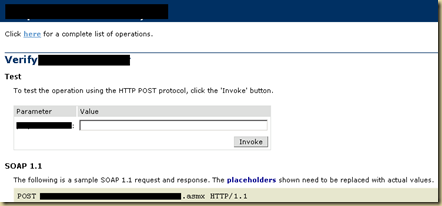
When you access an ASMX based web-service from a browser on the machine that hosts the web-service, you will typically be shown the Service Helper page. The Service Helper page is useful for testing if the webservice is working correctly and provides you with a basic form with text-boxes for every parameter used by the web-service and an Invoke button that allows you to call the web-service method with the provided parameters.

Here is what it may look like:

image

The  service helper page (or as I call it, the Service Invoker page) is not displayed if you attempt to browse to the asmx page from a system other than the hosting webservice. The reason for this is security.

But this is very useful tool for the purpose of debugging and sometimes you just need to be able to access this service helper page from a different machine. Fret not, you can expose the service-helper page via the web.config.

Within the System.Web node add the following lines:

<webServices>
   
<protocols>
       
<add name="HttpSoap12"/>
       
<add name="HttpSoap"/>
       
<add name="HttpGet"/>
       
<add name="HttpPost"/>
   
</protocols>
</webServices>

For more information: MSDN: Configuration Options for XML Web Services Created using ASP.Net

Friday, October 22, 2010

Making sense of WCF configuration

Created this diagram as a note to myself regarding the basics of WCF configuration.

WCF Configuration

Things to note:
The ABCs (address, binding, contract) are defined at the EndPoint level. {The address defines where the service is published, the binding defines how to connect to the service and the contract defines what the service can do}
Apart from the Service and Endpoint, none of the other elements are required. (In WCF 4, none of the elements are needed due to auto-configuration, but I still prefer defining the configuration, because of the control it provides me).
You can have multiple end-points for a given service (this allows you to provide endpoints that allow clients to connect using different protocols [bindings]).
The boxes in green, although not required, it is a good idea to define them. (ServiceBehavior defines things such as whether a WSDL document will be generated for the service and BindingConfiguration define specific behavior for each binding that is being used)
The boxes in orange are not required and should be defined only if you need specific control over the endpoint behavior

The diagram below shows how the different sections of the WCF configuration relate to each other.

WCF Configuration2

kick it on DotNetKicks.com

Friday, October 15, 2010

Modelling WSDL documents as UML

A picture says a thousand words and a UML diagram is definitely the easiest way to understand a SOAP based web-service.
I had blogged about HyperModel a while back, which is the best free tool that I have come across for modelling XML documents as UML. (http://www.xmlmodeling.com/download)
I have found it (XmlModelling) immensely useful for understanding Soap-based webservices (such as WCF services) as it breaks down visually the inputs and outputs of an operation and the various data-types and enumerations that the service supports.
Unfortunately there are 2 problems with Hypermodel. 1. Hypermodel hasn’t been updated in a while (last update: 5 July, 2008) – my biggest worry is this awesome tool will just die off and not be updated to support changes to the XML specification. 2: The tool isnt exactly intuitive to use when it comes to modelling WSDL documents.
Here I plan to remedy the 2nd problem:
  1. First you need to download the WSDL documents associated with the web-service. In this case I am going to use this public facing soap-service: http://www.webservicex.net/WeatherForecast.asmx?WSDL
    To do this I am going to use another awesome tool – SoapUI.
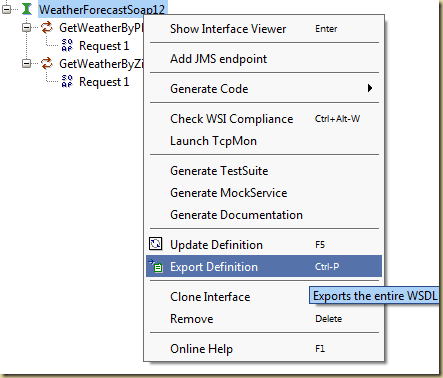
    Once installed, you need to import the web-service into SoapUI. After that, right click on the service and select “Export Definition”.
    Image 1
  2. The above step will export the WSDl document. (Note: sometimes the SoapUI file dialog takes a while to become responsive – so be patient). Depending on the WSDL file, you will find that SoapUI exported the wsdl documents as a series of files with the extension .WSDL or .XSD. (note: I found that WCF4 exports a nice set of XSD documents, whereas older versions result in WSDL documents). If the file does not already have a XSD extension, rename the extension. (Hypermodel will only read XSD files).
  3. Start up Hypermodel. (if its your first time starting up Hypermodel, you might have to setup some preferences. Just choose the defaults – as these worked for me).
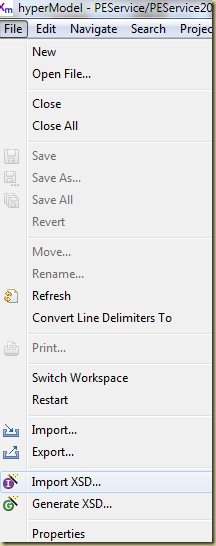
    Next, open the file menu and select Import XSD.
    Image 2 
  4. The Import XSD command will open the Import XSD Schemas dialog.
    The parent folder is just a way for you to organize your imported XML document. Name it anything you want. The filename, needs to end with .XML, otherwise the Next button will not enable.
    Image 3
    Click Next.
  5. Click next on the next dialog.
    Image 5
  6. If everything ran correctly, you should end up seeing a tree of all the XML objects that were defined in the WSDL document.
    Image 6
  7. You can now select the elements that you need to visualize as UML and select the “Class Dynagram” option from the context menu.
    Image 7
  8. Voila!
    Image 8
You can try generating the UML for the following web-service: http://ws.cdyne.com/delayedstockquote/delayedstockquote.asmx?wsdl
Which should look like this:
image
References:
List of web-services on which you can try the above steps: http://www.visualwebservice.com/web-services.do

Thursday, September 02, 2010

Sunday, August 29, 2010

RSA Animate–HomoEmpathicus

An interesting talk on how empathy has changed our perception about our environment. And how empathy is wired into our brains through mirror neurons. Finally, the animation ends on how our empathy can broaden our identity so that it “extends to think of the human race as fellow sojourners, creatures as fellow beings and the planet as our community” so that we truly can become an empathic civilization.

Thursday, August 12, 2010

A simple scheme for checking for JavaScript in a browser

Do you need a simple way for detecting if JavaScript is enabled in the browser and to notify the user that JavaScript is disabled.

Here is a simple method that I came across:

It uses JQuery and CSS. The idea is to have a JSMessage div with static text that specifies that Javascript is disabled in the browser. You then use Jquery to hide the div. If Javascript is enabled the message goes away, otherwise the message is seen by the user. The CSS helps in displaying the message prominently to the user.

Below is a screen shot of the site in IE:

image

Here is the source code:

HTML, using GeSHi 1.0.8.8
<html xmlns="http://www.w3.org/1999/xhtml" lang="en-US">
<head>
    <title>JavaScript Browser Test Sample</title>
    <script type="text/javascript" src="http://ajax.microsoft.com/ajax/jquery/jquery-1.4.2.js"></script>
        <style type="text/css">
                #jsMessageContainer
                {
                        text-align: center;
                        width: 100%;
                        z-index: 100;
                        position: absolute;
                        margin-top: 45px;
                }
                #jsMessage
                {
                        padding: 10px;
                        background-color: #FFFFE1;
                        width: 400px;
                        border: solid 3px #CCCCCC;
                        top: 20px;
                        margin: auto;
                        text-align: left;
                }
                #jsMessage .exclamation
                {
                        float: left;
                        margin: 10px;
                }
        </style>
</head>
<body>
    <div id="jsMessageContainer">
        <div id="jsMessage">
            <p>
                <img src="http://upload.wikimedia.org/wikipedia/commons/thumb/f/f0/Error.svg/497px-Error.svg.png" width="50px" class="exclamation" />
                JavaScript is required for running this website.
                                Instructions for fixing it........
            </p>
        </div>
    </div>
    <script type="text/javascript">
        $("#jsMessageContainer").hide();
    </script>
</body>
<h1>Hello World</h1>
Lorem ipsum dolor sit amet, consectetur adipiscing elit. Ut tincidunt lacus odio, at commodo neque. Aliquam ac felis magna, et placerat dui. Fusce fermentum, diam et congue rhoncus, ligula erat hendrerit magna, vel molestie augue velit vel ipsum. Mauris in erat mauris. Maecenas semper, sapien quis pretium ullamcorper, felis est posuere sapien, volutpat imperdiet enim magna at tortor. Praesent a nisi enim. Vestibulum ante ipsum primis in faucibus orci luctus et ultrices posuere cubilia Curae; Aliquam varius varius libero sit amet dapibus. Cras sed purus id sem bibendum accumsan. Mauris aliquam hendrerit aliquam. Mauris adipiscing congue nulla id pellentesque. Cras feugiat placerat quam, sed commodo lacus fringilla nec. Cras tempus lorem ut massa consequat accumsan. Suspendisse id urna nibh. Fusce mauris quam, imperdiet nec bibendum a, euismod at eros. Quisque accumsan orci vel eros bibendum id sollicitudin turpis adipiscing.
<html>

Friday, June 18, 2010

Why you cant make cross-domain XMLHttpRequest(s)

XMLHttpRequest method is an important part of any AJAX enabled website. But if you ever try to get data from a web-service that is hosted on a different server using XmlHttpRequest, you will quickly learn that this will not work.

For the longest time, I just knew that this would not work, but I could not give a specific reason as to why this was the case. Finally, I decided to spend a little time and learn the why behind this restriction and here is the answer:

Basically it is because of what is known as the “Same Origin Policy” and its a policy that is enforced by the browser which do it because of a W3C standard for XmlHttpRequest. (“The XMLHttpRequest object can be used by scripts to programmatically connect to their originating server via HTTP”)

There is a lot more in-depth information available on this issue from the Mozilla developer site: https://developer.mozilla.org/En/Same_origin_policy_for_JavaScript. This page also talks about what constitutes a cross domain request.

So are there ways around this: the answer is Yes. But some are more hacky then others and the best solution is dependent on your specific circumstance. (example: http://www.nathanm.com/ajax-bypassing-xmlhttprequest-cross-domain-restriction/)

The solutions that I lean towards are: If the web-service can return a special JSON object called JSONP object – then this is probably the easiest solution. A lot of publicly consumable web-services today expose this format. But what if the returned data is XML or cannot be converted to JSONP? In this case the next best solution is to write server side code that acts as a proxy to the original web-service. Your javascript code, calls a web-service on your server, which in turn calls the original web-service. Obviously for this to work you need to be able to write server side code (PHP or WCF, etc…)

Now you know!

More info:

Same Origin Policy: http://en.wikipedia.org/wiki/Same_origin_policy

JSONP: http://en.wikipedia.org/wiki/JSON#JSONP

Ajaxian: JSONP: JSON With Padding

Inside RIA - What in the heck is JSONP and why would you use it?

Friday, May 21, 2010

XSD to UML

Ever needed to look at the XSD in a Web-Service WSDL as a UML diagram? Here is an awesome tool that does just that:

HyperModel for Eclipse: http://xmlmodeling.com/hypermodel

Just download the XSD files referenced by the WSDL and then load them up in HyperModel. Its an awesome tool and its free!

Thursday, April 29, 2010

Using MakeCert to create a certificate with a trusted root for an IIS website

Why? If you dont use a certificate with a trusted root, then web browsers will complain that there is something wrong with the certificate. So what you need to do is to create both the Certificate Authority certificate (the root) and then create a derived certificate that you can use on your website. You then need to install the root certificate on all the clients that will access the website. Once that is done, when the clients access your site over SSL (https), they will get the lock icon and no error messages.

The most important use of this configuration is when you need to use username authentication with WCF using wsHttpBinding. (WCF will not allow you to use this configuration over an invalidly configured SSL connection). A separate post will detail how to enable username authentication using wsHttpBinding in WCF.

Note: this should only be used for development/testing. Never for production

1. Make a Certificate Authority certificate (root certificate) that is installed to “Trusted Root Certification Authorities”

makecert -r -pe -n "CN=Raj Local Certificate Root" -ss Root -sr localMachine -a sha1 -sky signature -sv c:\certs\RajRoot.pvk c:\certs\RajRoot.cer

2. Check that the cert was installed to “Trusted Root Certification Authorities”

To do this you need the Certificates admin tool. The easy way to do this is
Start > Run > MMC
File > Add-Remove Snap-In
Click Add
Select Certificates and click Add
Select Computer Account and hit Next
Select Local Computer

The CA certificate (created in step 1) is the one that you will have to put on all the clients that will access the SSL website. (otherwise you will end up getting an error that the certificate is not trusted).

3. Create a certificate using the CA cert. This is the one that you will install to your web server

makecert -pe -n "CN=fq.dn" -a sha1 -sky exchange -eku 1.3.6.1.5.5.7.3.1 -ic c:\certs\RajRoot.cer -iv c:\certs\RajRoot.pvk -sp "Microsoft RSA SChannel Cryptographic Provider" -sy 12 -sv c:\certs\rajServer.pvk c:\certs\rajServer.cer 
pvk2pfx -pvk c:\certs\rajServer.pvk -spc c:\certs\rajServer.cer -pfx c:\certs\rajServer.pfx

In the certificates admin tool, right click > All Tasks > Import and import the pfx file that you created above.

4. Assign the certificate to your IIS website.

Right click on the website > Properties > Directory Security tab
Server Certificate
On the second page choose “Assign an existing certificate”
Select the certificate that you imported in the last step of (3).

5. Test

Try and browse to a valid page on your site. Next try and add the s to the http and try it again and make sure you are able to connect to the site.

Notes:

Using MakeCert
http://www.digitallycreated.net/Blog/38/using-makecert-to-create-certificates-for-development (a good post that details all the different options)

Creating X.509 Certificates using makecert.exe: http://blogs.microsoft.co.il/blogs/applisec/archive/2008/04/08/creating-x-509-certificates-using-makecert-exe.aspx

Tuesday, April 13, 2010

'PageMethods' is undefined

“Microsoft JScript runtime error: 'PageMethods' is undefined”

I needed to call a server side method from my ASP.Net AJAX page.

The easy way to do this is to set the EnablePageMethods="true" on the ScriptManager object and then to add a static public method in the code behind file with the attribute: “[System.Web.Services.WebMethod]”

Once I had my simple method working, I tried to refactor my code by moving all the items into a user control…. and suddenly everything stopped working!. The error I was getting is the “PageMethods is undefined”.

All posts pointed to check if the EnablePageMethods was defined on the ScriptManager and that the “[System.Web.Services.WebMethod]” attribute was defined on the method. And they were. The code was all working fine when it was in a single aspx page. My problems started only when I moved the code into a separate ascx user control.

Turns out the problem was that PageMethods was unable to find the public static method that was being called from javascript. The simple fix was for the static method to be moved to the host page’s code-behind file. Once I did that, the issue went away.

Note: the javascript can sit in the user-control. It is only the WebMethod that needs to be moved to the host page.

Now the problem obviously becomes – how do you reuse the user control when the host page is where the code needs to reside? I am not sure there is any way around this dependency. (though, if you hate it – then maybe converting the method to a webservice is a work around. In my case, all I needed was this one method and that was all). Still looking into this usercontrol issue with WebMethods and will update this post if I find out anything else.

Thursday, April 08, 2010

Design recommendation on using impersonation for multi tiered applications

As a common design recommendation, the further from the client, the less significant its identity should be. In a layered architecture, each layer should run underneath its own identity, authenticate its direct callers, and implicitly trust its calling layer to authenticate its original callers.

See “Trusted Subsystem Pattern” (Patterns & Practices)

The Web service acts as a trusted subsystem to access additional resources. It uses its own credentials instead of the user's credentials to access the resource. The Web service must perform appropriate authentication and authorization of all requests that enter the subsystem. Remote resources should also be able to verify that the midstream caller is a trusted subsystem and not an upstream user of the application that is trying to bypass access to the trusted subsystem.

Aa480587.ch4_trustsub_f01(en-us,MSDN.10).gif

See also:

http://blogs.msdn.com/securitytools/archive/2009/12/30/wcf-security-impersonation.aspx

Thursday, March 18, 2010

Free icon collections

Here is a great collection of icons that can be used in your applications:

http://commons.wikimedia.org/wiki/Category:Icons_themes

For example the Nuvola icons are a good collection for a Web2.0 app: http://commons.wikimedia.org/wiki/Category:Nuvola_icons

Sunday, February 28, 2010

Use the 404 page to find missing children

Scott Hanselman blogged about an excellent idea that he had seen where a PHP developer had created a 404 page that displayed a list of missing children.

In my opinion this is a great idea – as people always end up seeing a 404 page and by displaying a list of missing kids – who knows, we might just be able to find a missing kid. Scott created a 404 page using only Javascript (the original used server side PHP). Scott’s implementation uses the ASP.Net AJAX Library and specifically uses the DataView control.

I wanted to make a few modifications to Scott’s implementation of the 404 page:

  1. Make the page so that it is a lot more easier for someone to download the code and reuse it.
  2. Use only JQuery
  3. Geolocate the user using their IP address.

The reason I wanted to use only JQuery was that I didnt think it was necessary to download an extra javascript library just to display the data, when JQuery could do it all. (In addition, I used direct references to jQuery – instead of the $, as it makes it easier to include on a DotNetNuke site).

The biggest improvement in my opinion is the use of the client’s IP address to geo-locate them. By geo-locating the end user, I can customize the list of children to the state from where the user is. This in my opinion increases the probability of finding missing children as the list is smaller and more relevant to the user.

For geo-locating the user, I use two techniques. Because JQuery is loaded using Google’s content delivery network I can use Google’s API to try and determine the location of the user. If this fails (and it does many times), I use IPInfoDB’s webservice to try and geo-locate the user.

image

Here is where you can take a look at my implementation of the 404 page with geolocation capabilities: http://www.aggregatedintelligence.com/404.html

Note:

As I use the Google API, you will need to generate a Google API key to use the code on a webserver (if you are testing – you dont need to do anything). To get the key go to : http://code.google.com/apis/ajaxsearch/signup.html. Once you generate the key, plug it into the file at line: 33 (or search for “YourGoogleApiKeyHere” to find the location).

Download the 404 page from: Google Docs FileShare

Friday, February 19, 2010

BBC Redesign

Here is a post on how the BBC is redesigning their new website. I found it an interesting study in design and how through their project was (setting guidelines on underlying grids, color palettes, embedding of audio/video, etc).

Also as some one who is completely bereft of the ability to choose good colors that go well with each other, there are palettes on the page that I could use on my web-pages (as well as other design pointers).

http://www.bbc.co.uk/blogs/bbcinternet/2010/02/a_new_global_visual_language_f.html

3-GVL2-Grid

Tuesday, February 09, 2010

Color Theory

As a software developer I have always found myself deficient in the area of colors. I can make a simple interface with just black and white colors or I can apply predetermined colors part of a template/scheme to a page to make it pretty. But what I cannot do is to select colors on my own to make a page look aesthetic and pleasing. So I am always on the look out for tutorials/documents that help me in this area:

Here is a collection from Smashing Magazine:

Color Theory for Designers, Part 1: The Meaning of Color

Color Theory For Designers, Part 2: Understanding Concepts And Terminology

Color Theory for Designer, Part 3: Creating Your Own Color Palettes

Monday, November 30, 2009

CSS box model

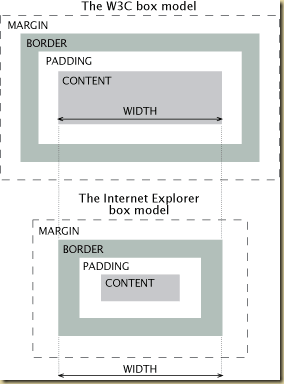
Two useful graphics that I found in my trolling about the box-model used in CSS

clip_image001

clip_image002

Friday, November 13, 2009

Empty Design View for User Controls

Came across a bug in Visual Studio 2008, where the design view all of a sudden turned blank. I was working on a user web-control, when the design view turned blank.

Turns out the problem was because I had added a style element to the user control. Because the user-control (ascx) is embedded into a web-page (aspx) it does not have a head section. When the designer comes across a style or link tag, it infers and generates the head tag – so as to allow the designer to display the page just like any other web-page. But sometimes the designer does not know when to exit the head section and hence the entire contents of the user-control end up inside the head section and hence the white screen of death.

The easiest solution – wrap your contents in a <div> element. It signals to the web-designer to exit the head section and enter the body section of the page. Alternatively (move the head parts to the end of the ascx document) – I think this is very hacky and like the first work-around better.

For more info read the following post - http://blogs.msdn.com/webdevtools/archive/2008/04/27/workaround-empty-design-view-for-user-controls.aspx

Saturday, September 19, 2009