Showing posts with label MVC. Show all posts

Wednesday, June 11, 2014

The ASP.Net MVC 5 Application Lifecylce

from: http://www.asp.net/mvc/tutorials/mvc-5/lifecycle-of-an-aspnet-mvc-5-application

Highlevel Overview:

image

Detail – Execution pipeline:

image

HTTPApplication Processing Pipeline

image

HttpApplication Processing Pipeline – Process of request (MvcHandler executes the controller action)

image

image

Authentication:

image

image

Authorization:

image

Tuesday, December 10, 2013

Custom Rules in Fiddler

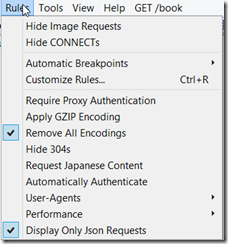
I needed to setup a filter in Fiddler so that I could view only JSON requests being made from my application. The default filter doesn’t allow for viewing only JSON requests. But luckily Fidller allows you to setup custom rules. Here is what I did:

Within the class “Handlers” add the following lines of code:

public static RulesOption("Display Only &Json Requests")
var m_bShowOnlyJsonRequests: boolean = false;

The above lines will add a Menu option under rules, that will easily allow you to turn on or off the JSON filtering.

image

Next, within the method: static function OnBeforeRequest(oSession: Session), add the following lines of code:

if (m_bShowOnlyJsonRequests && oSession.oRequest["Content-Type"] != "application/json"){
                oSession["ui-hide"] = "true";
          }

The above lines of code allow filters to display only those sessions that have a content-type header set to “application/json”.

As simple as that!

Notes:

1. The biggest problem that I have found is that there is hardly any documentation regarding the methods and properties available within the script file or off the oSession object (which is of type Session).

2. I think the script is based of JScript. I just wrote my code to resemble C# and it worked for my simple filter.

3. Samples from FiddlerBook site: http://fiddlerbook.com/Fiddler/dev/ScriptSamples.asp

4. Fiddler Script Editor is a pretty good tool that can help writing complex rules (it provides some documentation, though it wasn’t always helpful). http://fiddler2.com/fiddlerscript-editor

5. More Samples: http://fiddler2.com/documentation/KnowledgeBase/FiddlerScript/ModifyRequestOrResponse

6. Session object properties/flags: http://fiddler2.com/documentation/KnowledgeBase/SessionFlags

Wednesday, February 27, 2013

Telerik ASP.Net MVC Grid–Ajax binding boolean property

When you bind a collection of objects that have a boolean property on them and if you use server side binding, the columns are automatically rendered as check-boxes. But instead, if you use AJAX binding with the telerik MVC grid, they get rendered as literal texts (“true” or “false”). To fix it, what you need to do is to set the ClientTemplate. Here is an example:

grid.Columns(columns => {
columns.Bound(o => o.Value).ClientTemplate("<input type='checkbox' <#=Value?'checked':''#> disabled />");

Where the code that’s highlighted is the binding code and “Value” is the property to which I am binding. Also, I am using the ternary operator to output “checked:’’” if its true, else it outputs nothing.


Thursday, February 21, 2013

ASP.Net MVC–Authorize filter that loads users and roles from the application configuration file

I needed the ability to set the Authorization filter from a config file (instead of setting the roles and users directly on the controller). The main reason for this is that I needed different roles to be authorized to hit the action based on the environment to which it was deployed (dev,qa, prod).

Here is the code:

Wednesday, November 21, 2012

Asp.Net MVC 4–Creating an AJAX page and using JQueryUI dialog

This is a very quick tutorial on how to create a page that displays data using AJAX. In addition, I will also show how to use the JQueryUI dialog element.

First a quick description of the page we are going to build:

image

There are 5 links on the page. When you click on one of the links 2 parts of the page are updated via jquery. (The div at the bottom and the dialog to the right).

Step 1: Create a MVC 4 Internet application.
Create a new MVC 4 internet application project, which we will use for this tutorial.

Step 2: Check to make sure “UnobtrusiveJavaScriptEnabled” is set to true in your web.config file.

Step 3: Add the references to the unobtrusive scripts in _layout.cshtml:
This is done by adding the line: @Scripts.Render("~/bundles/jqueryval") right after the line: @Scripts.Render("~/bundles/jquery")
image

Note: FYI: The reference to “~/bundles/jqueryval” is based on the bundle names defined in “BundleConfig.cs”.

bundles.Add(new ScriptBundle("~/bundles/jqueryval").Include(
                        "~/Scripts/jquery.unobtrusive*",
                        "~/Scripts/jquery.validate*"));

Step 3: Add a new action to the HomeController, that will return a partial view:

public ActionResult IndexData(int id)
        {
            ViewBag.Id = id;
            ViewBag.Title = "The ID is: " + id;
            return PartialView();
        }

Step 4: Create a view for the IndexData action:

Right click in the action and select “Add View” and select the defaults.

Add the following code to the new IndexData.cshtml page:

@{
   
}
@Html.Hidden("Id",(int)ViewBag.Id)
@Html.TextBox("Title",(string)ViewBag.Title)

Step 4:Update Index.cshtml to show the links and allow calls to occur using AJAX:

Add a reference to the CSS files used by JqueryUi by adding the following code:

@Styles.Render("~/Content/themes/base/css")

Add an Ajax.ActionLink:

@Ajax.ActionLink("ajax load for id: 101", "IndexData", new {id = 101}, new AjaxOptions {HttpMethod = "Get", InsertionMode = InsertionMode.Replace, OnSuccess = "SuccessFunction", UpdateTargetId = "myDiv"})

The above line, adds a link with the text “ajax load for id: 101”. It will call the “IndexData” action on the HomeController and it will pass it the value of 101. Finally, check out the AjaxOptions values:
- The AJAX call will be performed as a GET operation
- The call will result in replacing the DOM with the data that is returned
- If the call succeeds, the “SuccessFunction” will be called.
- Finally the data that is returned by the ajax call will update a DOM element named “myDiv”

We will add a few more such links:

@Ajax.ActionLink("ajax load for id: 202", "IndexData", new {id = 202}, new AjaxOptions {HttpMethod = "Get", InsertionMode = InsertionMode.Replace, OnSuccess = "SuccessFunction", UpdateTargetId = "myDiv"})
<br/>
@Ajax.ActionLink("ajax load for id: 303", "IndexData", new {id = 303}, new AjaxOptions {HttpMethod = "Get", InsertionMode = InsertionMode.Replace, OnSuccess = "SuccessFunction", UpdateTargetId = "myDiv"})
<br/>

The next step is to add a couple of divs that will be used to display the data.

<div id="myDiv"></div>
<div id="myDiv2" style="border-width: medium; border-color: black"></div>

The first div will be used for the dialog and the 2nd div for updating a DOM element directly on the page.

Finally:

Add the following code to the end of the page:

@section scripts
{
    @Scripts.Render("~/bundles/jqueryui")
    <script>
        $(function() {
            $("#myDiv").dialog({ autoOpen: false });
        });
        function SuccessFunction(data) {
            $("#myDiv").dialog("open");

            $("#myDiv2").html(data);
        }
    </script>
}

Lets break down the code:

1. @Scripts.Render("~/bundles/jqueryui"): This line adds the reference to the JqueryUI scripts

2. $(function() : The ready-function, sets up myDiv to be a dialog. In addition, it sets it up to not open by default.

3. function SuccessFunction: This is the function that is called when the Ajax calls return. It opens the dialog and also updates the 2nd div to show the same data in 2 different ways.

Final code for the index.cshtml

@{
    ViewBag.Title = "Home Page";
}
@Styles.Render("~/Content/themes/base/css")
@Ajax.ActionLink("ajax load for id: 101", "IndexData", new {id = 101}, new AjaxOptions {HttpMethod = "Get", InsertionMode = InsertionMode.Replace, OnSuccess = "SuccessFunction", UpdateTargetId = "myDiv"})
<br/>
@Ajax.ActionLink("ajax load for id: 202", "IndexData", new {id = 202}, new AjaxOptions {HttpMethod = "Get", InsertionMode = InsertionMode.Replace, OnSuccess = "SuccessFunction", UpdateTargetId = "myDiv"})
<br/>
@Ajax.ActionLink("ajax load for id: 303", "IndexData", new {id = 303}, new AjaxOptions {HttpMethod = "Get", InsertionMode = InsertionMode.Replace, OnSuccess = "SuccessFunction", UpdateTargetId = "myDiv"})
<br/>
<div id="myDiv"></div>
<div id="myDiv2" style="border-width: medium; border-color: black"></div>
@section scripts
{
    @Scripts.Render("~/bundles/jqueryui")
    <script>
        $(function() {
            $("#myDiv").dialog({ autoOpen: false });
        });
        function SuccessFunction(data) {
            $("#myDiv").dialog("open");
            $("#myDiv2").html(data);
        }      
    </script>
}

Thursday, November 15, 2012

ASP.Net MVC–Returning XML

If you need to return xml content from an MVC controller, the easiest way to do it is to use the “Controller.Content” method.

public class TestController : Controller
{
        public ActionResult Index()
        {
             string result = “<books><book/></books>”
             return this.Content(result, "text/xml");
        }
}

Thursday, August 30, 2012

MVC Error: 0x800a1391 - Microsoft JScript runtime error: 'Sys' is undefined

If you get the error:

MVC 0x800a1391 - Microsoft JScript runtime error: 'Sys' is undefined

Then first check to make sure you have included the correct MVC javascript files:

C#:

<script src="<%= Url.Content("~/Scripts/MicrosoftAjax.debug.js") %>" 
    type="text/javascript"></script> 
<script src="<%= Url.Content("~/Scripts/MicrosoftMvcAjax.debug.js") %>"
    type="text/javascript"></script>

VB.Net:

<script src="@Url.Content("~/Scripts/MicrosoftAjax.js")" type="text/javascript"></script> 
<script src="@Url.Content("~/Scripts/MicrosoftMvcAjax.js")" type="text/javascript"></script>

Saturday, March 20, 2010

HaHaa Brothers Show – Lessons in Asp.Net Security

http://live.visitmix.com/MIX10/Sessions/FT05

A disturbing video with Scott Hanselman dancing to hamster on a piano and then to Beyonce!

Actually this is a good video of a MIX10 demo that shows how your coding practices can make your ASP.Net MVC app vulnerable and also instructs on best practices and ways to secure your web-app.

Demo 1: java-script injection

lesson 1: dont trust user data

lession 2: in MVC use the ValidateInput attribute

lesson 3: use “<%:” instead of “<%=” when using server variables in your front end code. This new construct is similar to calling html.encode.

Demo 2: javascript injection with defer tag on script

lesson 1: learn about the the AntiXSS library and use the AntiXSS.Encoder (which if you recall my previous post is an encoder based on a white list instead of the black list that the default encoder uses). You can set the AntiXSS encoder as the default encoder via the HttpRuntime setting in the web.config.

lesson 2: Use Ajax.JavascriptStringEncode

Demo 3: Cross-Site request forgery attack (a confused deputy attack)

This attack attempts to rely on the fact that you are already logged in to a secure site and attempts to submit a form with all the data that could lead to an unauthorized action.

lesson 1: Use the ValidateAntiForgeryToken in MVC on your controller methods and insert the token using Html.AntiForgeryToken into the html.

When the method in the controller gets called, the ValidateAntiForgeryToken will look at the hash code in the html page (inserted as a hidden field) and the hash code in the cookie and will throw an error if the 2 values do not match.

Demo 4: Javascript injection that redefines JS methods.

In this demo, a special method is called every time an ID is set on a page element. The hack depends on arrays that are being returned as JSON to a GET request.

I need to review this hack again – as I wasn't completely able to understand how the hack worked and what the fix does.

One best practice specified is that when returning data that should be secured then one should not return it as an array.

Demo 5: Hacked post values via tools like Fiddler

cool tip: to listen to messages being sent to a local HTTP server (like when you are developing an ASP.Net app), use “localhost.:” or “ip4.fiddler” so that data is passed through the fiddler proxy.

lesson: in MVC your post data is automatically bound to the controller methods parameter type. If a hacker tries to guess properties on your model type, then they might be able to send bad data to your application.

One way around this is to setup a white list (or a back list) using the Bind attribute on your parameter. The bind attribute tells MVC what data from the post can be automatically copied into your model object.

This video is definitely a good way to spend 60 minutes of your time.