Found this in Bing’s satellite imagery – an airplane taking off from Las Vegas airport.

Showing posts with label Imaging. Show all posts
Showing posts with label Imaging. Show all posts
Saturday, December 24, 2011


Friday, September 17, 2010
My new favorite free screen capture tool–PicPick
There is no price better than “free” and so I was using Faststone’s Capture version 5.3 tool until today for all my screen capture needs. Why version 5.3 when they are currently on version 6.7? Version 5.3 was the last one after which Faststone made their application a 30 day trial limited software.
I love Faststone Capture – even at version 5.3 it came close to SnagIt and its many features that I had grown used to. But 5.3 was getting dated and it wasn’t updated for Windows 7.
And today I found a new replacement for my screen capture tasks: PicPick.
PicPick, provides me with all the normal screen capture options: full screen, active window, free hand, etc. In addition it also provides me with the all important “Auto-Scroll” option that allows me to capture long documents and web-pages (a feature that is not available in all screen capture tools). PicPick, is more than a screen capture tool. It has a whole slew of tools for which I used to require to use multiple separate applications before (ruler, magnifier, protractor, etc.). I have been using it for only a day now, and I have already uninstalled Faststone Capture.
PicPick got a 4.5 star rating by CNet Editors and is tested spyware free: http://download.cnet.com/PicPick/3000-2192_4-75072925.html and ranked #12 in the Image Editing Software category.
Most importantly, PicPick is free!
Saturday, January 24, 2009
Image Mosaic: Obama Inaugural Day
Someone sent me a link to Ben Wikler’s site, which was a giant aggregation of images of front-pages of news papers from across the globe. I took Ben’s idea one step further and created a mosaic image from all those images. Check it out at Obama Inaugural Day Mosaic page.

And here is a DeepZoom version of the above image: My first DeepZoom – Obama’s mosaic
Monday, September 29, 2008
Free Download: Microsoft Pro Photo Tools 2
Microsoft Pro Photo Tools provides a set of tools for photographers to perform various tasks with their images—including RAW captures. The current version enables you to quickly geotag your photos, view and edit metadata, and more, leveraging the power of Windows and Microsoft Live Local.
| New in Microsoft Pro Photo Tools 2
|
|

Microsoft Professional Photography: Microsoft Pro Photo Tools 2
Other links from Microsoft:
Monday, September 22, 2008
A taste of things to come in the digital camera market
Canon is going to soon release its Mark II 5D digital SLR camera. One of the coolest features is that it allows you to capture movies. (The first digital SLR that I know of that allows you to do this). At close to $3000, it is being aimed at the professional photographer’s market. But, I am sure we will begin seeing this feature appear on lower end SLRs soon.
Check out this video that was taken using the EOS 5D Mark II. It is amazing for the amount of detail that is captured by a camera that is not a specialized video camera.
http://www.usa.canon.com/dlc/controller?act=GetArticleAct&articleID=2086
And here is a link to the creators blog. Vincent Laforet’s Blog
Thursday, September 04, 2008
Google Picasa - Automatic Face Recognition
Google just updated PicasaWeb. The updated website sports redesigned interfaces and some cool new features. One of which is automatic face recognition which is used in name tagging all your images.
You first need to enable name tags. To do this - go to Settings

and then click on the button to turn Name Tags on.
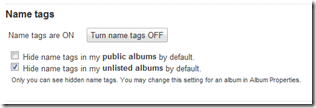
Once you do this, remember to hit the Save Button.
Google will now go through all your images and find faces to tag.

Even though Google said that the estimated processing time would be 40 minutes - it finished in about 20 minutes for me.

Clicking on Add name tags brings up the tagging interface. On this page Google displays all the faces that it thought belonged to the same person and allows you to tag them at once. Looking through my results - Google never made a mistake.
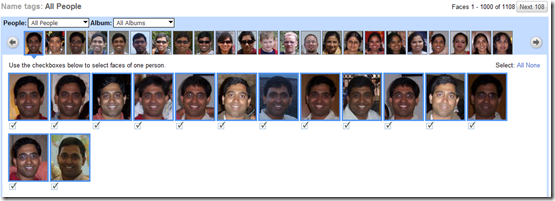
It found images of me that spanned almost 4 years during which time : my weight changed, I had glasses on and off and pictures were taken at different times of the day. The only thing that I noticed was that it was not able to match those images of mine where I was wearing sunglasses and covering my eyes.

Overall, I am impressed and it definitely saves a ton of time. (Imagine individually tagging each of the over 1000 faces that was found by Picasa). My only wish was that this feature was available in desktop version of Picasa and that I could tag and search for images by the people in them. (Version 3 which is in beta right now does not have this feature).
Wednesday, August 27, 2008
FastStone Capture 5.3
 A good screen capture tool is an important part of any developers toolbox. I love SnagIt - but I have only one license for my home computer. For my other computers I needed to find something free. For the last month I have been using MWSnap. MWSnap is a great tool - but I missed the fact that it does not have built in annotation tools.
I had used FastOne Capture a long time ago - and it was pretty close to SnagIt. Only thing is that the new versions that are available are all shareware versions that time out after 30 days. When I found FastStone Capture 5.3, I almost feel out of my chair! FSC 5.3 is completely free for private and non-commercial use and it never times out. And you can download it from the following site A+ Freeware (FastOne Capture 5.3).
The only thing that I miss in this version of FastOne is that it doesnt automatically post a captured image to the clip-board. (MWSnap and SnagIt both do this).
Here are some more recommendations for free screen capture tools: http://www.techsupportalert.com/best-free-screen-capture-utility.htm
Friday, August 22, 2008
Photo-Synth problem: Not uploading collection
A couple of the collections that I was PhotoSynthing would end up hanging during the upload phase. Even after an hour of waiting - the upload hadn't seemed to have finished.
I then found that PhotoSynth writes a log of what it is doing. When I looked at the log - it said that the collection had finished uploading. But in addition it also had the following message:
"Collection completed (100% synthy), but isn't avialable for viewing yet"
Turns out the PhotoSynth system had a couple of problems in the back-end because of the amount of load that the team's servers were experiencing (link). They are fixing the problem and it should be fixed soon (link). In the mean time - you just need to check the log and if the log says that the collection has been completed - then if you visit the PhotoSynth site after a little while and check your account - you should see your collection there. (It took about 20 minutes for my collection to show up).
(Check out the spelling of "available" in the above log message!!! 
My very first PhotoSynth
Some of you who have been regular readers of my blog - would have seen my previous posts about Microsoft's PhotoSynth technology. PhotoSynth is truly a ground breaking piece of software that is not just awesome for what it can do (create 3D scenes from a set of your 2d photographs), but also in how it represents the shift in how Microsoft does business. Just 5 years ago all the research that Microsoft did would find its way into some commercial piece of software. (For example a lot of the research into image manipulation would end up into Digital Image - a now discontinued product). Today a piece of software such as PhotoSynth which truly has huge commercial value, has been released to the public totally free of cost. (To boot MS is giving 20gb of space to everyone who signs up for a Live account - a prerequisite to creating PhotoSynths). A lot of this paradigm shift in how Microsoft is operating, I am sure is in no small part attributable to Google. (Though, it does feel like the amount of cool stuff coming out of Google is slowing down and Microsoft is quickly gathering the speed needed to over-take it).
The website itself has much to be desired off. (it is nice for a 0.5 version, but needs more work). It is hard to find cool PhotoSynths and I wish we could geo-code our images - so that people would know which location they represent. What would be even cooler would be that once multiple PhotoSynths for a location are created - they are all merged into one seamless representation of that area. Never-the-less, even in this iteration - this software is truly AWESOME!
Here is a MS Research paper on PhotoTourisim - a precursor to PhotoSynth: http://research.microsoft.com/IVM/PhotoTours/
Also - check out this truly cool video about PhotoSynth that was shown at a TED conference just a little over a year ago.
And here is my first ever PhotoSynth. The PhotoSynth was created with 7 photographs that I took of the Denver City Building while walking home. It took less than a couple of minutes for the PhotoSynth to be created and uploaded to the website.
Check out this point cloud that PhotoSynth creates from my pictures, which are used to "stitch" the images together.

Everytime I take a look at a PhotoSynth and the point cloud that sits behind it - I am truly awestruck. The problem that PhotoSynth solves is not a trivial one and to boot - they have made it work fast as well as accurately. It is truly amazing. PhotoSynth definitely takes photographs to a whole new level
Thursday, August 07, 2008
FullSizePosters.com - A Denver company

I heard about the company in a local magazine article. They are based out of a suburb of Denver (Westminister).
Having checked out their website - I found that they are one of the cheapest printers of full size posters. And the reviews of their service are also very good. Definitely going to give them a try.
FullSizePosters.com Your Pictures as Full Size Posters. Overnight.
Sunday, July 20, 2008
DSLR Shootout: Five Top Cameras Compared - - PopPhotoAugust 2008

Popular Photography has released it's top 5 Digital SLR cameras for under $1000 .
And here are the results:
1 Canon EOS Rebel XSi 23 points
2 Nikon D60 17 points
3 Pentax K200D (tie) 15 points
3 Sony Alpha 350 (tie) 15 points
5 Olympus E-520 10 points
DSLR Shootout: Five Top Cameras Compared - - PopPhotoAugust 2008
Which one do I have? I bought the Nikon D40 about 6 months ago. It is about $300 cheaper than the D60 (but only has a 7mp sensor compared to the D60s 10mp sensor). But I rather spend the savings on an extra lens. So I bought a Nikon 55mm - 200mm VR lens for about $225. And I am really happy with my setup.
Checkout pictures taken with the Nikon D40 - http://www.flickr.com/cameras/nikon/d40/
And here is a link to my photostream - which has pictures taken from 3 different cameras, most of the newest ones are with my D40.
http://www.flickr.com/photos/raj-rao/
Created with Admarket's flickrSLiDR.
A word that is worth $10. SnagIt Coupon Code
 SnagIt is probably the best screen capture utility that I have ever come across. But it is not free. So if MWSnap or one of the other free tools don't cut it for you - at least save yourself $10 and use the coupon code SNUG. (It last worked on July 14th, 2008).
SnagIt 9.0 is the most current version of this screen capture tool.
I have a license for 6.3 and I am eligible to upgrade to this latest version - so I am going to save myself $30 and go get it for $19.95.
Friday, July 18, 2008
Useful Developer Tools - Free Screen Shot tool
Here is a great little free screen capture tool called MWSnap. It has very similar capabilities to SnagIT. Try it out.
http://www.mirekw.com/winfreeware/mwsnap.html

Selected features (from Mirek's site)
- 5 snapping modes.
- Support for BMP, JPG, TIFF, PNG and GIF formats, with selected color depth and quality settings.
- System-wide hotkeys.
- Clipboard copy/paste.
- Printing.
- Auto-saving, auto-printing.
- Auto-start with Windows.
- Minimizing to system tray.
- An auto-extending list of fixed sizes, perfect for snapping images for icons and glyphs.
- A zoom tool for magnifying selected parts of the screen.
- A ruler tool for measuring screen objects lengths.
- A color picker showing screen colors with separated RGB parts.
- Fast picture viewer.
- Adding frames and mouse pointer images.
- Multilevel configurable undo and redo.
- Multilingual versions.
- Configurable user interface.
- And more...
Subscribe to:
Posts (Atom)