
Saturday, August 12, 2006
Cool Dev Tools
Often times I have XML files that I have written out in my code and I want to view quickly such that the view is formatted and nice and pretty with color.
Here is a great tool that does just that: XMLDocViewer. Its free and all it does is view XML files. I need to see if it will work with SOAP XML, cause if it does, then its like gold to me.
http://www.sliver.com/dotnet/XmlDocViewer/
There are many other tools and snippets on this guys website worth checking out : http://www.sliver.com/dotnet/index.aspx
Snippet Compiler: This is Jeff's best tool. An easy way to test C# code, without having to create a solution and a project in VisualStudio. A must have : http://www.sliver.com/dotnet/SnippetCompiler/

Tuning your XP machine for best performance during recording of Audio
Here is a site that has a list of tips for making an XP machine faster for recording of auido.
http://www.musicxp.net/tuning_tips.php
Friday, August 11, 2006

Replacing Start Run
Feed: ComputerZen.com - Scott Hanselman's Weblog
Title: Replacing Start Run - The Quest Continues
So many ways to launch programs. A good launcher doesn't just launch, it also auto-completes paths for you, starts your search engine or browser and generally saves you 15 minutes a day. No need to learn all the hotkeys like those Keyboard wonks who try to guilt you. Just learn ONE and make it do everything.
Given these offerings, if you open your Start Menu at all, at any point in the day, you're doing something wrong. Try them all, pick one, and save 15 min * 5 days * 52 weeks = 65 hours a year you'd have spent futzing around in your Start Menu*.
* These numbers came straight out of my butt.
- Slickrun - still the sexy favorite, this little floating magic bar keeps me moving fast, launching programs, macros and explorer with it's shiny simplicity.
Tell them I sent you. ;)
- SmartStartMenu - Shaun Harrington has created this elegant little application that lives in the task bar and automatically indexes the list of items in your Start Menu for quick access with the speed of AutoComplete.
It will take system commands, paths to launch explorer, even UNC paths. Launch anything on your system with less than 4 keystrokes. It also adds new context menus to Explorer like CopyPath and Open in DOS box to Explorer.
- slimSIZE: Change the current window's position, size or monitor location to any area of your choice.
- slimLAUNCH: Open applications, documents or folders by typing a few letters from their name.
- slimVOLUME: Display the volume level when you use your keyboard's volume control.
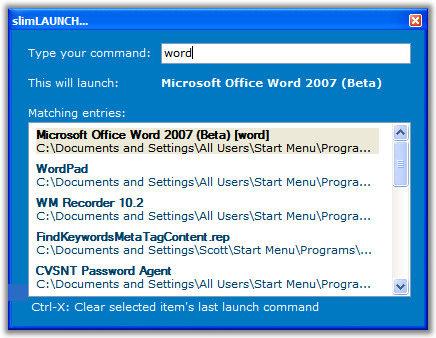
- Colibri - The closest thing so far, IMHO, to Quicksilver on Windows, although this little gem has a slow startup time, it runs fast! It's being actively developed and promises integration with a dozen third party programs. It also formally supports "Portable Mode" for those of you who like to carry your apps around on a USB key.
- Launchy - Another do it all application, this one Open Source and written
entirely in .NET, Launchy binds to Alt-Space by default. This app also has the potential to be Quicksilver like if it start including support for stringing together verb-noun combos. It's pretty as hell and totally skinnable (there's TWO Quicksilver skins included!) - AppRocket -this little bar sits at the top of your screen, popping down an active list of Bookmarks, Programs, Music, Web Queries and more. It's unclear if this tool is being enhanced for future versions as folks have reported not hearing from the company in a while.
- ActiveWords - Arguably the most minimal of these launchers (as it can have no UI at all if you like!), but the most configurable. ActiveWords watches everything you type, in every application, so anything you've just typed could potentially be used by you to launch a program, a macro, send email, or give you Auto-Correct in any application. Check out their screencast/demos and their scripting language. It also is the only launcher (I've seen) with explicit support for the Tablet PC and allows ink to trigger an "Active Word."
- Dave's Quick Search Bar - Written orignally in JavaScript and now written in magic and ensconced in voodoo, this little Toolbar sits in your Windows Task bar (or wherever you choose to drag it) and supports a huge community of macro writers who've enabled it as a Calculator, Web Searcher, People Finder, Currency Converter and literally hundreds of other tasks via simple to write plugins. Very actively developed and on the web for over 5 years (that's like 100 people years).It even has a Search Wizard to create your own web searches by example.
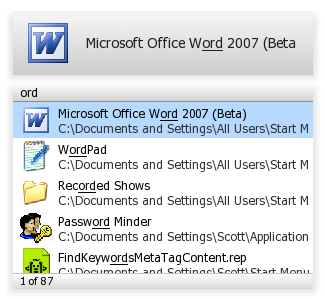
UPDATE: I forgot a few that were totally worth mentioning. My bad.
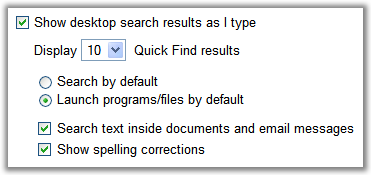
- Google Desktop -
- Find and Run Robot - Lightweight, small, quiet until you need it. This little application allows for tuneable heuristics to make it work like you think. Demo Screencast here.
Tuesday, August 01, 2006
Getting the relative path to a file, given its absolute path and a source folder (C#)
Here is some code that will get the relative path to a file, given its absolute path and the source folder from which the relative path should be computed.
Code is in C#
private static string GetRelativePath(string mainDirPath, string absoluteFilePath)
{
mainDirPath = mainDirPath.Substring(0,mainDirPath.LastIndexOf(Path.DirectorySeparatorChar));
string[]
firstPathParts=mainDirPath.Trim(Path.DirectorySeparatorChar).Split(Path.DirectorySeparatorChar);
string[]
secondPathParts=absoluteFilePath.Trim(Path.DirectorySeparatorChar).Split(Path.DirectorySeparatorChar);
int sameCounter=0;
for(int i=0; isameCounter )
{
newPath+=Path.DirectorySeparatorChar;
}
newPath+="..";
}
if( newPath.Length==0 )
{
newPath=".";
}
for(int i=sameCounter; i
{
newPath+=Path.DirectorySeparatorChar;
newPath+=secondPathParts[i];
}
return newPath;
}
Thursday, July 13, 2006
C# programs/source code
Found this page to be useful as it has links to useful C# projects that include source code.
http://www.manbu.net/Lib/En/Class3/Sub1/index.asp and http://www.manbu.net/Lib/En/Class3/Sub1/index.asp
Most of the projects have implementation of popular algorithms used in computational geometry as well as searching, etc.
void * __cdecl operator new(unsigned int) error during linking
Recently while trying to create a DLL in managed C++, i came across an error about : error "void * __cdecl >operator new(unsigned int)" (??2@YAPAXI@Z) being undefined!
This occured when I tried to create a dynamic unmanaged array in a managed class.
That is : within a gc class, I could not do the following int __nogc* buffer = new __nogc[100];
but in a non-gc class I could do it!
After much searching I found the resolution to be this:
Add msvcrt.lib to the input section of the linker property pages of your project settings. Thats all!
Monday, July 03, 2006
Memory corruption in Managed C++ .NET in Release Mode
Recently we were working with some .NET Managed C++ code, that would work in debug mode but not in Release mode.
What was weirder was that on most machines, it would work in Release mode. Except when it got built by the build machine. Further probing made us realize that the biggest difference between the developer machines and the build machine was it had the Professional version of Visual Studio - which meant that it had a different set of optimizations enabled.
Looking closer - the optimization we were using on the compiler was /O2 : Optimize for speed. which used a couple of underlying switches (/Og /Oi /Ot /Oy /Ob2 /Gs /GF /Gy). If we turned of Optimization the code would run properly and turning it out would give us garbage output. Further investigation lead us to pinpoint /Og switch as the culprit.
/Og uses global optimizations. Looking at the documentation, I figured the issue is most probably because we were pinning some arrays and using both the original array and the pinned pointer to access the data. I believe the problem is most probably to do with aliasing, where the optimizer gets confused when aliasing is used in code.
So our solution:
We could have just disabled optimizations on the project. But we wanted to have access to the speed. So we left the optimization swith /O2 in. Instead what we did was use the pragma directive "#pragma optimize" to turn off the "Og" optimization only for those methods that used pinning and aliasing. And voila - the problem is all gone and the code still runs nice and fast.
Tuesday, June 27, 2006
Creating a shell extension with C#
This article demonstrates a Windows Shell hook/extension in C#, demonstrating how easy it is to consume COM interfaces and to deploy the final code as though it is a bona-fida COM object.
http://www.codeproject.com/csharp/dateparser.asp
Wednesday, June 14, 2006
WHOS-IN Pro 2006 (a who's in and who's out office board)
http://www.hudsoft.com/products/whosin/index.html
WHOS-IN Pro 2006 is THE multi-award winning, easy-to-use, in-out board for businesses and organizations that would like to know who's in and who's out of the office.
Subscribe to:
Posts (Atom)