Sunday, December 16, 2007

Mobile phone tracking

sc2  sc1

Beta GSM mobile phone tracking system via the GPS-TRACK satellite network

You plug in a cell phone number and it shows you where the phone is on a map.

Mobile phone tracking

According to the website:

Based on repeater triangulation, the system tracks mobile phones using GPS and GSM technology

Approximate margin of error:
10 meters (max.) for mobile phones in Europe and the U.K.
25 meters (max.) for mobile phones in the U.S.A., South America and Canada.
50 meters (max.) for mobile phones elsewhere.
This system will not work in countries without GSM technology networks.

Thumb Calendar

via Thumb Calendar [Adam Sporka's Home Page]

2037019771_2b77d5fa55

The "Thumb Calendar" by Adam Sporka is something I stumbled upon while searching for a calendar to print and keep in my wallet. And this calendar qualifies for it.... it is simple, small and most of all - innovative. The dates are printed continuously across the face and to read the dates for a particular month - you cover all the other months with your thumb - hence "Thumb Calendar".

398045889_5546076e53_m

Best plugin for publishing code snippets via Windows Live Writer

After testing a couple of different code snippet publishing plugins for Windows Live Writer (WLW), I found that Leo Vildosola's plugin to work best with Google's Blogger.

If you select the embedded option - the code is published properly colored and formatted with indentations and all.

Download from WLW Plugin Gallery

A couple of other useful plugins for developers:

Here is some sample code pasted via Leo's "Insert Code Snippet" plugin

// NOTE: This code snippet is designed for VS.NET 2005 or later.
// Additional reference: System.Security.dll
// using using System.Security.Cryptography;
// using System.IO;
// This is a button click event - to encrypt the DB string to disk:
private void btnEncrypt_Click(object sender, EventArgs e)
{
    // The DB string that we want to encrypt/decrypt:
    String strConnectionString = $strDBString$;
    // Call the custom method for encrypting the string:
    this.EncryptDBString(strConnectionString);
}

// This is  a button click event - to unencrypt the saved DB string:
private void btnDecrypt_Click(object sender, EventArgs e)
{
    String strConnectionString = this.DecryptDBString();
    // Do something with the unencrypted DB string ...
    MessageBox.Show(strConnectionString);
}

// This method will encrypt the provided DB string to disk
private void EncryptDBString(String DBString)
{
    /**************** Encrypt/Protect Database String ****************/
    // Convert the string to a byte array:
    byte[] arrDBString = System.Text.Encoding.Unicode.GetBytes(DBString);
    // Provide additional protection via entropy with another byte array:
    byte[] arrEntropy = { 4, 5, 7, 9, 4, 5, 7, 9 }; // Save this for unprotecting later
    // Encrypt/protect the DB string:
    byte[] arrEncryptedDBString = ProtectedData.Protect(arrDBString, arrEntropy,
        DataProtectionScope.CurrentUser);

    // Write the encrypted DB string to disk:
    using (FileStream fs = new FileStream($strFileName$, FileMode.OpenOrCreate))
    {
        fs.Write(arrEncryptedDBString, 0, arrEncryptedDBString.Length);
    }
}

// This method will decrypt the saved encrypted DB string
private String DecryptDBString()
{
    /**************** Decrypt/Unprotect Database String ****************/
    // Setup the unencrypted DB string to return:
    String strUnencryptedDBString = null;
    // Provide additional protection via entropy with another byte array:
    byte[] arrEntropy = { 4, 5, 7, 9, 4, 5, 7, 9 }; // Save this for protecting later
    // Setup the byte array that will hold the encrypted DB string:
    byte[] arrEncryptedDBString = new byte[0];
    // Read the encrypted DB string from disk:
    if (File.Exists($strFileName$))
    {
        using (FileStream fs = new FileStream($strFileName$, FileMode.Open))
        {
            // Reset the byte array's length based on read length:
            arrEncryptedDBString = new byte[fs.Length];
            // Read the encrypted file into the byte array:
            fs.Read(arrEncryptedDBString, 0, (int) fs.Length);
        }
    }

    if (arrEncryptedDBString.Length > 0)
    {
        // Decrypt/unprotect the DB string:
        byte[] arrUnencryptedDBString = ProtectedData.Unprotect(arrEncryptedDBString,
            arrEntropy, DataProtectionScope.CurrentUser);
        // Convert the byte array to a string:
        strUnencryptedDBString = System.Text.Encoding.Unicode.GetString(arrUnencryptedDBString);
    }
    // Return the unencrypted DB string:
    return strUnencryptedDBString;
}
            

XML Serialization/Deserialization in C#

Here is a code snippet that I continuously use; it is used to serialize an object to a string and deserialize an object from a string. (The interesting thing to see here is during serialization the code uses a StringBuilder object which is passed to an XMLWriter which is in turn sent to the XMLSerializer).
public static object Deserialize(string data, Type dataType)  
{   
    using (TextReader rd = new StringReader(data))   
    {
        XmlSerializer sr = new XmlSerializer(dataType);
        return sr.Deserialize(rd);   
     }  
}

public static string Serialize(object item)  
{   
    StringBuilder bld = new StringBuilder();   
    using (XmlWriter xmlWr = XmlWriter.Create(bld))   
    {
          XmlSerializer sr = new XmlSerializer(item.GetType());    
          sr.Serialize(xmlWr, item);    
          return bld.ToString();
     }  
}

Saturday, December 15, 2007

~| 137 |~


from: ~| 137 |~

137"One hundred thirty-seven is the value of a number called the fine-structure constant. This constant, 137, is the way physicists describe the probability that an electron will emit or absorb a photon. Because this is the basic physical mechanism of electricity and magnetism, the fine-structure constant has its own symbol, the Greek letter a, “alpha.”

Now, alpha is nothing more, nothing less than the square of the charge of the electron divided by the speed of light times Planck’s constant. Thus this one little number contains in itself the guts of electromagnetism (the electron charge), relativity (the speed of light), and quantum mechanics (Planck’s constant). All in one number! Not only that, this number isn’t like the gravitational constant or the universal gas constant, full of meters and kilograms and degrees Celsius. Alpha is a pure, dimensionless number — little wonder that people have been fascinated."

The Manycore Shift

Microsoft Parallel Extensions to .NET Framework 3.5: a managed programming model for data parallelism, task parallelism, and coordination on parallel hardware unified by a common work scheduler.

The Manycore Shift White Paper : This paper describes how Microsoft and industry partners are working together to enable businesses, software and hardware vendors, and individuals to take advantage of the “manycore shift”.


MSDN Magazine Article: Parallel Performance: Optimize Managed Code for Multi-Core Machines

MSDN Magazine Article: Parallel LINQ: Running Queries on Multi-Core Processors

Sunday, December 09, 2007

LAS 2.0 data types and corresponding data types in .NET

The LAS2.0's specification defines the data types it supports in table 3.1 on page 4.

The following table shows the corresponding .NET data types as well as the C# built in data type.

LAS 2.0 Moniker Data Type Size (in bytes) .NET Data Type C# Type Range
BOOL Logical 1 Boolean bool true or false
B1 Byte 1 SByte sbyte -128 to 127
UI1 Unsigned Byte 1 Byte byte 0 to 255
I2 Signed Short Integer 2 Int16 short -32768 to 32767
UI2 Unsigned Short Integer 2 UInt16 ushort 0 to 65535
I4 Signed Long Integer 4 Int32 int 2,147,483,648 to 2,147,483,647
UI4 Unsigned Long
Integer
4 UInt32 uint 0 to 4,294,967,295
I8 Signed 8 byte integer 8 Int64 long -9,223,372,036,854,775,808 to
9,223,372,036,854,775,807
UI8 Unsigned 8 byte integer 8 UInt64 ulong 0 to
18,446,744,073,709,551,615
R4 Real Float 4 Single float  
R8 Real Double 8 Double double  
R10 Real Extended precision Double 10 ?? ??  
STR STR zero (null – binary
0000 0000)
terminated variable
length string
VAR Byte[] byte[] Even though the data is stored as an array of bytes, one can use the string data type and use convertors to convert the string to the byte values. Also remember the values are not the .NET Char type which is 2 bytes in size
BFx bit field x, where x = 1,2,4,8 Byte, UInt16, UInt32, UInt64 byte, ushort, uint, ulong data types are used as bit fields
[n] Array VAR Array Array of any of the types defined above for example UI[4] is uint[4]

Notes:

  • The BitConvertor class as well as the BinaryReader class can be used to convert bytes to their corresponding .NET data types.
  • To convert a byte array to string one can do the following:
public static byte[] StrToByteArray(string str)
{  
    System.Text.ASCIIEncoding encoding=new System.Text.ASCIIEncoding();  
    return encoding.GetBytes(str);
}
  • And to do the reverse
byte [] dBytes = ...
string str;
System.Text.ASCIIEncoding enc = new System.Text.ASCIIEncoding();
str = enc.GetString(dBytes);
  • The BitArray class (System.Collections namespace) can be used as a helper class to work with the BFx data type. It can handle arbitrary length bit fields and provides methods that allow you to perform bit arithmetic.
  • An important thing to remember is that bool in .NET is actual 4 bytes long (which corresponds to a WIN BOOL). So if you need to marshal your structure to native code or need to convert the data to bytes - you will need to use the Marshal As attribute to do it as a byte (UI1)

More information:
C# Data Type:
http://msdn2.microsoft.com/en-us/library/1dhd7f2x(VS.71).aspx 
LAS 2.0 Specification:
http://www.asprs.org/society/divisions/ppd/standards/incitsl1_las_format_v20.pdf 
LAS Documents:
http://www.asprs.org/society/divisions/ppd/standards/lidar_exchange_format.htm

Got Tech Posters?

Via Chris Bowen's blog post - Got Tech Posters?

The post lists all the different posters available to .Net programmers. The posters are related to .NET 3.5, Visual Studio 2008 and other MS technologies like BizTalk Server.

Here are my favorites from my list (which are related mainly to VC# and VC++):

Saturday, December 08, 2007

Hyundai Santa Fe Cabin Air Filter

Installing a cabin air filter for the Hyundai Santa Fe.

I have a Hyundai Santa Fe (2002). During the fall season, somehow dry leaves falling off the trees would find their way into the AC blower of my car. This would lead to an irritating ticking noise whenever the blower was on - which made the leaves and seeds fly around hitting around the insides of the blower. To clean it out the auto mechanic used to charge me about $45 each time.

So when the last time leaves got into the blower area, I decided to go after them myself. When I took apart the panels on the passenger side of the car, I found that there was an empty slot where all the leaves had accumulated - the slot is located between the blower motor and the A.C evaporator. After looking around on the web a little - I found that the slot had a purpose - at least in other cars that Hyundai made (like the Sonata) - it takes a cabin air filter. For some unknown reason Hyundai decided that the Santa Fe's (at least the ones sold in the U.S) don't need the cabin air filter. Luckily this is easy to fix. All you need to do is order the cabin air filter for the Sonata and it fits perfectly into the slot.

Also, Hyundai has a service bulletin that goes into just this topic of installing the cabin air filter.

Part information:

Cabin air filter can be installed only for Santa Fe's built 2001 or newer.

Santa Fe's 2001 to 2003: OEM part number - 97619-38100 - (1 piece particulate/paper type filter) (2003 models can be fitted with 97619-3D000)

Santa Fe's 2004 to current: OEM part number - 97619-3D000 - (Beginning on March 29, 2003, a new 2 piece cabin air filter was phased in as a running change to improve serviceability)

The typical service interval is 12,000 miles or 1 year, whichever occurs first.

A major benefit of the filter (if installed) is that it reduces the possibility that mold and mildew may accumulate on the evaporator. Particulate debris becomes trapped in the replaceable filter and is removed from the system during routine maintenance. Unwanted odors may also be remedied by replacing the air filter.

Here are the steps:
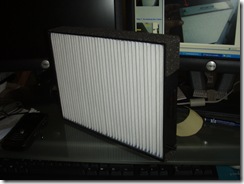
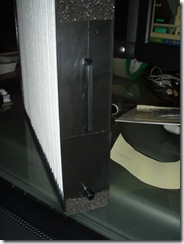
PC061113 PC061114

Part 97619-38100 bought from RockAuto.com. (For more info look at the end of this post of how to search for this part on RockAuto's website)

An important point to note about the above pictures is the handle that occurs in the middle and the peg that is at the bottom if the filter. The handle is the front side of the filter and the peg represents the bottom.

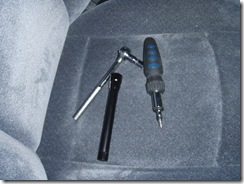
Tools needed:
PC081142

  • Philips screw-driver
  • Wrench - 10mm
  • flashlight- to look around the dark nooks

The panels and glove box are held in place by

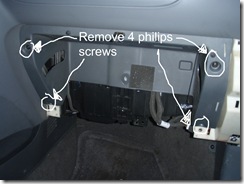
  • 5 philips head screws
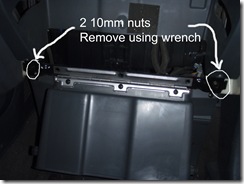
  • 2 10mm nuts

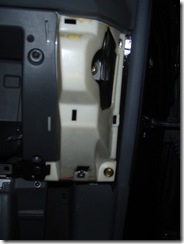
The cabin air filter slot is accessed by removing the glove box and glove box housing.

1. Removing the glove compartment box:
PC081141

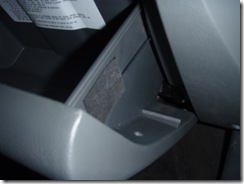
Open the glove compartment and remove the tape that holds the retention cord in place - found on the right side of the box. (Stick the tape some safe place as you will need it later).
PC081140

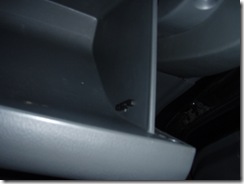
From the inside of the box, thread the plastic piece through the hole. This will release the glove box from the retention cable and the box. The next image showing the peg on the right side wall of the glove box. A similar peg exists on the left side wall. By pressing the wall in wards - you will be able to swing open the glove box. (Empty your glove box before you perform this step - otherwise you will have a mess to clean up).
PC081138 

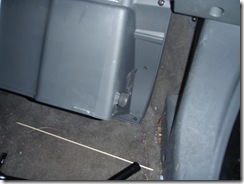
Swing open the cabin box so that it rests on the floor.

2. Removing the side panel:

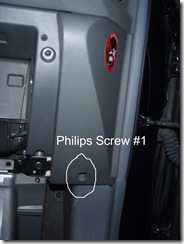
Next to remove the side panel, unscrew the philips screw that is at the bottom of the panel.
OLYMPUS DIGITAL CAMERA

PC081133

After the side panel has been removed.

3. Dismantling the glove box:

Remove the 2 nuts that hold the glove box in place. After removing the nuts just pull the glove box forward and it should come loose.
OLYMPUS DIGITAL CAMERA

4. Removing the glove compartment panel.
OLYMPUS DIGITAL CAMERA

Remove the 4 philips screws indicated in the above image. You should be able to pull the panel forward and this will give you access to the blower and evaporator compartment which is behind this panel.
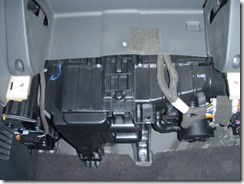
PC081132

Another view of the glove compartment panel.

5. Getting access to the cabin air filter compartment.:

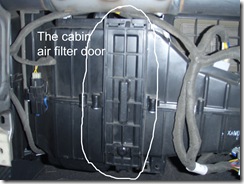
The cabin air filter compartment is located right behind the panel that you just took off.
OLYMPUS DIGITAL CAMERA

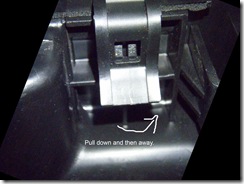
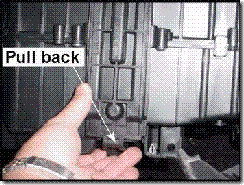
To remove the door, look just under the door, there is a latch like mechanism that you need to pull down and then towards you, which will open the door.
OLYMPUS DIGITAL CAMERA         0397002H

The above mechanism shows the latch mechanism found at the bottom of the door.

Once you have opened the door, take your flash-light and look around - you just might find some treasure. If not, this might be a good chance to clean out the dust that has built up in this compartment (a vacuum or a wet tissue will do the job).

6. Installing the cabin air filter:

Once you have opened the cabin air filter door you will get access to the air filter slot.

If you have a filter already installed - remove it gently, otherwise you might spill the dust accumulated on it into the compartment and double your work.
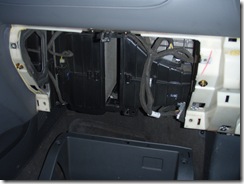
PC081119

The cabin air filter compartment is the slot in the middle.

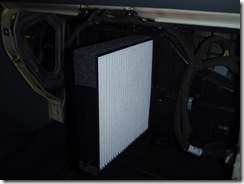
Insert the cabin air filter and push it all the way back. (Remember to keep the peg on the air filter towards the bottom of the compartment, otherwise the door will not close properly).
PC081120

7. That's it - you are done. Now reverse the above set of steps to put everything back together.

Remember to tighten the nuts and screws, otherwise the panels and the box might rattle when you drive.

Some things to remember:

1. I am not an auto expert - so some of the terms and steps might be wrongly described. Use common sense.

2. These steps were generated on my 2002 Santa Fe. The steps will be slightly different on other models. Also on later models - the air filter is 2 pieces and not 1 like the one used in my car. Also there might be glove box light wiring that you might have to disconnect - note the color of the wires and as to how they are connected.

3. The final word is that I am not responsible for you blindly following the steps. This is just a GUIDE.

footnote:

Purchasing the Cabin Air Filter from RockAuto.com

If you go to the RockAuto website, there is a link to search for parts. Follow the link and insert the part number and hit search. This will bring up "OEM Part # 9761938100A {one piece #9761938100}", this part works perfectly for the 2001 and 2002 Santa Fe cars and at less than $14, it is the cheapest I have found.  If you need the cabin filter for 2003 or newer, you can instead use RockAuto's catalog. (Search for your car and year and then drill down the tree via Heat & Air Conditioning -> Cabin Air Filter). The after market filters cost less than $20 and RockAuto charges approximately $6 for shipping. After my positive experience with them - I highly recommend RockAuto for your car parts.

Update: Here is a discount code for shopping at RockAuto (gives you additional 5% off - valid until Feb 18, 2008): 868821767880

More Information:

The HMA service website is an excellent site to get more information and help with this installation as well as any other issues you might have with your Hyundai cars. The site requires that you register. Its definitely worth it. Highly recommended.

Wednesday, December 05, 2007

Music Video - Bubble 2.0?

Here is a funny video about all the fan fare surrounding Web2.0 and whether its going to be another bubble.

Here Comes Another Bubble v1.1 - The Richter Scales