Friday, January 09, 2009

Software bugs – A tale of dates (Zune)

The recent zune fiasco, brought to the fore-front the ever present problem of software bugs. The Zune issue was caused by a bug in the code that reads the hardware timer and returns breaks it down into the date, month, year, minutes, seconds components. See if you can pin-point the issue from the following code:
year = ORIGINYEAR; /* = 1980 */
while (days > 365)
{
    if (IsLeapYear(year))
    {
        if (days > 366)
        {
            days -= 366;
            year += 1;
        }
    }
    else
    {
        days -= 365;
        year += 1;
    }
}

Basically, in a leap year, the code that would determine the year would end up in an infinite loop.

Here is what happens:Zune BSOD The year 2008 is a leap year, which means that it has 366 days.
    So, at 12:00am on Jan 1, 2009, the value of days will become 366. (The year will be 2008, remember this code is used to increment the year).  
    But because 2008 is a leap year, it will enter the first if block of the code. 
           But because the number of days is 366, it will never enter the inner if block that decrements the number of days
                  And hence the Zune will sit in an endless loop, until the timer increments the day to 366. The timer code is accessed during the boot up process of the Zune. So, if you turned on your Zune anytime between 12:00am Jan 1, 2009 and 11:59pm Jan 1, 2009, the Zune would seem like it was stuck on the bootup screen! The problem automatically fixes it-self on Jan 2nd, 2009, as the number of days becomes 367 and the new number of days will become 2 and the year will become 2009. In actuality, the Zune’s timer is based off GMT and based on Microsoft’s press release, you didn’t have to wait for 2nd Jan, but 12pm (noon) on Jan 1st GMT. Can you think of a way to fix the code shown above? Do you know how to check if a year is a leap year or not? Here is C# code for checking for a leap year:

static bool IsLeapYear(int year)
    {
        if ( ((year%4)==0 && (year%100 != 0)) || (year%400 == 0))
            return true;
        return false;
    }
Or just use the in-built method
DateTime.IsLeapYear(int year);
Here are two articles on some famous software bugs: “To err is human, but to really foul things up you need a computer.”  –Paul Ehrlich
ps: Microsoft’s solution for this was to tell Zune owners to wait until Jan 1, 2009 12pm GMT. This means that the bug it-self has not been fixed. Which means that this issue could re-appear in 4 years (2012). But if you are using the Zune, 4 years from now – I think you have bigger problems, than having to worry about not having your zune for 1/2 day.

A $7,500 interest free loan from the government towards your first home

This is a story that I havent seen much in the news, so I thought I would post it here for the benefit of others.

button3 The federal government is offering a $7,500 tax credit towards a first home (its actually 10% of the purchase price or $7,500,whichever is lower – so a house above $75,000 will qualify you for the full tax credit). The house should have been bought between July 2008 and July 2009.

So, why is this a loan? Basically, the credit provided to you by the government needs to be recaptured over a 15 year period. You will end up paying the amount as an additional amount on each tax year, starting in 2010 for 15 years. (If you sell the house then you might have to close this loan from the government right away – special rules apply, so read up).

This tax-credit is available for tax filed for the year 2008. But, you can claim the credit even on houses that you bought in 2009 (up to July).

If you bought a home in the last 6 months, or plan on buying one in the next 6 months, this could be a great source of money for you.

Remember – to look at it as an interest free loan and not as an tax-credit.

More information is available at: http://www.federalhousingtaxcredit.com/

Google Search for more articles on the $7,500 tax-credit for 2008.http://www.google.com/search?hl=en&rlz=1T4GGLL_en&q=7500+tax+credit+first+time+home+buyer+2008

Wednesday, January 07, 2009

Getting the changed data from a GridView in the RowUpdating event

Ah! the good old problem of getting the data from the row that is being currently edited within a GridView.

Obviously the simplest method is to use DataKeyNames on the GridView and then you should have the data in your GridViewUpdateEventArgs as part of e.NewValues.

But e.NewValues and e.OldValues dont always get a value. This can happen for a number of reasons. In my case this was happening because I was binding to a List of custom objects.

There are multiple ways in which one can get the data from the current row that is being edited in a GridView.

1. Using "ExtractValuesFromCell": This is an easy way to get all the values from the current row. As the values are inserted into an OrderedDictionary - you can use the field names to access the changed data odNew.

OrderedDictionary odNew = new OrderedDictionary();
        for (int colIndex = 0; colIndex < gridView.Columns.Count; colIndex++ )
        {
            DataControlRowState dcrState = DataControlRowState.Normal;
            DataControlFieldCell cell = gridView.Rows[e.RowIndex].Cells[colIndex] as DataControlFieldCell;
            gridView.Columns[colIndex].ExtractValuesFromCell(odNew, cell, dcrState, true);
        }

2. Accessing the "Controls": This method gets you access to the control in the GridView, which might be useful based on what you are doing. (In the following example, I cast to a CheckBox as I know I have a checkbox at the colIndexYouAreInterestedIn - you should cast to whatever control you have in that column).

CheckBox checkBoxAllowView = gridView.Rows[e.RowIndex].Cells[colIndexYouAreInterestedIn].Controls[0] as CheckBox;

Note
A common mistake that a lot of people do is that they perform a databind each and every-time the Page_Load method is called. This will lead to problems like "GridView does not show updated values", "GridView looses values changed by user". Perform your databinding only when you have to. In your Page_load, this is typically only inside a block where you check to make sure that Page_Load is not being called during a post-back call.

Monday, January 05, 2009

Denver Neighborhoods Map

(updated 1/16/2008) The Denver Neighborhoods Map now has a permanent home at : http://www.aggregatedintelligence.com/googlemaps/DenverNeighborhood.html

I could not find a map of Denver Neighborhoods on Google Maps, so I created one. The neighborhood boundaries were downloaded from Zillow.

The shpfile was converted to a KML file using SHP2KML.

Microsoft Visual Studio 2008 License Terms

license I was trying to determine if the VS2008 license terms allowed a single developer to install the IDE on multiple machines (basically at work and at home or my laptop). I have known for a long time that the Visual Studio license has been developer based, but I needed to find the exact wording in their EULA.

Weirdly, the EULA is not easy to find on the Internet. So after a lot of searching, I found some of the EULAs and here is the list for the benefit for others.

As for the part that allows us to install VS on multiple machines owned/used by the developer, here is what I think is the relevant wording from the license document (taken from Microsoft Software License Terms: Microsoft Visual Studio 2008 Professional Edition and Trial Edition)

1. OVERVIEW.
a. Software.
The software includes development tools, software programs and documentation.
b. License Model. The software is licensed on a per user basis.

2. INSTALLATION AND USE RIGHTS.
a. General.
One user may install and use copies of the software to design, develop, test and demonstrate your programs. Testing does not include staging on a server in a production environment, such as loading content prior to production use.
b. Included Microsoft Programs. These license terms apply to all Microsoft programs included with the software. If the license terms with any of those programs give you other rights that do not expressly conflict with these license terms, you also have those rights.

Based on the above license terms, one user can install Visual Studio on multiple machines as long as each installation is for that specific user's use.

And here is a list of links to the actual license terms documents

Visual Studio 2008 Standard
Visual Studio 2008 Professional
Microsoft Visual Studio Team System 2008 Team Foundation Server, Standard Edition, Workgroup Edition

Here is the final Google Search that got me the documents.

Note: The grant of license to install multiple copies per developer seemed to be a lot more defined in the VS 2003 EULA:

If you are an entity, Microsoft grants to you a personal, nonexclusive license to use the Software, and to make and use copies of the Software, provided that for each individual using the Software within your organization, you have acquired a separate and valid license for each such individual.

Oracle - How To: Get the source for your package

Here are a couple of scripts that will let you get your hands on the source for your package as stored by the database.

Select  TEXT 
from SYS.USER_SOURCE 
where NAME='Package Name' 
and TYPE='PACKAGE' 
order by LINE;

Select  TEXT 
from SYS.USER_SOURCE 
where NAME='Package Name'
and TYPE='PACKAGE BODY'
order by LINE;

What was surprising to me, was that the code is stored as a separate record for each line in the package.

Sunday, January 04, 2009

Earn $100 and help a local startup

Via ColoradoStartups.com

image SurveyGizmo is looking for people with a relative degree of computer experience and are comfortable doing online search and navigating websites in a browser, to participate in a usability study in Boulder. Participants will need to come to their Boulder office on January 20th or 21st for approximately 60-90 minutes to be observed using the software.

The company is offering a $100.00 American Express gift card upon completion of the study.

If you are interested in helping out SurveyGizmo and getting $100, just follow this link.

Web-pages that looked good in IE6 look bad in IE7

If you have found this post while performing a search on Google, then you or your organization recently upgraded to Internet Explorer 7 (IE7) from Internet Explorer 6 (IE6) and you suddenly found some or all your web-pages look terrible in IE7.

In most of the pages, divs and panels were cutting off and not displaying their entire contents. In other cases fonts looked bigger or table cells seemed to have more space around their contents. In the beginning it just did not make sense as to why the pages were looking bad in IE7 while they worked in IE6 for ages. And then I found out that IE7 has been made to be a more standards compliant browser (IE7 and standards compliance). Which meant that IE6 was not a standards compliant browser and that, it would turn out, would be the cause of the problem.

The problem of cut of divs and panels in my web-pages was due to the way in which IE6 interprets the height property: IE6 interprets the height as the minimum height property for the elements. For some reason, a number of pages in my site had div and panel elements with invalid height values such as 1px. This I think was due to the Visual Studio 2005 web-designer. When viewed in IE6, these elements looked fine, this was because IE6 was disregarding the height element and interpreting it as though it were a minimum height for the element, which meant that it would show all of the content inside the element. But when the same page was viewed in IE7 (which interprets the height correctly, as THE height for the element), the elements were cutting off the content that fell outside of the height value.

So how do you fix these problems?

There are couple of solutions available: setting IE7 to render pages just like IE6 would, or fixing the elements so that they show up correctly in all browsers.

Solution 1: Making IE7 HTML renderer behave like IE6’s renderer

First a quick introduction to “Quirks” mode. Almost all browsers contain a rendering mode called the Quirks mode. According to this article in Wikipedia:

Quirks mode refers to a technique used by some web browsers for the sake of maintaining backward compatibility with web pages designed for older browsers, instead of strictly complying with W3C and IETF standards in standards mode.”

So what we need is a flag to tell IE7 that we would like it to display a web-page in Quirks mode.

Lets first take a look at an example web-page that has been designed in Visual Studio 2005.

 Web-page in VS 2005's Web-designer As you can see, Visual Studio 2005’s web-designer displays the page correctly.

But when the page is viewed in IE7, the result is that the web-page gets pretty badly mangled.

Web-page without fixes in IE7

It turns out that IE7 determines on which rendering engine (standards or quirks) to use to display a web-page by looking at the DOCTYPE declaration for that page. In the case of my sample web-page shown above the html includes the following DOCTYPE definition:

<!DOCTYPE html PUBLIC "-//W3C//DTD XHTML 1.0 Transitional//EN" "http://www.w3.org/TR/xhtml1/DTD/xhtml1-transitional.dtd">

IE7 looks at this doctype tag and decides to display the page in “Standards” mode.

To make IE7 use “Quirks” mode to display the page, all we need to do is add a comment tag before the DOCTYPE tag:

<!-- -->
<!DOCTYPE html PUBLIC "-//W3C//DTD XHTML 1.0 Transitional//EN" "http://www.w3.org/TR/xhtml1/DTD/xhtml1-transitional.dtd">

This flags IE7 to turn on its quirks mode rule set while rendering the web-page. If you look at the web-page in IE7 now, it will look very close to the page that was designed in VS 2005.

Web-page viewed in IE7 using Quirks mode

My thoughts about using Quirks Mode:

Getting IE7 to display pages in quirks mode so as to make the web-page look like it used to in IE6 using the comment tag before the DOCTYPE tag is a quick and dirty solution. The reason that I say dirty are 4 fold:

1. You are only masking the problem, by making Internet Explorer go back to its bad days of not adhering to the W3C standards.

2. Your pages will not display correctly in other standards compliant browsers (future IE versions, FireFox, Google Chrome, etc.).

3. You are relying on Microsoft correctly implementing the quirks mode to display your web-pages correctly.

4. Depending on the types of CSS used on your elements, Quirks mode may or may not fix your problems. (for example on some of my pages, margins in cells got exaggerated in IE7’s quirks mode, making the page look terrible, even though other elements looked fine).

Notes: If you decide on using this solution, I suggest that you put a comment in between the comment tags, that will make it easy to find all the pages where you are flagging IE7 to use quirks mode, thus allowing you to come back at a later time and fix the pages for good. I use <!--TODO: Fix IE7 Quirks Mode Requirement-->

Solution 2: Fix the problem

Like I said before, solution 1 is a quick and dirty fix that one can use to get their pages to display correctly in IE7. But this is definitely not my preferred way of fixing this issue. In my opinion, it is always better to fix the root cause of the problem whenever possible, instead of using something that covers up the problem. The biggest benefit to fixing the problem is that your pages will appear correctly in all future versions of Internet Explorers as well as other browsers such as FireFox and Chrome.

But unfortunately the problem is not easy to fix using Visual Studio 2005. This is because VS 2005’s web-designer uses the same rules that IE6 used to render content and hence displays pages differently when compared to IE7. So you will have to do one of the following to fix the problem:

1. Fix pages blind: Once you know what elements are causing the problem, you will have to go through the HTML and fix the styling properties on those elements. In my sample web-page, this would be easy as all I would have to do is remove the height properties on the div elements. But in reality this will not be easy to do on an entire site, as you will have many different types of problems that will have to be fixed and many of them will have to be fixed simultaneously. Not knowing what the result will look like in the designer, you will be forced to go through many, many iterations of manipulating the HTML and viewing the results in IE7. I definitely do not recommend this route. If you are stuck with VS 2005, then you are probably better of trying to use Quirks mode.

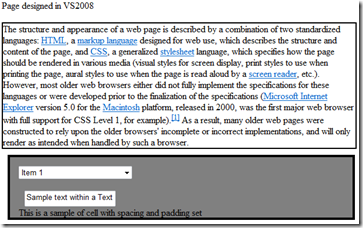
2. Get VS 2008: Visual Studio 2008’s web-designer uses the same set of rules that IE7 uses when displaying web-pages. This means that what you see in VS 2008 is what you see in IE7 (the following screen shot shows the web-page as displayed by VS 2008’s web-designer before any fixes were applied).

image

Because the designer shows the page with all its problems, it becomes extremely easy to fix the page’s issues.

Web-page in VS2008 after fixes have been applied. Fixed web-page in IE7
image image

Notes: VS 2008’s web-designer does not know what quirks mode is, so even if you use the comment before DOCTYPE tag trick, the page will be displayed in the designer as though it were in standards mode. Also, I found that the web-designer seems to treat the height property on some elements (such as drop down lists) as though it were the min-height property for that element. These elements will appear correctly in the web-designer, but will look wrong in IE7.

The following JavaScript can be used to determine if a page is being displayed in Quirks mode or Standards mode.

javascript:m=(document.compatMode=='CSS1Compat')?'Standards':'Quirks';window.alert('You%20are%20in%20'%20+%20m%20+%20'%20mode.');

Or, just drag the following link/bookmarklet on to your links toolbar or save it to your bookmarks Q or S Mode. Clicking it will display whether the page is being displayed in quirks mode or standards mode.

Final Note: This problem should make it clear how important it is to use CSS for the formatting of the pages in your web-site. This is because, if you used CSS, then it would become extremely easy to fix the problems by fixing the CSS in one central place (your CSS file). If you did not use CSS, then you will have to fix each page individually. Furthermore, if you used an external CSS file, it will make it easy for you to use hacks to make your page display correctly across different web-browsers.

References:

IE8, standards compliance and interoperability: http://blogs.msdn.com/ie/archive/2008/03/03/microsoft-s-interoperability-principles-and-ie8.aspx

IE7 and standards compliance: http://blogs.msdn.com/cwilso/archive/2006/08/10/694584.aspx

List of IE CSS bugs: http://www.positioniseverything.net/explorer.html

A fix for the IE6 height bug: http://www.webmasterworld.com/css/3128123.htm

Saturday, January 03, 2009

When a Phillips is not a Phillips!

image

Ever wondered why there are so many different types of screws? 1

Each screw type tries to solve a certain type of engineering problem; for example the star screw (commonly called phillips screw) is made so that one cannot over tighten the screw (this is based on the principle of cam-out, where when excess torque is applied the screw driver pops out of the screw). Intrigued? Instructables has an excellent post that describes 28 different types of screws and their disadvantages and advantages.


When a Phillips is not a Phillips! - More DIY How To Projects

An interesting screw type is the modified phillips tamer-proof screw, which uses a pin in the middle of the screw, to make it impossible to unscrew the screw, unless one has a matching screw driver with a hole to match the pin the screw’s head.

image

Wednesday, December 31, 2008

Crystal Reports Basic 2008 Runtime Installer

Need the Crystal Reports Basic 2008 run-time installer? Find it in the following folder on the development machine.

C:\Program Files\Microsoft SDKs\Windows\v6.0A\Bootstrapper\Packages\CrystalReports10_5

More Info: http://msdn.microsoft.com/en-us/library/ms225231.aspx

Copy and run the installer on the machines where you plan on deploying your application.

Crystal Reports Basic 2008 is the version of CR that is bundled with Visual Studio 2008.

important note: The correct method of deploying CR 2008 Basic is to create your installer correctly. If done correctly VS will include all the dependencies required by your application, including the CR dlls. This is typically done by including the CR merge module installer.

Read more at http://msdn.microsoft.com/en-us/library/ms227351.aspx

Note 2: The runtime installer for Crystal Reports for Visual Studio 2005 can be found at

C:\Program Files\Microsoft Visual Studio 8\SDK\v2.0\BootStrapper\Packages\CrystalReports

More Links….

https://www.sdn.sap.com/irj/sdn/go/portal/prtroot/docs/library/uuid/40c0aa01-5a64-2b10-11a8-eef191b91316