Viddler.com - WIFI Antenna Hack!
Here is an interesting video that shows you how to quickly hack your WiFi antenna so as to make it into one of those expensive WiFi extender antenna that BestBuy sells for 20 bucks or more.

Viddler.com - WIFI Antenna Hack!
Here is an interesting video that shows you how to quickly hack your WiFi antenna so as to make it into one of those expensive WiFi extender antenna that BestBuy sells for 20 bucks or more.
I recently purchased a laptop which came with Windows Vista Home Premium. The server in my home is a Windows XP machine running a Epson Stylus CX4800 printer (which is connected to the server via a USB cable). There are two other XP machines that connect to that machine and installing the printer on those machines involved just browsing the network neighborhood, drilling down to the server and dragging the printer on to those machines.
Unfortunately, installing the printer onto my new Vista machine wasn't as straight forward.
Keep in mind that what I had to do was for an Epson Stylus CX4800 machine, but the solution should work on any network where you are able to browse to server that hosts the printer and you are able to see the printer in the network.
Here are the steps.
I am not sure why installing the printer in the traditional manner does not work and after almost a day of trying various steps - I stumbled upon some tips that pointed me in this direction and it works great. So I am not complaining no more.
Have you ever got the "This implementation is not part of the Windows Platform FIPS validated cryptographic algorithms." exception while trying to use some of the classes in the "System.Security.Cryptography" namespace?
The exception normally thrown is a "TargetInvocationException" exception and the message that accompanies it is usually the unhelpful "Exception has been thrown by the target of an invocation". It is only when you drill down into the InnerException that you see the "This implementation is not part of the Windows Platform FIPS validated cryptographic algorithms." message. The reason that this exception is thrown is that you have tried to use a cryptographic algorithm that is not FIPS compliant.
What is FIPS compliance? FIPS stands for Federal Information Processing Standards. (link to more information) and are US Government standards that provide a benchmark for implementing cryptographic software.
WindowsXP and later operating systems have both FIPS compliant and non-compliant algorithms that can be used by developers. FIPS compliant algorithms are those that have been validated by the FIPS 140 program. One can call both the compliant and non-compliant algorithms as the check for FIPS compliance is by default turned off.
How do you turn on and off FIPS compliance checking:
Two methods:
1. Go to Control Panel -> Administrative Tools -> Local Security Policy
Enable the setting for "System cryptography: Use FIPS compliant algorithms for encryption, hashing, and signing"
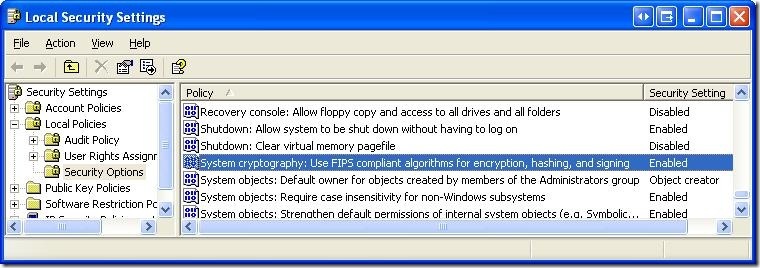
2. Another method is to directly edit the registry by setting the following value to 0 (disable) or 1 (enable)
HKLM\System\CurrentControlSet\Control\Lsa\FIPSAlgorithmPolicy
Alternatively you can copy the following lines into a registry script file (.reg) and run it.
Windows Registry Editor Version 5.00
[HKEY_LOCAL_MACHINE\SYSTEM\CurrentControlSet\Control\Lsa]
"fipsalgorithmpolicy"=dword:00000001
Note: One thing that I am not certain off is that this option might be available only on Windows XP Professional OSs and not in the basic Windows XP OS. I havent been able to confirm this via documentation - but the option is not available on my home machine (Windows XP), but is available on my work machine (Windows XP Pro).
For Developers:
So what does this mean for developers? If you ever envision your software running on a government computer (especially in the US), you should turn on FIPS compliance checking. This way, your application that uses cryptography algorithms provided by the OS will work on all machines and you wont have to deal with the "Exception has been thrown by the target of an invocation".
For .NET Developers:
FIPS compliance checking (if turned on in the local security policy) I think was introduced starting in version 2.0 of .NET. Unfortunately, the MSDN documentation on FIPS compliance is pretty skimpy and there is no list of the algorithms in the "System.Security.Cryptography" namespace that are FIPS compliant. (Also there is no property that can be checked or an interface or base class that FIPS compliant algorithms implement - which would allow for runtime checking - hint, hint MS).
So here is a quick list that I obtained by using reflection (C# code is below)
FIPS compliant Algorithms:
Hash algorithms
HMACSHA1
MACTripleDES
SHA1CryptoServiceProvider
Symmetric algorithms (use the same key for encryption and decryption)
DESCryptoServiceProvider
TripleDESCryptoServiceProvider
Asymmetric algorithms (use a public key for encryption and a private key for decryption)
DSACryptoServiceProvider
RSACryptoServiceProvider
Algorithms that are not FIPS compliant
HMACMD5
HMACRIPEMD160
HMACSHA256
HMACSHA384
HMACSHA512
MD5CryptoServiceProvider
RC2CryptoServiceProvider
RijndaelManaged
RIPEMD160Managed
SHA1Managed
Useful Links:
Code:
Here is some quick C# code to help you test for FIPS compliance:
Remember to enable FIPS compliance using one of the methods suggested above before running this code, otherwise all the algorithms will come up as being FIPS compliant.
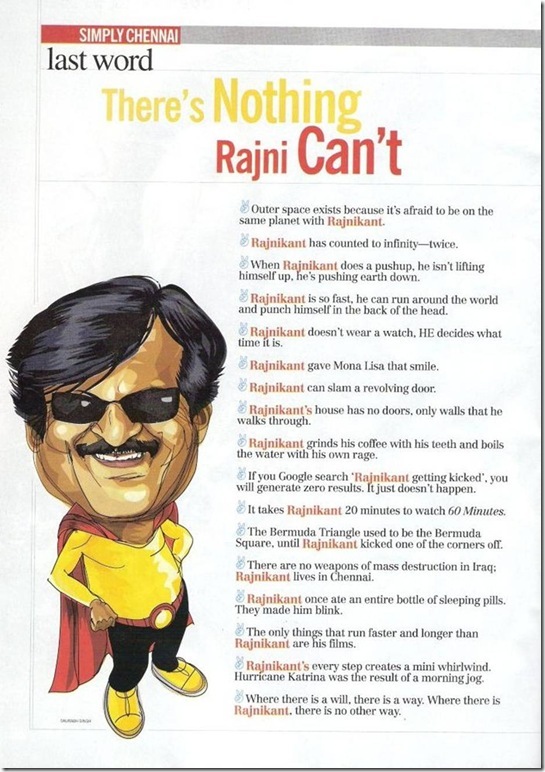
I received this pic in my email today - and thought I should share it:
They are jokes that are very similar to the ones that float around about Chuck Norris here in America (actually many are copies), but nevertheless they are definitely funny.
And here is the link to Chuck Norris' jokes - http://www.chucknorrisfacts.com/
The one I love best : There is no theory of evolution. Just a list of creatures Chuck Norris has allowed to live.
Obviously it goes without saying Rajnikanth is the Indian equivalent of Chuck Norris (actually he is more like Chuck Norris, Arnold Schwarchenegger, Jackie Chan, Steven Segal and Michael Jackson all rolled into one).
MapQuest.com Beta Launches! - MapQuest Blog

Last week (Oct 12), MapQuest announced the release of the beta version of their mapping website. Before the days of Google Maps, my primary mapping website was MapQuest. Somewhere along the way I moved over to MSN Maps (I liked their interface better). These were the days of static maps and moving around required a refresh of the entire page.
Then Web2.0 came along and so did Google Maps.... Google Maps became much primary mapping software. They continuously updated their maps, imagery and the way in which their interface worked. I loved it. And then they added Google Earth and that sealed the deal.
Microsoft has money and managed to throw tons of it at its mapping group and the website that they came out with was nice. Slowly they caught up and in many ways they surpassed Google Maps (search results, 3D in the same window as their 2D mapping interface - ingenious and being more open to developers - GoogleEarth is not yet open to devs). Even their imagery for locations that I constantly lookup is more up to date. Though I love sketch up and still use GoogleEarth for hardcore 3D viewing of maps. All that is for another post!
MapQuest during all of this seemed to be falling behind. It was a shame because in my opinion they were the trail-blazers to web based mapping, getting directions, etc. (Even today a lot of older folk tell me to MapQuest the directions to their homes). So I am glad that they have released this new version.
But I wonder:
As for the interface:
This is just a beta version at this time. I am sure that in the coming weeks we will hear more about the changes that they are going to be incorporating in their site.
And in my opinion it is to early to write off MapQuest's come back. Because remember that the primary reasons that we use online maps are for directions and finding businesses. Directions are more or less standard (though walking directions would be a big plus for them). Relevant search results is extremely important and could decide if they can still be a relevant player in this marker (remember I moved from Microsoft Maps to Google Maps and then back to Live Maps primarily because of the search results that I was getting back).
In a final note -
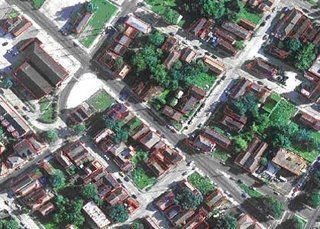
At the highest zoom level, MapQuest had very good orthographic imagery for Denver. Though this imagery was available only at the very highest zoom level only. (See images below).
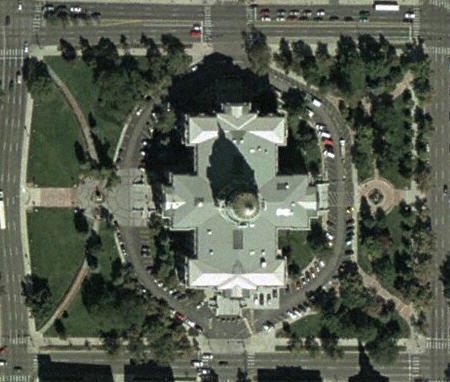 Zoom Level 15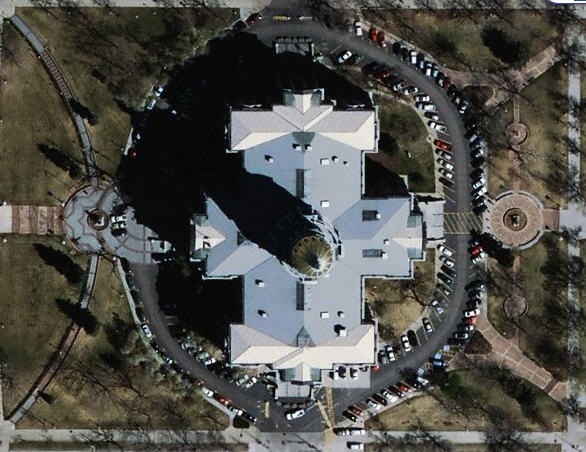
Zoom Level 16
For those of you who do not know this already - Feature Analyst is not only available for ESRI's ArcGIS platform but also for ERDAS Imagine. (In addition Feature Analyst also work in BAE's SocetSet, RemoteView and GeoMedia).
All of this is possible due to the innovative Feature Analyst 4.x API that Feature Analyst and LIDAR Analyst are built upon. It allows you to code once and be able to deploy your GIS tools across all the platforms that the FA 4.x API supports (right now the list is ESRI's ArcGIS, BAE's SocetSet, Intergraph's GeoMedia and RemoteView from Overwatch - our parent company). The FA 4.x API is written using the .NET framework from Microsoft - so it allows you to rapidly write plugins in C#, Managed C++ and VB. You can also leverage native C++.
Here is a recent post on Feature Analyst for Imagine: Geospatial Imaging: "Trend": Detection of form at Leica Geosystems .... (translated via Google from French - original link)
Mio Plans Black Friday Block Party For GPS - 10/10/2007 9:38:00 AM - TWICE

I bought my first GPS unit a Mio c310x during last years black Friday and needless to say that I have been extremely happy with my unit. It has been dependable and pretty accurate. Granted we had trouble with the old maps that came on the device and the support for the map update provided in July of this year was pretty bad. But the unit itself is good and there is tons of information on hacking/upgrading the software online.
This year too it looks like MIO plans on new black Friday offers on their lower end units.
Here are the interesting parts from the Twice article:
 Textron Buying United Industrial - Forbes.com
Textron announced today that it plans on acquiring United Industrial (nyse: UIC) for about $1 billion. AAI Corp. a unit of UIC, based in Hunt Valley, Md., makes aerospace and defense systems including unmanned aircraft and ground control stations and counter-sniper devices.
Price of Textron stock at the start of the day was $63.46. UIC's stock price jumped by almost $4.00 from Friday's close to $80.25 at today's start of trading.
More information from : MarketWatch and SmartMoney
UAV videos from AAI Corp: http://www.aaicorp.com/New/UAS/html/video_gallery.html
