Tuesday, December 08, 2009

More climate data – global annual temperature variations since 1880

This time I decided to look at the range between the maximum and minimum temperatures annually. The data again is from the Goddard Institute for Space Studies (GISS). (Global-mean monthly, annual and seasonal dTs based on met.station data, 1880-present, updated through most recent month)

What I thought I would see is a range that grew since 1880. But instead what I observed was that the range grew smaller. But what was even more surprising is that both the maximum temperature and the minimum temperature trendlines were both sloping upwards. This meant that not only were the summer months getting warmer, but so were the winter months!

http://spreadsheets.google.com/pub?key=t1-Xl4C6zccrFEDvd5aBMsg&output=html

global temperature variations since 1880 
TMax – trendline for maximum temperature, TMin – trendline for minimum temperature, TRange – trendline for range

I havent seen this analysis before, so if you happen by this post, I would be interested in your thoughts.

Monday, December 07, 2009

Climate Facts – 10 warmest years

Based on data from the Goddard Institute for Space Studies (GISS), the 10 warmest years on record occurred in the last 11 years.

Here is a Google Spreadsheet with the data from GISS:

http://spreadsheets.google.com/pub?key=tiOjptDEMMFEh1JlYEzXWyA&single=true&gid=2&output=html

Read more:
http://data.giss.nasa.gov/gistemp/graphs/

Date downloaded from: http://data.giss.nasa.gov/gistemp/graphs/Fig.A2.txt

URI vs URL – whats the difference?

First off – URL is deprecated terminology. You are better of using URI where ever you used to use URL.

Here is why:
URI – Uniform Resource Identifier
URL – Uniform Resource Locator
*notice: its not universal as many end up calling it – it is uniform.

The URI allows for the identification of resources using the identifier. The following are all examples of URIs:
ftp://ftp.sample.com/samplefiles/readme.txt
http://www.sample.com/samplefiles/readme.html
http://www.sample.com/samplefiles/readme.txt
https://www.sample.com/samplefiles/readme.html
mailto:jane.doe@sample.com

Even the scheme “tel:+1-800-800-8000” is considered a URI. In the early days (!), a URI was either a URN or a URL (i.e, the URI either referred to the the name without the location or the location of a resource). The term URL is now considered to be a URI that identifies a resource via its access mechanism (http, ftp, etc). Here the http, ftp, etc in the URL address are known as URI schemes (and define the syntax that is legal in the URI). So just remember, basically the URL is a subset of URI. (i.e., all URLs are URIs).

So, instead of worrying about the difference, just use the TLA URI instead of URL from now on.

reference:
Uniform Resource Identifier: Generic Syntax: http://labs.apache.org/webarch/uri/rfc/rfc3986.html
Uniform Resource Identifiers (URIs), URLs, and Uniform Resource Names(URNs): Clarifications and Recommendations: http://www.ietf.org/rfc/rfc3305.txt

Sunday, December 06, 2009

Ad Music – Annie Little – Fly Me Away – Amazon Kindle

The Amazon Kindle Ad

The song Fly Me Away is available as a free download from Amazon.

Lyrics
Silver Moons and paper chains,
Faded maps and shiny things.
You're my favorite one-man show.
A million different ways to go.
Will you fly me away?
Take me away with you,
My love.
Painted scenes, I'm up all night.
Slaying monsters, flying kites.
Speak to me in foreign tongues.
Share your secrets one by one.
Will you fly me away?
Take me away with you,
My love.
Now I cant think what life was like
Before I had you by my side.
Cant say what I'd do without you,
Knowing what its like to have you.
Hidden walk ways back in time.
Endless stories, lovers cry.
In my mind I've been set free.
Will you take this Journey
You and Me?
Will you Fly me away?
Take me away with you,
My love.
Fly me away with you,
My Love.
Take me away with you,
My Love.

Saturday, December 05, 2009

Using Google DSN on your Apple Mac

Google Public DNS is a free, global Domain Name System (DNS) resolution service, that you can use as an alternative to your current DNS provider.

Why do you need a DNS service?

You might not realize it, but you already use a DNS service, typically this is automatically setup for you by your ISP and so you dont have to do anything special to get it working. The DNS service is what allows you to type a named address (such as www.google.com) in your web-browser and get to the website. The DNS service resolves the name to the actual address of the server where the website is located.

So why use Google’s DNS service?

Its provided by Google – good enough for me.

Other reasons:
Google has its DNS servers located all over the globe and they use intelligent algorithms to use the closest one to your computer. This means faster browsing of the web.
Also, Google has a public privacy policy and so you know exactly what they are doing with the data they capture while you use their DNS service. I have no idea how my ISP uses the information it collects while I use their DNS service. (Google stores your IP address for 24 hours, and no other identifying information is stored for longer than that. Read more at http://code.google.com/speed/public-dns/faq.html#privacy)

Alternatives: There is OpenDNS (http://www.opendns.com), but that is not Google!

How to use it:

You need to configure your TCP/IP settings to use the following DNS servers: 8.8.8.8 and 8.8.4.4

Configuring your Mac to use Google DSN.

1. I use a WiFi network to get to the Internet from my Mac. So click on the Wireless icon (2nd from right)
Screen shot 2009-12-05 at 5.06.35 AM 
2. Select “Open Network Preferences”.
Screen shot 2009-12-05 at 5.07.12 AM
3. Click on AirPort and then “Advanced…”Screen shot 2009-12-05 at 5.07.26 AM
4. Click on DNS and enter the numbers “8.8.8.8” and “8.8.4.4”

Screen shot 2009-12-05 at 5.07.41 AM

And you are done. Close the dialog and fire up your browser. Browse to your home-page or my web-page (http://raj.aggregatedIntelligence.com/) and if it shows up – you are good to go.

Monday, November 30, 2009

Path from where a user control was loaded (ASCX)

Here is the code to retreive the path from where a user control (ASCX) was loaded.

protected string GetLoadDirectory()
{
    string controlPath = this.ResolveUrl(this.AppRelativeVirtualPath);
    if (string.IsNullOrEmpty(controlPath) == false)
    {
        int indexOfLastSlash = controlPath.LastIndexOf("/");
        controlPath = controlPath.Substring(0, indexOfLastSlash + 1);
    }
    return controlPath;
}

CSS box model

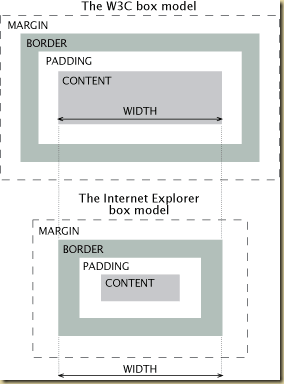
Two useful graphics that I found in my trolling about the box-model used in CSS

clip_image001

clip_image002

Thursday, November 19, 2009

Do math in your head

A nice little wiki with some short-cuts on how to perform some simple math calculations mentally.

howto.Wired.com

http://howto.wired.com/wiki/Do_Speedy_Math_in_Your_Head

Leaving yourself a message on Google Voice

Why? Well because you could leave a note to self and it will be automatically transcribed and available in your mailbox for searching, archiving, forwarding, etc.

Whats the problem now? When you call your Google Voice number from a registered cell number – you are automatically taken to the administrator's voice prompts menu. No way to leave yourself a message by default.

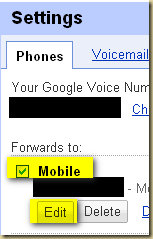
Workaround: Simple really. Go to Google Voice settings. Click on the Phones Tab. Click Edit on the cell phone number you use to forward calls to when your Google Voice number is called.

image

Click on “Show Advanced Settings” 

image

Set Voicemail Access to “No”. (by default this is set to Yes for mobile phones).

image

Now when you call your cell – you will be presented the same greeting that all callers are presented. You can leave a message to yourself. And if you want to access the administration menu – just press the * button. (This doesnt bother me too much – because I mainly use the website to access my voice mails).

Extra tip

You can also create a contact for yourself and setup the contact information so that when you call from that phone, you will be directly forwarded to your voicemail. I think this makes it a lot more quicker to get to the point where you can leave yourself a message (fewer rings).

Steps:

Click on contacts in the left bar. (If you dont have one for yourself, create it)
Select the contact.
Click on Edit Google Voice Settings
Under the heading “When this contact calls you:” click Edit.
Select the option “Send to Voicemail”

Free LIDAR training from ESRI

ESRI is offering its online LIDAR training for ArcGIS for free. Check it out at - http://training.esri.com/acb2000/showdetl.cfm?DID=6&Product_ID=945

The overview on page states:

This seminar introduces lidar in general, discusses how to manage lidar data using ArcGIS, and also addresses the needs of those who would like to know the benefits of using lidar data in ArcGIS.

Lidar datasets are massive and contain three-dimensional spatial information about features such as buildings, trees, power lines, etc. Lidar datasets are raw point cloud formats that are not easily interpreted. ArcGIS Spatial Analyst and ArcGIS 3D Analyst provide the functionality and tools you need to represent and extract feature information from lidar data.

The presenter will discuss:

  • Introduction to lidar
  • Understanding and interpreting lidar data using ArcGIS
  • Lidar applications and derived products using ArcGIS