Thursday, April 19, 2012

Dynamics CRM–Add new from sub grid causes Insufficient Permissions error

If you get the “Insufficient Permissions” error when clicking on “Add New” from within a sub-grid of an entity (eg: you are in the form for an Account entity, and you click on Opportunity node and try and create a new opportunity), then you probably are missing read permissions on the “Attribute Map”.
Note: If you turn on tracing, you will see the error: “Error Details: Principal user (Id=GUID, type=8) is missing prvReadAttributeMap privilege”.

To get around this issue, you need to check the “Security Role” that that person is in and make sure that under the “Customization” tab, the “Attribute Map” entity has at least “Read” access.

image

Wednesday, April 18, 2012

CRM tracing

CRM tracing can be enabled via the registry. Here is the script:

Windows Registry Editor Version 5.00

[HKEY_LOCAL_MACHINE\SOFTWARE\Microsoft\MSCRM]
"TraceEnabled"=dword:00000001
"TraceRefresh"=dword:00000001

Copy the above code into a text file and rename the file to “.reg”. Run the file and tracing will be enabled.

The trace files are written to the folder: “C:\Program Files\Microsoft Dynamics CRM\Trace”.

To disable tracing use the following code:

Windows Registry Editor Version 5.00

[HKEY_LOCAL_MACHINE\SOFTWARE\Microsoft\MSCRM]
"TraceEnabled"=dword:00000000
"TraceRefresh"=dword:00000000

You should be able to enable disable tracing through the use of Powershell scripts, but I could never get it working. Here is the code I wrote (that doesn’t seem to work):

Add-PSSnapin Microsoft.Crm.PowerShell

$input = Read-Host "Enable/Disable tracing (e/d)";

Write-Host "Running....";

if ($input.ToUpper() -eq "E")
{
    $setting = Get-CrmSetting TraceSettings
    $setting.Enabled="True";
    $setting.Categories="*:Verbose";
    Set-CrmSetting $setting;
    Write-Host "Trace folder: c:\Program Files\Microsoft Dynamics CRM\Trace"
}
elseif ($input.ToUpper() -eq "D")
{
    $setting = Get-CrmSetting TraceSettings
    $setting.Enabled="False";
    Set-CrmSetting $setting;
}
Write-Host "Tracesettings: ";
Get-CrmSetting TraceSettings;

Read-Host "Press any key to continue....";

Tuesday, April 17, 2012

DPM 2012–Powershell scripts

To run DPM 2012 powershell scripts from machines other than the DPM server, you need to install the DPM Remote Administration component:

image

And for the scripts to run, you need to import the DPM powershell module using the following script:

$installPath = (Get-ItemProperty "HKLM:\SOFTWARE\Microsoft\Microsoft Data Protection Manager\Setup" "UIInstallPath").UIInstallPath
$dpmModuleFullPath = $installPath + "Modules\DataProtectionManager\DataProtectionManager.psd1"
Import-Module $dpmModuleFullPath

Sunday, April 15, 2012

Car seat inspection stations

I was looking for baby car seat inspection stations in Douglas County in Colorado and came across the NHTSA’s Inspection Station Location web-page, which is a very useful resource to find inspection stations across the country.

http://www.nhtsa.gov/cps/cpsfitting/index.cfm

Also, here is the list of the currently rated car-seats by the NHTSA. If you use the link, you can sort/manipulate/duplicate the worksheet directly: https://docs.google.com/spreadsheet/ccc?key=0AjvtUeIvT94wdDFlWThFV3c3RUZsVENtcFVaNkhRenc

Friday, April 13, 2012

CRM 2011 plugin - Attribute ‘xxxx’ cannot be NULL

I was getting the “Attribute ‘xxxx’ cannot be NULL” error while attempting to update a CRM entity. What I was trying to do was to use the Entity object to perform an update and I think that was causing an error as the attribute ‘xxxx’ which was a required attribute did not have a value. But in my case, all I was trying to do was to update one of the attributes of that entity.

The original code that did not work:

Incident incident = new Incident();
incident.IncidentId = incidentGuid;
contact.new_Contact_Incident_Id = incident;

I was able to get my code working by using the EntityReference object. Here is the working code:

EntityReference incidentRef = new EntityReference(Incident.EntityLogicalName, incidentGuid);
contactEntity[“new_contact_incident_id”] = incidentRef;
PluginContext.OrganizationService.Update(contactEntity);

Tools list 2012

I got a new computer at work and had to reinstall a bunch of software. Here is the list I made along the way.

General tools

  1. Chrome: http://www.google.com/chrome/
  2. GreenShot (Screen capture tool): http://www.getgreenshot.org/
  3. NotePad++ (replacement for notepad): http://notepad-plus-plus.org/
  4. Windows Live Writer: http://writer.live/com/
  5. Paint.Net (replacement for Paint): http://www.dotpdn.com/downloads/pdn.html
  6. Fences (Desktop management software): http://www.stardock.com/products/fences/
  7. Spotify (music!): http://www.spotify.com
  8. DisplayFusion (multiple monitor enhancements): http://www.displayfusion.com/
  9. TeraCopy (enhanced file copy): http://codesector.com/teracopy
  10. 7-Zip (archive file tool): http://www.7-zip.org/

Developer tools

  1. Visual Studio 2012 (msdn)
  2. NuGet: http://www.nuget.org/
  3. LinqPad: http://www.linqpad.net/
  4. Fiddler: http://www.fiddler2.com/
  5. WinMerge: http://winmerge.org/
  6. SoapUI: http://soapui.org/
  7. WCFStorm: http://www.wcfstorm.com/
  8. PowerGui: http://powergui.org/
  9. Sql Server (msdn)
  10. SqlComplete Express/Free: http://devart.com/dbforge/sql/sqlcomplete
  11. SSMS Tools: http://www.ssmstoolspack.com/download
  12. Balsamiq (Screen mock-ups): http://www.balsamiq.com/
  13. Hypermodel (UML modeling tool – great to visualize XSDs): http://www.xmlmodeling.com/hypermodel
  14. Oracle DataModeler: http://www.oracle.com/technetwork/developer-tools/datamodeler/overview/index.html
  15. Team Foundation Kicks: http://www.attrice.info/cm/tfs/
  16. Team Foundation Power Tools 2011: http://visualstudiogallery.msdn.microsoft.com/c255a1e4-04ba-4f68-8f4e-cd473d6b971f
  17. XML Notepad: http://www.microsoft.com/download/en/details.aspx?id=7973
  18. Expresso Regular Expression development tool: http://www.ultrapico.com/Expresso.htm

SDKs and such:

  1. Microsoft SDK for Windows 7 and .Net 4: http://www.microsoft.com/download/en/details.aspx?id=8279
  2. Silverlight SDK: (4.0): http://www.microsoft.com/download/en/details.aspx?id=7335
  3. Enterprise Library (5.0): http://msdn.microsoft.com/en-us/library/ff632023.aspx
  4. Prism: http://compositewpf.codeplex.com/

System tools:

  1. SysInternals Suite (awesome set of sys tools): http://technet.microsoft.com/en-us/sysinternals/bb842062
  2. Oracle VirtualBox (Virtual PC): https://www.virtualbox.org/
  3. Remote Desktop Connection Manager (manage multiple remote desktop connections): http://www.microsoft.com/download/en/details.aspx?displaylang=en&id=21101
  4. Virtual Clone Drive (mount ISO files): http://www.slysoft.com/en/virtual-clonedrive.html
  5. FileZilla FTP Client: http://filezilla-project.org/
  6. WinDirStat (graphically view disk space usage): http://windirstat.info/

Tuesday, April 10, 2012

CRM 2011–Access is denied error–Javascript

I was using the “MSXML2.XMLHTTP.3.0” activeX object to create connections to the CRM service and the code that I had previously written and tested as working was suddenly failing. The error was occurring on the open method and the exception was “[object Error]”. Looking at the exception.message property, the error was “Access is denied”

After some digging and some providence, I found out that the error would happen only when I hit the URL as “http://www.company.com/…..” but not if I hit the url with “http://company/…..”

Turns out the “Access is Denied” is being thrown because of cross-site scripting restrictions that are imposed on the XmlHttp object.

Here is the original way I was creating the URL:

oDataEndpointUrl = Xrm.Page.context.getServerUrl() + "/XRMServices/2011/OrganizationData.svc

So getServerUrl() was not returning the url correctly formatted based on how users were navigating to the page.

To overcome the issue I used the following code:

oDataEndpointUrl = "/" + Xrm.Page.context.getOrgUniqueName() + "/XRMServices/2011/OrganizationData.svc";

This makes the URL relative and hence I was able to get around the cross-site scripting issue.

Note: another way to get around this issue is if you add the URLS to the same zone in Internet Explorer.

References:

About Native XMLHTTP: http://msdn.microsoft.com/en-us/library/ms537505(v=VS.85).aspx

Saturday, April 07, 2012

Smtp4dev–SMTP server for development

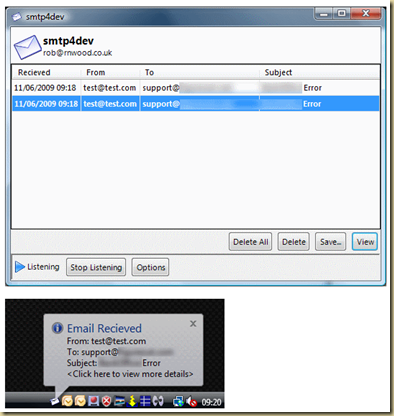
Came across “Smtp4dev” a CodePlex project that runs a local service that acts as an SMTP server. Extremely useful for testing sending of email messages (especially when you don’t have an SMTP server available for such testing).

Check it out at: http://smtp4dev.codeplex.com/

image

Wednesday, April 04, 2012

Sql Server, Transaction Isolation and Entity Framework

Recently I had to work through some deadlock issues that I was getting while using EF.

Here are some things that I found out and is useful information for you to know:

  1. EF by default uses SQL-Server’s default isolation mode, which is Read Committed. Something to know about read-committed reads is that by default it performs the reads using shared locks which will block reads of modified data.(Unless you use the setting READ_COMMITTED_SNAPSHOT and set it to on).
  2. When EF performs a SaveChanges, it implicitly uses a transaction. This by default will be Read Committed.
  3. But, if EF finds an ambient transaction, it will use that transaction.
  4. So you can override the isolation level by using a transaction.
  5. But, remember, by default transactions in .Net use “Serializable” isolation level, which is the MOST restrictive transaction isolation level.
  6. So, its important to use a transaction, that uses an isolation level that makes sense for your operation. Here is an example:
    • using (var transactionScope = new TransactionScope(TransactionScopeOption.Required, new TransactionOptions { IsolationLevel= IsolationLevel.Snapshot }))
      {
              // update some tables using entity framework
              context.SaveChanges();
              transactionScope.Complete();
      }
  7. I am using IsolationLevel.Snapshot in the above transaction to reduce the possibility of deadlocks. The reason for this can be seen in this paragraph from MSDN’s documentation:
    • SNAPSHOT isolation specifies that data read within a transaction will never reflect changes made by other simultaneous transactions. The transaction uses the data row versions that exist when the transaction begins. No locks are placed on the data when it is read, so SNAPSHOT transactions do not block other transactions from writing data. Transactions that write data do not block snapshot transactions from reading data. You need to enable snapshot isolation by setting the ALLOW_SNAPSHOT_ISOLATION database option in order to use it.


MSDN:

ThrowIfMaxHttpCollectionKeysExceeded exception being thrown by an Asp.Net website

One of our Asp.Net websites started throwing an “ThrowIfMaxHttpCollectionKeysExceeded” exception with message that looked like this:

“Operation is not valid due to the current state of the object”

It turns out that in late december (2011), Microsoft put out a patch for a DOS vulnerability. This patch limits many different collections to a value of 1000. (One of them being the number of keys allowed in the HttpCollection).

To fix it, you need to up the limit to a number that’s reasonable for your application, using the following configuration setting:

<configuration>
  <appSettings>
    <add key="aspnet:MaxHttpCollectionKeys" value="1000" />
  </appSettings>
</configuration>

Notes:

Microsoft Security Bulletin MS 11-100: http://technet.microsoft.com/en-us/security/bulletin/ms11-100

An ASP.Net request that has lots of form keys… fails with an exception: http://support.microsoft.com/kb/2661403