Friday, August 01, 2008

Crystal Reports Viewer - Physical Database Not Found

I was assigned to troubleshoot a problem with an old application that had been written in our shop using Visual Basic 6 and Crystal Reports 8.5. The application when installed on brand new machines would crap out with the following generic error message "Physical Database Not Found".

clip_image002 

Well it turns out the problem has nothing to do with the database itself, but with the dependencies that Crystal Reports has on other dlls.image

After a lot of muddling around here is how I got the issue to go away. You need to get your hands on the following dlls:

  • CRAXDRT.dll
  • craxdrt_res_en.dll
  • p2smon.dll (the p2xxx.dlls are the Crystal Reports Physical Database DLL for xxx. p2smon are the physical database dlls for Active Data Reporting)
  • crviewer.dll

And then do the following:

  1. Copy craxdrt.dll and craxdrt_res_en.dll into the Windows\System32 folder
  2. Register craxdrt.dll.
    - at the command prompt type regsvr32 craxdrt.dll
    - verify that you get a dialog that confirms that registration was successful
  3. Drop p2smon.dll and crviewer.dll into the same folder as your application's executable.
  4. Run your application and verify that Crystal Reports viewer shows up.

Other stuff:

The above instructions work with an application that was created using CR 8.5.

If the above instructions dont work then try dropping the following files into the application folder and see if the application begins to work: (These files might be needed by CR to correctly connect to the database. In my case, we were connecting using ADODb and it worked with p2smon. You might need one of the other p2 dlls - the physical database dlls)

p2solap.dll
p2soledb.dll
p2sodbc.dll

into System32 and registering them.

CRAXDDRT.DLL
CRDESIGNERCTRL.DLL

Other dependencies that might be needed are:
IMPLODE.DLLimage
CRPAIG80.DLL
SSCSDK80.DLL
PG32CONV.DLL
COMCAT.DLL
OLEPRO32.DLL
crxf_RTF.DLL
crxf_PDF.DLL
crtslv.dll
exportmodeller.dll
CRXLAT32.DLL

Unfortunately - you will typically need a Crystal Reports installer CD to get most of the files referenced above. If you dont, then look for them on a machine where the application works. It is a shame that SAP (they currently own Business Objects and Crystal Reports), dont provide a way to download these redistributables for their API.

BTW:

If you have dsr files in your VB6 project and you are unable to open them. And the dsr file when opened in NotePad has a reference to a COM object with GUID "BD4B4E61-F7B8-11D0-964D-00A0C9273C2A". And if the referenced object has an attached binary file with extension dsx. Then it most probably was created using Crystal Reports Designer. (To confirm, search for "Crystal Reports ActiveX Designer" in the DSX file).

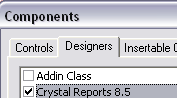
image image

You will need to install Crystal Reports to be able to view or edit these files. A word of advice: If you have Crystal Reports working on your machine, then export these files to .RPT, so that you can open them in a later version of Crystal Reports. These files are becoming less and less used and soon no one will even remember how they are edited or used.

More useless information - the CR designer needs the craxdui.dll. But in my experience just copying this dll and registering it - isnt enough. It obviously has some dependencies that I havent been able to figure out as yet.

Wednesday, July 30, 2008

Searching along routes

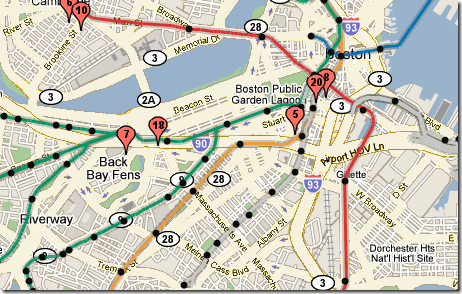
imageHave you ever wished that Google Maps and Virtual Earth would provide search results that were along a route that you have planned? I have! Such a feature would be great when you wish to find a business such a Wal-mart along a route that you are going to take.

Weirdly, both Virtual Earth and Google Earth dont have such a feature. (At least not as of now)

Yahoo! has released as part of its newest framework a feature that allows you to search along a route.

MetroMapr has a mash-up that uses this new feature to return only those businesses that are located along the light rail lines.


Yahoo! documentation - http://developer.yahoo.com/search/local/

Dreaded 'Sys' is undefined error when using ASP.Net AJAX

If you are using ASP.Net AJAX for the first time, no doubt you will come across the 'Sys' is undefined error while working with an AJAX control.

After a lot of scratching my head I figured out what caused it and how to fix it.

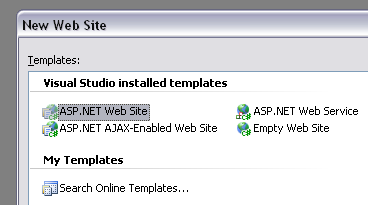
Typically you are going to be hit with this error when you are working with a plain ASP.Net website. (i.e., the project was created by selecting Asp.Net website in the New Project dialog).

image

Instead if you created the project by selecting ASP.Net AJAX-Enabled web site, I dont think you will see this error - as VS will setup your project correctly so that the error will not occur.

Ok - now what do you do if you have an existing project that was created by selecting just the "ASP.Net Web Site" option.

Turns out that all the errors arise from the Web.Config file not having all the correct entries required for you to "AJAXify" the web site.

Here is what you do:

(I am assuming that your project already contains a web.config file)

If you look in the ASP.Net AJAX install folder you will find a sample web.config that shows all the configuration items that you need to setup. (This is typically the folder - C:\Program Files\Microsoft ASP.NET\ASP.NET 2.0 AJAX Extensions\currentVersion)

Under <configuration><configSections> add the following text.

<sectionGroup name="system.web.extensions" type="System.Web.Configuration.SystemWebExtensionsSectionGroup, System.Web.Extensions, Version=1.0.61025.0, Culture=neutral, PublicKeyToken=31bf3856ad364e35">
      <sectionGroup name="scripting" type="System.Web.Configuration.ScriptingSectionGroup, System.Web.Extensions, Version=1.0.61025.0, Culture=neutral, PublicKeyToken=31bf3856ad364e35">
          <section name="scriptResourceHandler" type="System.Web.Configuration.ScriptingScriptResourceHandlerSection, System.Web.Extensions, Version=1.0.61025.0, Culture=neutral, PublicKeyToken=31bf3856ad364e35" requirePermission="false" allowDefinition="MachineToApplication"/>
        <sectionGroup name="webServices" type="System.Web.Configuration.ScriptingWebServicesSectionGroup, System.Web.Extensions, Version=1.0.61025.0, Culture=neutral, PublicKeyToken=31bf3856ad364e35">
          <section name="jsonSerialization" type="System.Web.Configuration.ScriptingJsonSerializationSection, System.Web.Extensions, Version=1.0.61025.0, Culture=neutral, PublicKeyToken=31bf3856ad364e35" requirePermission="false" allowDefinition="Everywhere" />
          <section name="profileService" type="System.Web.Configuration.ScriptingProfileServiceSection, System.Web.Extensions, Version=1.0.61025.0, Culture=neutral, PublicKeyToken=31bf3856ad364e35" requirePermission="false" allowDefinition="MachineToApplication" />
          <section name="authenticationService" type="System.Web.Configuration.ScriptingAuthenticationServiceSection, System.Web.Extensions, Version=1.0.61025.0, Culture=neutral, PublicKeyToken=31bf3856ad364e35" requirePermission="false" allowDefinition="MachineToApplication" />
        </sectionGroup>
      </sectionGroup>

</sectionGroup>

Next under <system.web> add the following text

<pages>
      <controls>
        <add tagPrefix="asp" namespace="System.Web.UI" assembly="System.Web.Extensions, Version=1.0.61025.0, Culture=neutral, PublicKeyToken=31bf3856ad364e35"/>
      </controls>
</pages>

Also under <system.web> make sure that you have the following entry (which goes under <system.web><compilation><assemblies>:

<add assembly="System.Web.Extensions, Version=1.0.61025.0, Culture=neutral, PublicKeyToken=31bf3856ad364e35"/>

Also make sure that <system.web> has the following entries for httpHandlers and httpModules

<httpHandlers>
      <remove verb="*" path="*.asmx"/>
      <add verb="*" path="*.asmx" validate="false" type="System.Web.Script.Services.ScriptHandlerFactory, System.Web.Extensions, Version=1.0.61025.0, Culture=neutral, PublicKeyToken=31bf3856ad364e35"/>
      <add verb="*" path="*_AppService.axd" validate="false" type="System.Web.Script.Services.ScriptHandlerFactory, System.Web.Extensions, Version=1.0.61025.0, Culture=neutral, PublicKeyToken=31bf3856ad364e35"/>
      <add verb="GET,HEAD" path="ScriptResource.axd" type="System.Web.Handlers.ScriptResourceHandler, System.Web.Extensions, Version=1.0.61025.0, Culture=neutral, PublicKeyToken=31bf3856ad364e35" validate="false"/>
    </httpHandlers>

    <httpModules>
      <add name="ScriptModule" type="System.Web.Handlers.ScriptModule, System.Web.Extensions, Version=1.0.61025.0, Culture=neutral, PublicKeyToken=31bf3856ad364e35"/>
    </httpModules>

And that should be it. You should be in business and your web site should be AJAXed.

Final word, after googling this error - I found that there might be many different reasons for this error. This one is the most rudimentary and worth testing out first, before going down a more in-depth path in trying to determine the source of this issue.

Here is an excellent blog post that goes into the depths about this error - http://weblogs.asp.net/chrisri/archive/2007/02/02/demystifying-sys-is-undefined.aspx

Sunday, July 27, 2008

trueSpace for Virtual Earth 3D Development

trueSpace, which has been around for 23 years is a 3D modeling tool developed by Caligari. Last year Caligari was acquired by Microsoft, and last week they released trueSpace as a free product. trueSpace is similar to SketchUp, in that, SketchUp is used to create building models for GoogleEarth and Microsoft intends users to use trueSpace to create models for Virtual Earth. trueSpace seems to be more similar to tools such as Maya then to SketchUp, which kinda intimidates me. Traditionally 3D tools have a very steep learning curve. Where-as SketchUp had extremely intuitive and easy to learn tools that made it a breeze to build models. (But it is this simplicity that also makes its feature set a lot more limited when compared to trueSpace).

Read Announcing trueSpace for Virtual Earth 3D Development, to see what features of trueSpace make it a great tool for creating models for Virtual Earth. Also check out the very cool video in that blog post, which show cases what is possible using trueSpace.

My only gripe with the tool at this point is that it does not support the Collada file format. Because if it did, then it would mean that you could create models that could be used in Google Earth, as well as import models from GoogleEarth for editing in trueSpace.

Overwatch to Host Free Software Training At ESRI User Conference

imageOverwatch Geospatial Systems, an operating unit of Textron Systems, a Textron Inc. (NYSE: TXT) company, will provide free geospatial data production training for “Building 3-D City Models from Imagery and LIDAR.” The training is scheduled for Friday, August 8, 2008 at San Diego State University and space is limited to the first 20 registered attendees.

The training will develop feature extraction skills to build, analyze and publish a 3D city model from satellite imagery and airborne LIDAR data using the Feature Analyst®, LIDAR Analyst® and Urban Analyst™ software.  Seats are limited, and registration is needed prior to attendance.  Those who would like more information can email Marilyn Lee at mlee@overwatch.textron.com.

Overwatch Geospatial Systems will also host a user group meeting on Wednesday, August 6, 2008 from 1:00 to 2:30 p.m. in room 23 C of the San Diego Convention Center.  The meeting will showcase feature extraction projects using the Feature Analyst, LIDAR Analyst and Urban Analyst software as well as preview new tools planned of the 5.0 release.  Attendees are welcome to bring questions and provide input during the session.

http://vls-inc.com/topics/news.htm

Ignore your assets and they could disappear.

FYI! - From a recent ING Direct mailing.

So you've put some money away. And you're just letting it sit there and grow. Or maybe you've stashed away some valuables in a safe deposit box. If you haven't touched either in three to five years, you may never touch them again. It's all because of state laws - called escheatment or unclaimed property laws - that require banks and brokerages to turn over unclaimed property, including un-cashed payroll checks, stock, bank deposits and more, to the State. Property is classified as "unclaimed" when a Customer doesn't contact the bank where his/her money is held over an extended period of time and there has been no activity.

The State government is then supposed to identify and contact the rightful owners, and reunite them with their property; however, each State has a "who's who" list of people who "couldn't be found" and whose property has been seized. For more info, visit ingdirect.com/unclaimedproperty.

Thursday, July 24, 2008

LASIK - results so far

If you have been reading my blog, you by now know that I have had LASIK surgery done on both my eyes (my LASIK posts).

Its been a really long while since I last posted about my post surgery results - almost four months. Right after my surgery I was having dry eyes and it was reducing. But over the last 3 months - I have had chronic dry eyes and my eye-sight hadn't yet reached 20/20. After waiting for 3 months to pass after my LASIK surgery, the doctor decided to put in some "Punctal" plugs - which block the lower eye lid tear ducts. This was in the hope of reducing the dry eyes that I was experiencing.

Your eye doctor can insert punctal plugs into your tear ducts, to keep eye moisture from draining too fast.

SNAG-0001

I have had the punctal plugs in my eyes for about 2 weeks now. The dry eyes are still there, but my eye-sight is improving.... (in my last check up - I had gotten close to 20/15).

At this point this is what I can recommend to you:

If you are following my LASIK experience to decide if you should also get LASIK done - then wait a little while longer - to see if my dry eyes syndrome gets any better. I work for 8 to 10 hours a day on the computer and on some days when the dry eyes are bad, I really wish that I hadn't gotten the surgery done.

At this point - I am hoping that with time the dry eyes will get better and my eyes will stabilize at 20/20. Until then I will be praying and hoping and waiting.

As shown here, dry eyes can become red and irritated.The biggest take away for you - would be, these posts are my experiences with LASIK. Yours might be vastly different depending on your eyes and possibly the LASIK machine that you use (I used ICON LASIK, which uses NIDEK machines and I wonder sometimes, if I had used VISX customVue, if my results would have been different).
At the end - LASIK is a surgery, an irreversible one and comes with risks that you have to weigh before undertaking the surgery.


Wednesday, July 23, 2008

Getting started with MS SQLServer Express - The first thing to do

Update: Rick pointed out to me that there is a better version of SQL Server Express that you can install, which comes with SSMSE and some other advanced tools and services. Check it out at Microsoft SQL Server 2005 Express Edition with Advanced Services (SP2).

Also, I found "SQL Server Migration Assistant for Access", which makes it extremely easy to port your existing Access databases into SQL Server 2005. (More migration tools available at http://www.microsoft.com/downloads/results.aspx?pocId=&freetext=SQL%20Server%20migration&DisplayLang=en#).

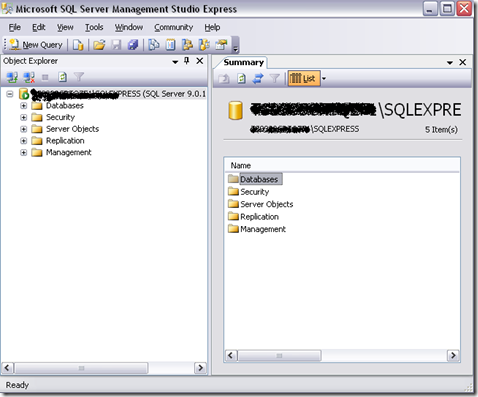
In my opinion the first thing one should do after installing SQLServer Express is to go and download and install "Microsoft SQL Server Management Studio Express".

SQLServer Express does not come with any tools that allow you to work with the database directly. The only method of interacting with the system is using the command line tools OSQL and SQLCmd. But for some reason I just could not get anything done using these 2 command line tools. Finally I found "SSMSE" a great little visual tool - that allows you to connect and interact with the database engine.

Finally I can get some testing done! Not sure why Microsoft does not include it with their SQLExpress install.

image

And if you are having connectivity issues - then check out this post - which has tons of useful information to debug that sort of a problem.
http://blogs.msdn.com/sql_protocols/archive/2005/10/22/sql-server-2005-connectivity-issue-troubleshoot-part-i.aspx

Tuesday, July 22, 2008

Using the Stopwatch Class for performing timing

images Previously I used to use the DateTime structure to determine elapsed time, especially for performance timing. DateTime is extremely easy to use but cannot be used to measure small spans of time.

With .NET 2.0, MS released the Stopwatch class. The main reason that this class is superior for performing really small measurements of elapsed time is that the Stopwatch class will use the hardware's high resolution performance counters if one is available. In addition the Stopwatch class counts the ticks that have elapsed, instead of the actual time. If a high resolution counter is not available - then the class will default to using the system's timer.


Here is how you can use it:

   1:  long ticks, totalTime;
2: long timeInMicroSeconds = 1000000L;
3: long timeInNanoSeconds = 1000000000L;
4: Stopwatch sw = new Stopwatch();
5: long freq = Stopwatch.Frequency;
6: sw.Start();
7:  
8: //////////////////////////////
9: //Code that needs to be timed
  10:              //////////////////////////////
11:  
12: sw.Stop();
13: ticks = sw.ElapsedTicks;
14: totalTime = timeInMicroSeconds * ticks/freq ; // use timeInNanoSeconds, if you want the elapsed time in Nano seconds

Read more at MSDN - Stopwatch Class (System.Diagnostics)

Some stuff that you did not know about Strings in .NET

  1. Did you know that all literal strings (string values known at compile time)  that have the same values will point at the same location.
    1. The reason for this is a .NET optimization called Intern Tables
  2. All strings created at run-time will be stored at separate memory addresses.
  3. Strings created at run-time can be interned too.
    1. var s1 = String.Format("{0} {1}", "Hello", "World");
    2. var s2 = String.Format("{0} {1}", "Hello", "World"); //s1 and s2 are stored at separate memory addresses
    3. var internedS1 = String.Intern( s1 ); 
    4. var internedS2 = String.Intern( s2 ); //internedS1 and internedS2 point to the same memory
  4. You can determine if a string is interned using the IsInterned method.


String Comparison

Different ways available to compare strings:

1. The String class’s instance Equals method

Calling convention: sLHS.Equals( sRHS)

Checks the values of the strings

Does not check for reference equality

2. The String class’s static Equals method

Calling convention: String.Equals(sLHS, sRHS);

First checks for reference equality and then performs the same checks as the instance Equals method.

Potentially faster than option 1, especially if many interned strings are present

3. The equality operator (==)

Calling convention: sLHS == sRHS

Uses the String class's static Equals method

Faster than 1 but slower than 2, as an extra call has to be made from the == method

4. The String class’s instance CompareTo method

Calling convention: sLHS.CompareTo(sRHS)

This is slow as it performs a much more indepth comparison of the the strings, taking into account information about culture, etc.

5. The String class’s static Compare method

Calling convention: String.Compare(sLHS,sRHS)

This too is much slower than options 1 to 4 as it uses a much more in-depth checking mechanism similar to the instance CompareTo method. Also provides useful overloads that allow you to perform comparisons that ignore case, etc.

6. .NET’s Regular Expression static RegEx.IsMatch method

This uses .NET's Regular Expression mechanism to compare and match strings. Certainly the slowest of all the available comparison methods.

Take away:

If performance is critical - then use either the instance or static Equals methods.If versatility is important and you want comparisons to work on strings originating from different cultures than stick to CompareTo or the static Compare methods.

More in-depth information is available at Stringing along in .NET… « akutz’s blog