Monday, August 12, 2013

WPF–Creating a single instance application

I wanted to make my WPF application such that only a single instance of it could run at a time. I found that there were 2 main ways demonstrated on the internet:
1. Use “Microsoft.VisualBasic.ApplicationServices.WindowsFormsApplicationBase” and setup the “OnStartupNextInstance” to activate the first instance of the application. or
2. Use Mutex to ensure only a single instance of a program can be run at time. (Which is the accepted answer on StackOverflow. http://stackoverflow.com/a/522874/44815).
I wanted to use the Mutex method, though the article referenced in the StackOverflow answer - “C# .Net Single Instance Application” does not give all the details that one has to implement for a WPF application, so here is some more detailed info:

1. Add a Mutex to the “App” class
/// <summary>
/// Interaction logic for App.xaml
/// </summary>
public partial class App
{
 /// <summary>
 /// This should be a unique name which is used to determine if another instance of app is running
 /// </summary>
 private const string APP_UNIQUE_NAME = "UNIQUENAME_FOR_MY_APP or use a GUID";
  /// <summary>
  /// Initializes the Mutex class and make the calling thread have initial ownership of the mutex
 /// and a string that is the name of the mutex.
 /// </summary>
 static readonly Mutex _mutex = new Mutex(true, APP_UNIQUE_NAME);


2. Add a Main method to the “App” class, which will act as the entry point for the application and will signal the mutex to wait until its released
[STAThread]
static void Main()
{
//using TimeSpan.Zero as we want the mutex to test state of wait handle and return immediately
 if (_mutex.WaitOne(TimeSpan.Zero, true))
 {
 //calling waitone stops everyone else from entering the code in this block until the mutex is released
  try
  {
   App app = new App();
   app.InitializeComponent();
   app.Run();
  }
  finally
  {
   _mutex.ReleaseMutex(); 
  }
 }
 else
 {
  MessageBox.Show("Only one instance of the app can be run!","App Name",MessageBoxButton.OK, MessageBoxImage.Exclamation);
 }
}
3. Setup the WPF application to use the “Main” method as its entry point
a. Right click on the application’s project file and select properties. On the tab “Application”, set the “Startup object” to the name of the “App” class we modified above.
b. Right click on the “App.xaml” file in your project and select properties. Change the “Build Action” to “Page” from “ApplicationDefinition”
4. Build and test the application!

Sunday, July 28, 2013

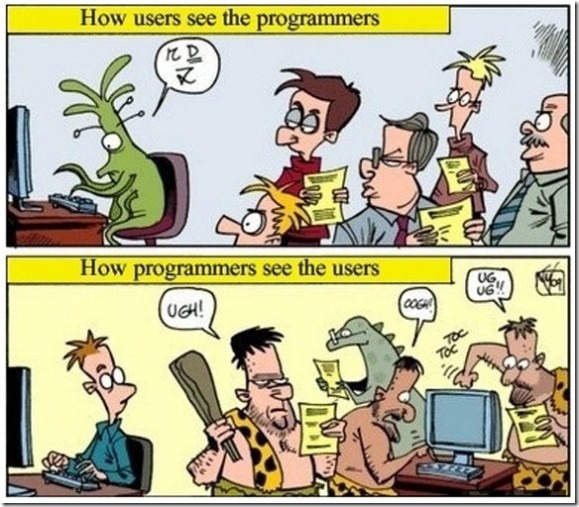
How users see programmers and how programmers see users

Encountered on the InterWeb. Unfortunately this is often true and I see a lot of software engineers treat their users like cave-men. Its unfortunate, because it leads to software engineers not listening to their users or changing features as they (software engineers) think is the right way to implement it. Never a good idea.

Respect and trust between the 2 groups is important otherwise you  risk building the wrong things for the users.

How-users-see-programmers-and-how-programmers-see-users-575x503

Friday, July 12, 2013

Obi202 not ringing for incoming calls

I recently bought an Obi202 VOIP phone adapter so that I could receive calls on my Google Voice number on my land line phone. (Will post a review soon – but for now just know that I am amazed by this product. Love it).

Anyways, the device was working fine until this morning after which phone calls to my Google Voice number were not ringing on my land-line phone. After a lot of trouble shooting what I found out is that to received calls via the Obi VOPI adapter, you need to enable Google Chat as a forwarding phone. You do this by logging into Google Voice and click on the gear icon (upper right) and then choose “Settings”. Under the “Phone” tab, make sure “Google Chat” is checked.

image

Monday, July 01, 2013

NonSerializedAttribute cannot be applied to fields that are Events

I recently encountered a compiler error, where I could not apply the [NonSerialized] attribute on a field that was an event.

The error that I got was: Attribute 'NonSerialized' is not valid on this declaration type. It is only valid on 'field' declarations.   

I made the assumption that, the reason for that is that events are not serialized by the serializers and so went ahead and left the field without any serialization modification attribute. Alas, the next day, I got emails from a bunch of people at work that my checkin had broken the app! FIRE DRILL.

Apparently, on fields that are events, one needs to attribute them using [field:NonSerialized] attribute.That fixed the problem and life continued on as usual.

Friday, June 28, 2013

WCF Timeouts explained

Found this good explanation for the various timeouts in WCF and which ones get used on the client and which get used on server.

Brief summary of binding timeout knobs...

Client side:

  • SendTimeout is used to initialize the OperationTimeout, which governs the whole interaction for sending a message (including receiving a reply message in a request-reply case).  This timeout also applies when sending reply messages from a CallbackContract method.
  • OpenTimeout and CloseTimeout are used when opening and closing channels (when no explicit timeout value is passed).
  • ReceiveTimeout is not used.

Server side:

  • Send, Open, and Close Timeout same as on client (for Callbacks).
  • ReceiveTimeout is used by ServiceFramework layer to initialize the session-idle timeout.

From: http://social.msdn.microsoft.com/Forums/vstudio/en-US/84551e45-19a2-4d0d-bcc0-516a4041943d/explaination-of-different-timeout-types

Monday, June 24, 2013

Using the Adobe Pdf Reader control in WPF

Important: This will not work if your application targets 64 bit. It will only work as a 32bit app as the AcroPdf.dll is a 32 bit dll.

1. Create a WPF Control Library

2. Add a Windows Forms user control

3. Open the user-control form.

4. In the toolbox, right click and choose “Choose Items…”

5. On the “COM Components” tab, select “Adobe PDF Reader”

image

6. Drag the “Adobe PDF Reader” from the toolbox on the user-control.
Name the control that was added on to the form as "axAcroPdf”

7. Make sure the Anchors are set to “Top, Left” and that Dock is set to “Fill”
image

8. Add the following code to the code behind:

		private AxAcroPDFLib.AxAcroPDF AdobeAcrobatPDfControl
		{
			get
			{
				return this.axAcroPDF;
			}
		}
 
		public void LoadFile(string pdfFilePath)
		{
			AdobeAcrobatPDfControl.LoadFile(pdfFilePath);
		}

8. Create a WPF UserControl. Name it WpfAcrobatCtrl.

9. Drag a WindowsFormsHost WPF control onto the design surface.

10. Set the following properties on the WindowsFormsHost control:
Width and Height to Auto
HorizontalAlignment and VerticalAlignment to Stretch
Name: wpfWindowsFormsHostCtrl.

11. Add the following code to the code behind of the WPF control:

public static readonly DependencyProperty FilePathProperty
			= DependencyProperty.Register("FilePath", typeof(string), typeof(WpfAcrobatCtrl), (PropertyMetadata)new FrameworkPropertyMetadata((object)null, new PropertyChangedCallback(WpfAcrobatCtrl.FilePathChanged)));
 
 
		private string _filePath = string.Empty;
		private CustomAcrobatCtrl _customAcrobatCtrl;
	
		
		private static void FilePathChanged(DependencyObject d, DependencyPropertyChangedEventArgs e)
		{
			((WpfAcrobatCtrl)d).FilePathChanged((string)e.OldValue, (string)e.NewValue);
			CommandManager.InvalidateRequerySuggested();
		}
 
		public WpfAcrobatCtrl()
		{
			InitializeComponent();
			_customAcrobatCtrl = new CustomAcrobatCtrl();
			wpfWindowsFormsHostCtrl.Child = _customAcrobatCtrl;
 
		}
 
		public string FilePath
		{
			get
			{
				return _filePath;
			}
			set
			{
				this.SetValue(FilePathProperty, value);
			}
		}
 
 
		private void FilePathChanged(string oldFilePath, string newFilePath)
		{
			_filePath = newFilePath;
			_customAcrobatCtrl.LoadFile(_filePath);
		}

12. Create a new WPF Window.

13. Drag and drop the WpfAcrobatCtrl onto the design surface.

14. Set the file-path in XAML or code-behind.

Eg: wpfAcrobatCtrl.FilePath = "C:\\test.pdf";

or in XAML: <WpfAcrobat:WpfAcrobatCtrl x:Name="wpfAcrobatCtrl" Margin="0" FilePath="C:\\test.pdf"/>

That’s all!

Note: The above code adds a little extra stuff for the dependency property “FilePath”. This allows for setting the file path via XAML (which was important for me as I needed to be able bind to the property).

Note 2: If you try and use the AcroPdf.dll in a 64 bit app, you will get the following error: {"Class not registered (Exception from HRESULT: 0x80040154 (REGDB_E_CLASSNOTREG))"}

Tuesday, June 11, 2013

C# - Why you must never lock on this

You should never lock on “this” if this points to an instance of a publicly accessible class. The reason is that if the class is publicly accessible, then you have no control over whether someone else who uses your class, uses the instance for locking. And if they do lock an instance of your class, then you will end up in a dead-lock.

Here is some simple code to illustrate this:

using System.Threading.Tasks;

void Main()
{
    ClassTest test = new ClassTest();
    lock(test) //locking on the instance of ClassTest
    {
        Parallel.Invoke (new Action[]{() => test.DoWorkUsingThisLock(1)});
    }
}

public class ClassTest
{
    public void DoWorkUsingThisLock(int i)
    {
        Console.WriteLine("Before ClassTest.DoWorkUsingThisLock " + i);
        lock(this) //this is bad - this will never end - you have been deadlocked!
        {
            Console.WriteLine("ClassTest.DoWorkUsingThisLock " + i);
            Thread.Sleep(1000);
        }
        Console.WriteLine("ClassTest.DoWorkUsingThisLock Done " + i);
    }
}

From MSDN:

In general, avoid locking on a public type, or instances beyond your code's control. The common constructs lock (this), lock (typeof (MyType)), and lock ("myLock") violate this guideline:

  • lock (this) is a problem if the instance can be accessed publicly.

  • lock (typeof (MyType)) is a problem if MyType is publicly accessible.

  • lock("myLock") is a problem because any other code in the process using the same string, will share the same lock.

References:

Lock Statement (MSDN)

Monday, May 27, 2013

The 14 characters you meet as a coder–InfoWorld

Ran into this article on InfoWorld and it was too funny to not share:

http://www.infoworld.com/d/application-development/the-14-characters-you-meet-coder-218142?page=0,0

The Developer Diva. Great software is rarely a one-person effort. There are users, plus the testers, plus the crew who markets or sells the work. But the Developer Diva recognizes those efforts in the same way actors who win Oscars thank the "little people." Developer Divas are not satisfied with standard accommodations; they need to be pampered. In fact, someone in management needs to devote at least 50 percent of his or her time to listen to the diva's complaints and get the diva to produce. If that management load increases every time the Developer Diva acquires a new skill, perhaps it's time to send the diva packing, even if the replacement is a little less skilled.

The Rock Star. Generally this guy knows HTML and JavaScript or maybe PHP, but from the ego you'd think he just set down his Les Paul after headlining at Madison Square Garden. After his 15 minutes are up, the crashing ego isn't pretty.

The Reluctant Programmer. Rather than urge their kids to be doctors or lawyers, some parents push their progeny to go into software development. Sometimes it works out. And sometimes the poor, benighted offspring gaze out of the office window yearning for hard labor in the 95-degree heat -- anything except spending their lives doing something they don't want to do, whether or not they have the aptitude for it. Usually their work is mediocre, and they're out the door every day at 4:55 p.m. sharp.

The Holy Priest. This person revels in technology for its own sake and has no patience for the hapless techno weenies who don't spend their days chanting arcane invocations using terms like "regex," "SOAP," "asynchronous messaging," "n-tier architecture," and "CORBA." Holy Priests recognize opinions as valid only if they come from fellow clerics, and they express contempt for "lusers" at every opportunity. They may be brilliant coders, but keep them locked in the closet, far away from customers.

The Process Guru. You might wonder who would spend all their time reading books on the latest development methodologies. That would be the Process Guru, who knows more about Scrum, XP, RUP, Crystal, PSP, TSP, and COCOMO than the rest of your organization put together. The guru is interested only in the process of creating software and cares nothing about the output of said process. Consuming every minute of every meeting, the Process Guru likes to explain how "we're doing agile wrong" and pontificates about the need for more agile training. Usually, but not always, the Process Guru is recognizable by the Certified Scrum Master status.

The "Jeopardy" Champion. The expert on arcane trivia, this developer may or may not be generally productive, but stands as the one person on the team who always seems to possess some obscure bit of needed knowledge. Whether it's the details of how "volatile" works in Java, both before and after the changes to the memory model spec, or deep knowledge of tuning a JBoss AS 4.2.3 configuration, the "Jeopardy" Champion is a valuable asset (at least twice a year).

The Hipster Hacker from Hell. We really need to rewrite all of our software in Haskell because then our code will be beautiful. Never mind the costs! Did I say Haskell? Haskell was so last year. I mean Clojure because it will be simple! Bugs? Features? I have no time for such trivial matters. I have a whole new architecture to write in Ceylon!

The Architecture Astronaut. This developer loves complexity and never sees a problem too simple to deserve a multitier, distributed system using a Java application server, multiple message queues, SOAP-based Web services with distributed transactions, and native code in C++ for good measure. When not designing byzantine architectures, astronauts immerse themselves in the WS-* specs or CORBA manuals. They may be found associating with Hipster Hackers from Hell, scheming up a new distributed system built in a combination of Erlang, Scala + Akka, Node.js, and Haskell. The astronaut will try to spend at least half of the allocated time for the project drawing UML diagrams and "fleshing out the architecture." Mantra: "The project isn't done until it uses at least 7/8 of the patterns in the GoF book."

The Insecure Evangelist. This guy/gal designed the entire system, but is threatened by new suggestions from just about anybody. Basically, my ideas are good and yours are bad, unless I repackage them as my ideas.

The Code Poet. The poet's code is elegant and conforms beautifully to design patterns. On the other hand, the Code Poet holds you up in meetings forever and never notices the missed deadlines or the annoyed looks on other peoples' faces.

The Cloud Zealot. This character has never heard of (or doesn't believe in) the eight fallacies of distributed computing and couldn't spell "SLA" if you spotted him the "S," "L," and "A." However, they can leap on a trending buzzword like a lion stalking a gazelle on the savannah. The Cloud Zealot races to move everything "to the cloud" with no regard for security, latency, network outages, data interoperability, vendor lock-in, or the long-term viability of the SaaS vendor du jour. Secure in his knowledge that no fly-by-night SaaS offering has ever been hacked, leaking usernames, email addresses, and unencrypted passwords for every user account, the Cloud Zealot sleeps easy. Lucky for him, he'll have moved on to a new company before you discover that all of your employees identities are for sale by the Russian mafia.

The Traditionalist. "Why would you ever need anything other than Java and an Oracle DB?" "You should definitely run your application on WebSphere." "Oh, you want to send messages between nodes? Let me prepare the XML schema."

The Uber Traditionalist. This party thinks Java is too newfangled and unproven for production use, preferring to develop on an AS/400, in RPG, using the SEU. The UT spends most of his time regaling you with tales of his youth, when the VAX was still a technological marvel and the PC was yet to be born. He probably built his first computer from raw transistors on a breadboard and never hesitates to remind the Hipster Hacker from Hell (his mortal enemy) that "the ideas in Node.js were originally developed in SNOBOL in the '70s, you know" or "Haskell is just a less pure and inferior LISP in many ways."

The Proprietary Priest. Telltale signs: Insists that all solutions should use proprietary tools from a trusted name; Perforce, Websphere, AIX, Oracle -- you get the idea. If Microsoft, IBM, or some other corporation didn't write it, then it must be crap.

Monday, April 29, 2013

Controls that implement WPF Commanding

I was trying to find a quick list of the basic WPF controls that support commanding (so that I could expose a DelegateCommand from my ViewModel to which I could bind the view). What I found out was that “generally” commands that support commanding implement ICommandSource. Based on that info, I was able to generate the following list of controls that implement ICommandSource:

System.Windows.Input.InputBinding
System.Windows.Input.KeyBinding
System.Windows.Input.MouseBinding
System.Windows.Controls.MenuItem
System.Windows.Controls.Button
System.Windows.Controls.Primitives.ToggleButton
System.Windows.Controls.CheckBox
System.Windows.Controls.GridViewColumnHeader
System.Windows.Controls.Primitives.CalendarButton
System.Windows.Controls.Primitives.CalendarDayButton
System.Windows.Controls.Primitives.DataGridColumnHeader
System.Windows.Controls.Primitives.DataGridRowHeader
System.Windows.Controls.Primitives.RepeatButton
System.Windows.Controls.RadioButton
System.Windows.Documents.Hyperlink
System.Windows.Shell.ThumbButtonInfo

MS.Internal.Documents.DocumentGridContextMenu+EditorMenuItem
System.Windows.Documents.TextEditorContextMenu+EditorMenuItem
System.Windows.Documents.TextEditorContextMenu+ReconversionMenuItem

More info:

MSDN: commanding overview: http://msdn.microsoft.com/en-us/library/ms752308.aspx

Monday, March 18, 2013

Convert an Anonymous type object to a dictionary

I wanted to write a method that would take an anonymous object and have it spit out key,value pairs from the properties defined on that anonymous object.

For example:

new {j="j1",k="k1"}

Should create a dictionary with 2 keys (j,k) which have corresponding values of (j1,k1).

A while back I had written about an helper method that would convert all the properties on an object into a dictionary: http://blog.aggregatedintelligence.com/2013/01/convert-objects-property-values-to.html

It turns out that the same method can be used even for anonymous types!