Tuesday, October 15, 2013

MSBUILD : error MSB1005: Specify a property and its value.

I was getting the following error from MS-Build:

MSBUILD : error MSB1005: Specify a property and its value.
Switch: /p:Deploy=true;DeployToEnvironment=es1ci;Configuration=Debug;UsingNUnit=true;

The problem turned out to be the last “;”. Apparently MsBuild doesn’t like it!. Took it out and MsBuild was able to run!

Thursday, October 10, 2013

Work Ethic–17 things you should never say to your boss

I came across this article on LinkedIn recently and found it interesting as, in a way, it kind of tells you what someone with good work ethics would not do or say at work. (its based on answers given by bosses at some new technology companies). I wish more people would read this.

Read it at: http://www.linkedin.com/today/post/article/20130923134035-15077789-17-things-you-should-never-say-to-your-boss

17 Things You Should Never Say to Your Boss

1. 'I Am Just Here for the Money'

In China, it is very common for a lot of employees to work just for the money. This means they will leave if you fail to give them a raise or if their peers start to make a lot more money than they do. Our interview process has filtered this as much as possible but if we hear through the "grapevine" that the person is just doing the job for the money we will let them go very quickly.

- Derek Capo, CEO and Founder, Next Step China

2. 'You Never Told Me to Do It'

When something important doesn't get done, the worst thing you can say is, "You never asked me to do it." There are few better ways to neglect yourself of that promotion, a raise, or even job security.

- Ken Cauley, President, Advanced Media

3. 'There's Something Wrong'

It's easy to complain about what's wrong. It's hard to come up with solutions to fix the problem. My former manager at LivingSocial said, "Be a problem solver, not spotter," and I've taken this advice to heart in my everyday life. If you see a problem, don't address the situation with what's wrong; address the situation with an answer. If you don't have a real solution, wait until you do.

- Sarah Ware, Markerly

4. 'I Want to Do What's Easiest'

We have a client who had an employee literally explain that he would rather do a particularly menial task than the task that the employer had assigned because it would be easier for him. We were shocked. This is the most explicit way to alert your boss that you don't care about improving your skill set without directly telling him. Never do this if you care about your career!

- Patrick Conley, Founder / CEO, Automation Heroes

5. 'That Takes Up Too Much Time'

Through the years, we have had many operational restructurings that have required large amounts of data to be filtered and edited or re-formatted in some manner. There's nothing worse than an employee who complains about the amount of time required to move the company to the next level.

- Laura Land, CFO / COO, Accessory Export, LLC

6. 'I Could Be Doing Other Things'

Bratty much? Don't complain about your job. If you hate it, quit. If there's something wrong with it, find a way to fix it. If someone or something is really ticking you off, don't project your anger onto others, especially not your boss. If it's a good job, be grateful for it. If you want more out of your job, make it happen. Be diplomatic about it and make it your dream job, or leave.

- Danny Wong, Co-founder, Blank Label

7. 'I Promise to Do That'

Don't ever tell your boss you're able to do something if you know you may not be able to deliver. It is better to be honest, ask for advice and have a proactive attitude. If you fail to deliver, then it has negative repercussions for the business, which is taken much more seriously.

- Christopher Pruijsen, Co-Founder / Partnerships, Afrostart.io

8. 'It's Too Difficult'

I get fired up when someone is paralyzed and doesn’t complete a task because it’s difficult or because few others have done it. We’re a disruptive company that has to innovate, that has to do things few have done before us. One of my advisors here has a quote: “If it were easy, everyone would be doing it.” We won’t win if we don’t think big.

- Marcos Cordero, Chief Gradsaver, GradSave, LLC

9. 'I Agree to Disagree'

Whether it is said explicitly or passive-aggressively, this mindset has no place in startup culture. Those who have this mindset should either found their own startups or go work in big corporate America where this goes unnoticed. At a startup, you're either all the way in or all the way out.

- Danny Boice, Co-Founder & CTO, Speek

10. 'I Don't Have an Opinion'

The people who just sit and nod their heads are the ones who are expendable. If you want to make an impression as a valuable member of the team, offer your insights. No one ever agrees with his boss 100 percent all the time, so make your opinion known if you have something worth saying.

- Nick Friedman, President, College Hunks Hauling Junk and College Hunks Moving

11. 'I Can't'

I don’t want to hear excuses ever! We focus on hiring can-do, positive, creative employees with passion, drive and determination.

- Kuba Jewgieniew, Founder and CEO, Realty ONE Group

12. 'I'm Not Optimistic'

The most important thing for any team member is to stay optimistic. Being a pessimist and doubting the future of the company is a real downer. There is nothing wrong with being realistic; however, people who are melancholy suck the life out of an early-stage company and cannot last long.

- Raoul Davis, CEO, Ascendant Group

13. 'I'm Clocked Out'

There is nothing more discouraging to an entrepreneur than when an employee says he is not willing to go the extra mile because he isn't "clocked in." We remind our employees that they work for a young company and they are in control of their own careers. Acting within the status quo never gets you to the top!

- Darren Solomon, President, Kid Ventures

14. 'That's Not My Responsibility'

It’s critical that everyone feels invested in the success of all areas of the business. Everyone should be willing to pitch in, even if what’s required isn’t part of their normal day-to-day activities.

- Robert J. Moore, Co-Founder and CEO, RJMetrics

15. 'That's Not My Job'

Your responsibilities aren't limited to what was listed in your original job description -- especially at a startup. Unless your boss is asking you to do something illegal or unethical, you should do it.

- Mary Ellen Slayter, Founder/Managing Director, Reputation Capital

16. 'I Don't Like Working for Other People'

An employee actually told me that he didn't like working for other people. That person doesn't work for me anymore!

- Andrew Angus, CEO, Switch Video

17. 'I'm Not Working Hard'

I never want to know that someone who works for me isn’t working hard. People can disagree with me, and I’m fine to hear criticism. I’ll never lose respect for anyone because he disagrees with me or because they failed. I don’t want to know if someone is giving less than their best effort or that someone lied. I have high expectations of people when it comes to their work ethic.

- Dries Buytaert, Co-founder and CTO, Drupal

Monday, September 16, 2013

CRM 2011–Plugin Registration Error: Assembly must be registered in isolation

While registering a CRM 2011 plugin I kept getting the following error in only one of our test environments.

Assembly must be registered in isolation

After a lot of searching I found out that the reason I was getting this error in only one environment was that I was not designated as a “Deployment Administrator”. Once I had that fixed, the error went away!

Unhandled Exception: System.ServiceModel.FaultException`1[[Microsoft.Xrm.Sdk.OrganizationServiceFault, Microsoft.Xrm.Sdk, Version=5.0.0.0, Culture=neutral, PublicKeyToken=31bf3856ad364e35]]: Action failed for assembly xxxxxxxxx, Version=1.0.0.0, Culture=neutral, PublicKeyToken=yyyyyyy': Assembly must be registered in isolation.

Friday, September 06, 2013

What We Actually Know About Software Development, and Why We Believe It's True

A very good presentation on how we can make the field of software engineering better by Greg Wilson: http://vimeo.com/9270320. He also brings up some thought provoking data-points:

Greg Wilson - What We Actually Know About Software Development, and Why We Believe It's True from CUSEC on Vimeo.

From the slides in the presentation:

  • Most errors are introduced during requirements analysis and design. Not during writing and debugging. The later a bug is removed, the more it costs to remove. (Boehm (1975))
  • For every 25% increase in problem complexity, there is a 100% increase in solution complexity. It's non-linear because of interaction effects.  (Woodfield (1979))
  • The two biggest causes of project failure are poor estimation and unstable requirements, neither of which seem to be improving in the industry as a whole. (van Genuchten (1991))
  • If more than 20-25% of a component has to be revised, it's better to rewrite it from scratch. (Thomas et al. (1997))
  • Hour for hour, sitting down and reading the code is the most effective way to remove bugs. It's better than running the code and better than writing unit tests. 60-90% of all errors can be removed before the very first run of the program. BUT, all of that value comes from the first hour by the first reviewer. You can only read code for an hour before your brain is full - only a couple hundred lines of codes depending on skill / practice. This means we should have small patches and changes. (Fagan (1975))
  • The architecture of the system reflects the organizational structure that built it. (Herbsleb (1999))
  • Physical distance between a team of developers doesn't affect post release fault rate. Distance in the org chart does. Thus, it's fine to have people remote as long as they are on the same team, just don't put developers working under different people on the same project. (Nagappan (2007) & Bird (2009))
  • No code (or other) metrics that were published before 2001 have any correlation with post-release error rate beyond that predicted by source lines of code (SLOC). (El Emam (2001))
  • When estimating the time it will take to complete a project the only thing that matters in the spec for the project is how long the writer of the spec thinks it will take (ie. the anchoring effect from psychology). "All work done to date on software estimation is pretty much pointless. All the engineers are going to give us back is what we want to hear." (Aranda & Easterbrook (2005))

Monday, August 12, 2013

WPF–Creating a single instance application

I wanted to make my WPF application such that only a single instance of it could run at a time. I found that there were 2 main ways demonstrated on the internet:
1. Use “Microsoft.VisualBasic.ApplicationServices.WindowsFormsApplicationBase” and setup the “OnStartupNextInstance” to activate the first instance of the application. or
2. Use Mutex to ensure only a single instance of a program can be run at time. (Which is the accepted answer on StackOverflow. http://stackoverflow.com/a/522874/44815).
I wanted to use the Mutex method, though the article referenced in the StackOverflow answer - “C# .Net Single Instance Application” does not give all the details that one has to implement for a WPF application, so here is some more detailed info:

1. Add a Mutex to the “App” class
/// <summary>
/// Interaction logic for App.xaml
/// </summary>
public partial class App
{
 /// <summary>
 /// This should be a unique name which is used to determine if another instance of app is running
 /// </summary>
 private const string APP_UNIQUE_NAME = "UNIQUENAME_FOR_MY_APP or use a GUID";
  /// <summary>
  /// Initializes the Mutex class and make the calling thread have initial ownership of the mutex
 /// and a string that is the name of the mutex.
 /// </summary>
 static readonly Mutex _mutex = new Mutex(true, APP_UNIQUE_NAME);


2. Add a Main method to the “App” class, which will act as the entry point for the application and will signal the mutex to wait until its released
[STAThread]
static void Main()
{
//using TimeSpan.Zero as we want the mutex to test state of wait handle and return immediately
 if (_mutex.WaitOne(TimeSpan.Zero, true))
 {
 //calling waitone stops everyone else from entering the code in this block until the mutex is released
  try
  {
   App app = new App();
   app.InitializeComponent();
   app.Run();
  }
  finally
  {
   _mutex.ReleaseMutex(); 
  }
 }
 else
 {
  MessageBox.Show("Only one instance of the app can be run!","App Name",MessageBoxButton.OK, MessageBoxImage.Exclamation);
 }
}
3. Setup the WPF application to use the “Main” method as its entry point
a. Right click on the application’s project file and select properties. On the tab “Application”, set the “Startup object” to the name of the “App” class we modified above.
b. Right click on the “App.xaml” file in your project and select properties. Change the “Build Action” to “Page” from “ApplicationDefinition”
4. Build and test the application!

Sunday, July 28, 2013

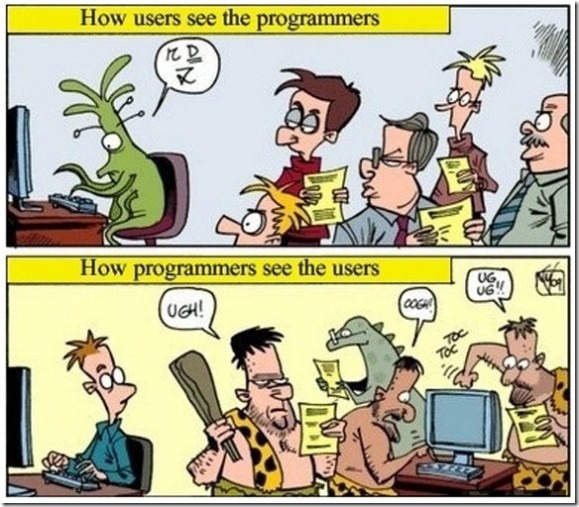
How users see programmers and how programmers see users

Encountered on the InterWeb. Unfortunately this is often true and I see a lot of software engineers treat their users like cave-men. Its unfortunate, because it leads to software engineers not listening to their users or changing features as they (software engineers) think is the right way to implement it. Never a good idea.

Respect and trust between the 2 groups is important otherwise you  risk building the wrong things for the users.

How-users-see-programmers-and-how-programmers-see-users-575x503

Friday, July 12, 2013

Obi202 not ringing for incoming calls

I recently bought an Obi202 VOIP phone adapter so that I could receive calls on my Google Voice number on my land line phone. (Will post a review soon – but for now just know that I am amazed by this product. Love it).

Anyways, the device was working fine until this morning after which phone calls to my Google Voice number were not ringing on my land-line phone. After a lot of trouble shooting what I found out is that to received calls via the Obi VOPI adapter, you need to enable Google Chat as a forwarding phone. You do this by logging into Google Voice and click on the gear icon (upper right) and then choose “Settings”. Under the “Phone” tab, make sure “Google Chat” is checked.

image

Monday, July 01, 2013

NonSerializedAttribute cannot be applied to fields that are Events

I recently encountered a compiler error, where I could not apply the [NonSerialized] attribute on a field that was an event.

The error that I got was: Attribute 'NonSerialized' is not valid on this declaration type. It is only valid on 'field' declarations.   

I made the assumption that, the reason for that is that events are not serialized by the serializers and so went ahead and left the field without any serialization modification attribute. Alas, the next day, I got emails from a bunch of people at work that my checkin had broken the app! FIRE DRILL.

Apparently, on fields that are events, one needs to attribute them using [field:NonSerialized] attribute.That fixed the problem and life continued on as usual.

Friday, June 28, 2013

WCF Timeouts explained

Found this good explanation for the various timeouts in WCF and which ones get used on the client and which get used on server.

Brief summary of binding timeout knobs...

Client side:

  • SendTimeout is used to initialize the OperationTimeout, which governs the whole interaction for sending a message (including receiving a reply message in a request-reply case).  This timeout also applies when sending reply messages from a CallbackContract method.
  • OpenTimeout and CloseTimeout are used when opening and closing channels (when no explicit timeout value is passed).
  • ReceiveTimeout is not used.

Server side:

  • Send, Open, and Close Timeout same as on client (for Callbacks).
  • ReceiveTimeout is used by ServiceFramework layer to initialize the session-idle timeout.

From: http://social.msdn.microsoft.com/Forums/vstudio/en-US/84551e45-19a2-4d0d-bcc0-516a4041943d/explaination-of-different-timeout-types

Monday, June 24, 2013

Using the Adobe Pdf Reader control in WPF

Important: This will not work if your application targets 64 bit. It will only work as a 32bit app as the AcroPdf.dll is a 32 bit dll.

1. Create a WPF Control Library

2. Add a Windows Forms user control

3. Open the user-control form.

4. In the toolbox, right click and choose “Choose Items…”

5. On the “COM Components” tab, select “Adobe PDF Reader”

image

6. Drag the “Adobe PDF Reader” from the toolbox on the user-control.
Name the control that was added on to the form as "axAcroPdf”

7. Make sure the Anchors are set to “Top, Left” and that Dock is set to “Fill”
image

8. Add the following code to the code behind:

		private AxAcroPDFLib.AxAcroPDF AdobeAcrobatPDfControl
		{
			get
			{
				return this.axAcroPDF;
			}
		}
 
		public void LoadFile(string pdfFilePath)
		{
			AdobeAcrobatPDfControl.LoadFile(pdfFilePath);
		}

8. Create a WPF UserControl. Name it WpfAcrobatCtrl.

9. Drag a WindowsFormsHost WPF control onto the design surface.

10. Set the following properties on the WindowsFormsHost control:
Width and Height to Auto
HorizontalAlignment and VerticalAlignment to Stretch
Name: wpfWindowsFormsHostCtrl.

11. Add the following code to the code behind of the WPF control:

public static readonly DependencyProperty FilePathProperty
			= DependencyProperty.Register("FilePath", typeof(string), typeof(WpfAcrobatCtrl), (PropertyMetadata)new FrameworkPropertyMetadata((object)null, new PropertyChangedCallback(WpfAcrobatCtrl.FilePathChanged)));
 
 
		private string _filePath = string.Empty;
		private CustomAcrobatCtrl _customAcrobatCtrl;
	
		
		private static void FilePathChanged(DependencyObject d, DependencyPropertyChangedEventArgs e)
		{
			((WpfAcrobatCtrl)d).FilePathChanged((string)e.OldValue, (string)e.NewValue);
			CommandManager.InvalidateRequerySuggested();
		}
 
		public WpfAcrobatCtrl()
		{
			InitializeComponent();
			_customAcrobatCtrl = new CustomAcrobatCtrl();
			wpfWindowsFormsHostCtrl.Child = _customAcrobatCtrl;
 
		}
 
		public string FilePath
		{
			get
			{
				return _filePath;
			}
			set
			{
				this.SetValue(FilePathProperty, value);
			}
		}
 
 
		private void FilePathChanged(string oldFilePath, string newFilePath)
		{
			_filePath = newFilePath;
			_customAcrobatCtrl.LoadFile(_filePath);
		}

12. Create a new WPF Window.

13. Drag and drop the WpfAcrobatCtrl onto the design surface.

14. Set the file-path in XAML or code-behind.

Eg: wpfAcrobatCtrl.FilePath = "C:\\test.pdf";

or in XAML: <WpfAcrobat:WpfAcrobatCtrl x:Name="wpfAcrobatCtrl" Margin="0" FilePath="C:\\test.pdf"/>

That’s all!

Note: The above code adds a little extra stuff for the dependency property “FilePath”. This allows for setting the file path via XAML (which was important for me as I needed to be able bind to the property).

Note 2: If you try and use the AcroPdf.dll in a 64 bit app, you will get the following error: {"Class not registered (Exception from HRESULT: 0x80040154 (REGDB_E_CLASSNOTREG))"}