Prevents a match when X appears at this point in the expression. For example, real~(ity)matches the "real" in "realty" and "really," but not the "real" in "reality."
the current ASP.net version started of as a project with 2 developers, and then ramped up to 12 developers and with an ops team at its peak.
Full time designer was dedicated to the project -> consistent look and feel
tech stack used Asp.Net 3.5 Commerce Server 2007 (cart, profiles, etc) SqlServer 2005 Endeca (search - Java based)
Dev methodology: Scrum
Need to Define what done means on your project (do it early) XHTML compliance Unit tested Browser support WAVE test
FireBug - useful tool for FireFox (similar for IE dev toolbar)
Used XHTML 1.1 standard
XHTML 1.1 deprecates stuff like iframe, target, etc. Use XHTML 1.1 as base for most pages and XHTML 1.0 on the pages that require it. Why target is not supported by XHTML 1.1 http://www.w3.org/MarkUp/2004/xhtml-faq#target -ASP.Net pages by default target XHTML 1.0 transitional -XHTML 1.1 supported natively by VS 2008 -To change your page use: Update the doctype in your aspx page: <!DOCTYPE html PUBLIC "-//W3C//DTD XHTML 1.1//EN" "http://www.w3.org/TR/xhtml11/DTD/xhtml11.dtd"> To the web.config set: xhtmlConformance mode="strict" (default is transitional) -use CSS friendly adapters -use ASP.Net themes & skin files -Do all of the above in one easy step while setting up your project using the "Visual Studio 2008 XHTML 1.1 Project" http://www.codeplex.com/VSXHTML11Templates
The future - ASP.Net 4.0 – cool features coming: -allows you to control the ID that is used on controls sample options: static, predictable also allows you to add a row suffix makes it easier to use CSS to control design -disable viewstate at container level Panel disabled, means all contained controls have viewState disabled you can still enable it for each control individually
ASP.Net Accessibility: - its the law - WCAG 1.0 & 2.0 - WebAim.org - WAVE accessibility evaluation tool http://wave.webaim.org/
Make XHTML compliance part of development Cycle. - Uses a VSTS integration test - need to find out more AspNetDevelopmentServer Speaks to W3C validator to determine compliance
Server Controls: - typically can be used only within a Form tag - can be hacked to be used outside the Form tag override - VerifyRenderingInServerForm to always return true for the page http://msdn.microsoft.com/en-us/library/system.web.ui.page.verifyrenderinginserverform.aspx -using multiple forms in one page: only one server form allowed use action attribute to submit to a different page action="page.aspx" use it as a client.form need to test this
Support for multiple browsers (increasing reach) - dont target browsers instead target standards set the baseline standard (typically CSS3/extensions - which is FireFox 3, Safari 3 Opera 9.5 and IE8) CSS 2.1 for IE7 and FireFox 2 support
Think about users who might be on slow internet connections - use YSlow http://developer.yahoo.com/yslow/ - use GZip Compression - CSS sprites - need to read up on this
Progressive enhancements -make basic site -add bells and whistles (javascript, etc) later. -eg: shoppingg cart drop down on same page *created as a simple link *used jquery to add behavior to link to show a div containing cart details
Testing -unit tests *tests the basic unit of code -integration *combines some of the units to test them together -functional * uses whatin - a wrapper around IE -performance Mocks - RhinoMocks http://ayende.com/projects/rhino-mocks.aspx
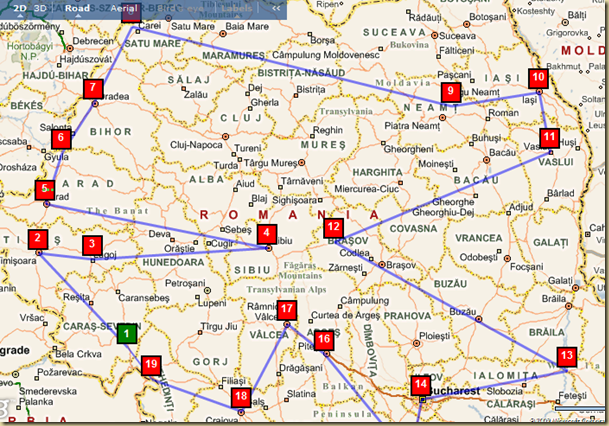
As I said before, OptiRoute in an approximation for the optimal route to visit a bunch of points. Its an approximation that runs in O(n), and can handle unlimited number of points, which is its uniqueness. But because it is an approximation – it might not be the best solution possible.
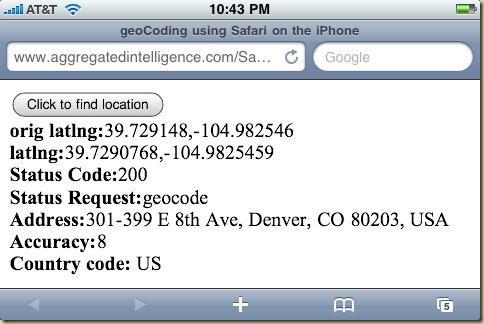
iPhone GeoLocation in Safari uses the Safari’s new geoLocation api to retrieve the current location and in turn gets address information using Google Maps geoCoding api.
var geocoder;
function initialize()
{
geocoder = new GClientGeocoder();
findLocation();
}
function findLocation()
{
if (navigator.geolocation != null)
navigator.geolocation.getCurrentPosition(foundLocation, noLocation);
else
document.getElementById("map_canvas").innerHTML = 'Browser does not support geoCoding';
}
function foundLocation(position)
{
getAddress(new GLatLng(position.coords.latitude,position.coords.longitude));
}
function noLocation()
{
document.getElementById("map_canvas").innerHTML = 'Could not find location';
}
function getAddress(latlng)
{
if (latlng != null)
{
geocoder.getLocations(latlng, showAddress);
}
}
function showAddress(response) {
if (!response || response.Status.code != 200) {
alert("Status Code:" + response.Status.code);
}
else
{
place = response.Placemark[0];
point = new GLatLng(place.Point.coordinates[1],
place.Point.coordinates[0]);
var locData =
'<b>latlng:</b>' + place.Point.coordinates[1] + "," + place.Point.coordinates[0] + '<br>' +
'<b>Status Code:</b>' + response.Status.code + '<br>' +
'<b>Status Request:</b>' + response.Status.request + '<br>' +
'<b>Address:</b>' + place.address + '<br>' +
'<b>Accuracy:</b>' + place.AddressDetails.Accuracy + '<br>' +
'<b>Country code:</b> ' + place.AddressDetails.Country.CountryNameCode;
document.getElementById("map_canvas").innerHTML = locData;
}
}
The reason that this happens is that IE does not use the entire network stack when processing traffic from http://localhost/ or http://127.0.0.1/. And because the complete stack is not used, Fiddler does not see the traffic that is being sent to these addresses. The easiest work around for this is that you use your machine name instead of localhost.
How to modify the request data that is being sent to a web-site using Fiddler.
There are many ways to skin this cat. You can write custom script, you can write a plugin, etc.
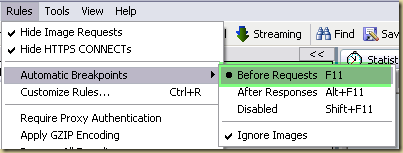
But the easiest method is to enable breakpoints in Fiddler. Fiddler will break any request and allow you to inspect and modify the request before sending it along.
Here is how:
Turn on break points for before requests:
Hit the web-site that you wish to modify the request off.
The minute Fiddler detects the request, it will break the request and give you a chance to modify the request.
The red icon in the web-sessions panel represents a request that has hit a break point and is waiting for your input. If you select the entry, you will find that in the right pane, it will show you options to respond to the break point.
Before selecting “Run to Completion”, you can modify the response headers using the TextView of the Request headers (upper right pane).
If you select “Break on Response”, you will get a chance to modify the response headers using the TextView (lower right pane).
OptiRoute is a mapping tool that attempts to calculate the optimal route (shortest path) to visit a set of locations that you provide.
Until I get around to writing a complete tutorial, here is what you need to know:
It does not guarantee an optimal route (its an approximation – so it might not be the shortest path).
It runs in O(n) and can handle unlimited number of points (at least theoretically) and shouldnt take ever to compute.
The algorithm does not take into account one-ways, detours, etc. It uses straight line distances in determining the optimal route.
The algorithm attempts to visit every point in a circle, visiting the closest points first.
Once the optimal order of visitation is determined, you get the list of the points in the order to visit them on the left side of the map. On the right side you get links to Google Maps and Bing Maps, which will let you see the actual route that you would have to take to visit each location.
Instead of making you insert points one by one (by address or latitude/longitude), it uses points that you might have already collected in popular online mapping tools like Google Maps and Bing Maps (Virtual Earth or Live Maps).
OptiRoute uses points in a GeoRSS feeds as its source of points.
Bing Maps allows you add points and store them as Collections. Collections can then be exported to a GeoRSS feed using the Actions menu.
In Google Maps you need to create a new MyMap and then use the RSS feed icon.
Copy the GeoRSS feed to your map containing the collection of points you wish to visit and paste it into the text box in OptiRoute and hit the load button.
OptiRoute will fetch all the points and then route them and display the route on a map as well as in the table on the left side of the map.
Here are some examples for you to try:
Bing Maps examples (copy the URL and try them in OptiRoute):
Want to find out what is going on in Denver or Boulder : Denver or Boulder
Interested in all tweets with the words Iran or Tehran: Iran OR Tehran
Specific phrases: use quotes
Search for tweets about Colorado Springs: “Colorado Springs” as opposed to just Colorado Springs, which will return stuff like Glenwood Springs Colorado.
1. When Chuck Norris throws exceptions, it’s across the room. 2. All arrays Chuck Norris declares are of infinite size, because Chuck Norris knows no bounds. 3. Chuck Norris doesn’t have disk latency because the hard drive knows to hurry the hell up. 4. Chuck Norris writes code that optimizes itself. 5. Chuck Norris can’t test for equality because he has no equal. 6. Chuck Norris doesn’t need garbage collection because he doesn’t call .Dispose(), he calls .DropKick(). 7. Chuck Norris’s first program was kill -9. 8. Chuck Norris burst the dot com bubble. 9. All browsers support the hex definitions #chuck and #norris for the colors black and blue. 10. MySpace actually isn’t your space, it’s Chuck’s (he just lets you use it). 11. Chuck Norris can write infinite recursion functions…and have them return. 12. Chuck Norris can solve the Towers of Hanoi in one move. 13. The only pattern Chuck Norris knows is God Object. 14. Chuck Norris finished World of Warcraft. 15. Project managers never ask Chuck Norris for estimations…ever. 16. Chuck Norris doesn’t use web standards as the web will conform to him. 17. “It works on my machine” always holds true for Chuck Norris. 18. Whiteboards are white because Chuck Norris scared them that way. 19. Chuck Norris doesn’t do Burn Down charts, he does Smack Down charts. 20. Chuck Norris can delete the Recycling Bin. 21. Chuck Norris’s beard can type 140 wpm. 22. Chuck Norris can unit test entire applications with a single assert. 23. Chuck Norris doesn’t bug hunt as that signifies a probability of failure, he goes bug killing. 24. Chuck Norris’s keyboard doesn’t have a Ctrl key because nothing controls Chuck Norris. 25. When Chuck Norris is web surfing websites get the message “Warning: Internet Explorer has deemed this user to be malicious or dangerous. Proceed?”.
My biggest gripe with Visual Studio (especially ASP.Net apps) is that you need to maintain multiple copies of your configuration files for each environment you build your app for (typically this is dev, qa and prod). This is especially true for ASP.Net apps as they depend on databases and you typically have different databases for each environment. The biggest problem with maintaining different versions of web.config is that you have to remember to keep some of the settings in sync and the rest need to be left different. In addition, you need to remember to copy the correct web.config file to the correct environment and in addition remember to rename the files. TOO MUCH WORK!
This is going to change in VS 2010 with a feature called Web.Config transformations. I have not tried it out yet. But this post: web.config transformations on the WebDevTools blog explains it step by step and I am excited to use it when VS 2010 releases. It will definitely make life easier to deploy my ASP.Net apps.
I was getting this error everytime I tired to build my VSTS Database project. The project had been created as a “database project” and not a “server project”.
Because logins are server level objects, they do not get imported as part of the schema into the database project and hence you see the error.
The method that I used (and liked) to solve the problem was to create a 2nd database project which I setup as a “server project”. This one imported login ids and whole lot of other stuff. I then deleted all the other parts that belonged to the project, leaving behind only the login objects.
Finally, I referenced this database project in my main database project.
Voila! and it worked!
Why do I prefer this (over just having a single server project)? because when you create your deployment script – there are 2 scripts created one thats based on the server project and the other based on your database project. In my case, the server project contains all kinds of crap that I typically never need unless I am standing up a new server, so I can ignore it and work only with the main database project.
If you have an ASP.Net control in your web-page with ID “aspCtrl” how do you access it in JavaScript?
One would think that document.GetElementByID(“aspCtrl”) would work. And it would in a very simple Asp.Net page. But the minute your control begins being put into other Asp.Net controls, you will find that the ID of your controls will be changed by the run-time before being sent to the client’s browser.
So how do you work around this?
Use the client id of the control – like so: var ctrl1 = document.getElementById('<%=aspCtrl.ClientID%>').value;
So if you are familiar with UniqueId then you might be wondering what the difference is between UniqueID and ClientID? The difference is that ClientId is the value that would be assigned to the control’s ID attribute (which is why you use it in GetElementById). UniqueID, contains the fully qualified name for that control (which includes the names of all the controls that contain that element concatenated with weird symbols($) and all).
Today, I began evaluating using the new Visual Studio Team System Database Edition to manage and source control the database model used for one of our applications.
After importing an existing schema, I altered one of the columns (in Schema View) so as to create a deployment script which would then be run on the target SQL Server instance to modify it so as to match my changes in Schema View.
Instead of running the deployment script from within Visual Studio, I wished to run it from within SQL Server Management Studio (this is because I would like to hand off my DB script to the systems team to run the actual upgrade process).
So when I loaded up the script file into SQL Server Management Studio (I am using SQL Server 2005) and tried to run it I got this error : Incorrect syntax near ':'. And it was occurring on a setvar line.
:setvar DatabaseName "dbName"
The solution is super simple: You need to turn on SQLCMD mode before attempting to run the script (Query | SQLCMD Mode). Or hit the button on the SQL Editor toolbar.
We have all seen are share of error messages that are completely useless.
I have definitely seen my share (the first ones that I remember “Abort, Retry, Fail” & “PC Load Letter”) and I am sure I have contributed my share in the applications that I have written.
The importance of useful error messages is under-scored by this piece of news of how emergency alert messages were not sent out to the residents of a city when a tornado was eminent (Errors stalled warning in Fort Collins). In this case, because the user had created overlapping regions to send out alerts to, the software (Everbridge Aware) failed to send out the alert messages to the city’s residents. But because the system did not provide the user with a useful error message, the user was unable to correct the issue and send out the alert.
In my experience unhelpful error messages are caused by:
1. Prototype code entering production system and never having been refactored and revamped.
2. The developer did not realize that a certain operation could cause an un-handled exception.
3. The developer coded defensively to handle all exceptions, using just the generic exception class, instead of a specific exception type.
All of the above could lead to a generic error message being displayed to the user.
And sometimes the above will end up creeping into your application, because that is just the nature of the beast. It is for this reason that one should have a robust logging mechanism attached to their application (and documenting where the logs exist for end-users to find). If this had been done with the EverBridge system, then the operator might have thought of looking at the log file to determine the exact cause of the error message and taken remedial action. (This sort of behavior is common Microsoft Installers use a log file as well the system log, VLS’s Feature Analyst uses a log file as well as a real-time console window to display system messages)
Bottom line: We as developers need to be cognizant of the fact that some of our error messages might make no sense to the end user and can cause a great deal of frustration to them. Apart from using presentation guidelines in our error messages, one should also try and capture information regarding the context in which the error occurred which can be used by end users to further diagnose a problem when they come across an error message which is less than helpful.
Coding Standards and Error Messages:
Typically, Coding Standards documents ignore dealing with error messages, because that isnt really considered as an “integral” part of the developer’s job. Ideally your errror message guidelines should be made a part of your organizations coding standards document – this way, everyone will be thinking of making them usable while they are developing applications. Presented below are some examples:
If a wrong value found in the configuration file, application should throw an error or give a message and also should tell the user what are the correct values.
Error messages should help the user to solve the problem. Never give error messages like "Error in Application", "There is an error" etc. Instead give specific messages like "Failed to update database. Please make sure the login id and password are correct."
When displaying error messages, in addition to telling what is wrong, the message should also tell what should the user do to solve the problem. Instead of message like "Failed to update database.", suggest what should the user do: "Failed to update database. Please make sure the login id and password are correct."
Show short and friendly message to the user. But log the actual error with all possible information. This will help a lot in diagnosing problems.
For error messages the following conventions apply:
Provide specific error messages with all the relevant information (variables, exceptions, etc.)
Messages start with a capital letter.
Try keeping messages below 70 characters.
Don't end the error message with a '.'.
Don't use wildcard characters (* ? \) inside the error string. A search in the logs for text containing these characters are always difficult.
Don't include newline characters in error messages.
Quoting information is done using single quotes ('some info').
Don't include the name of the method where the error occurs in the error message. Log systems will provide this information by itself.
When including path or filenames in the error string, be sure to quote them. (i.e. "Can't find '/path/to/repos/userfile'")
Suggestions or other additions can be added after a semi-colon, like this: "Can't write to 'file': object of same name already exists; remove before retrying"
Try to stay within the boundaries of these conventions, so please avoid separating different parts of error messages by other separators such as '--' and others.
The regex breaks down the phone number into the following groups:
Here is how the Regulator’s RegEx analyzer explains it:
^ (anchor to start of string)
Non-capturing Group
Non-capturing Group
Any character in"\+"
? (zero or one time)
Capture to <CountryCode>
Any character in"\d"
At least 1, but not more than 3 times
Non-capturing Group
Any character in" "
+ (one or more times)
or
Any character in"\-."
End Capture
End Capture
End Capture
? (zero or one time)
Any character in"("
? (zero or one time)
Capture to <AreaCode>
Any character in"\d"
Exactly 3 times
End Capture
Any character in"\-/)"
? (zero or one time)
Non-capturing Group
Any character in" "
+ (one or more times)
End Capture
? (zero or one time)
End Capture
? (zero or one time)
Capture to <Number1>
Any character in"a-zA-Z0-9"
Exactly 3 times
End Capture
Non-capturing Group
Any character in"\-. "
? (zero or one time)
End Capture
Capture to <Number2>
Any character in"a-zA-Z0-9"
At least 4 times
End Capture
Non-capturing Group
Any character in" \-"
Non-capturing Group
Non-capturing Group
Any character in"xX"
or
ext
End Capture
Any character in" \-"
Capture to <extn>
Any digit
At least 2, but not more than 5 times
End Capture
End Capture
End Capture
? (zero or one time)
$ (anchor to end of string)
I needed a quick cheat sheet that compares C# keywords with those that VB.Net uses so that I could perform a code-walkthrough on someone else’s code. Here is what I came up with:
Team Foundation Power Tools adds integration for TFS into the windows shell. If you have installed the TFS PowerTools package and you cannot see it, it is because Windows Shell integration is not selected by default and you need to select it.
Once you have TFS windows shell integration you can interact with TFS’s source control directly from windows explorer:
The green arrow symbolizes a folder that is under TFS Source Control
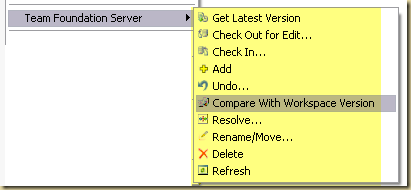
Options available from windows context menu for a folder under TFS control.
I keep mixing it up between heap and stack, so this post is more of a reminder for me.
Value types go in one container and Reference types go in the other.
Typically value types go into the Stack and reference types go onto the Heap.
Why do I say typically? Because value types that are declared as part of a reference type (members) are stored on the heap.
A more specific rule:
Reference types are always allocated on the Heap.
Value types and pointers are allocated on the Stack if they were defined within a method. But if they (value types and pointers) were declared as member variables of a class (a reference type), then they get allocated on the Heap.
Here is a good article that touches on these issues and more: Heaping vs. Stacking
What do the Payment Card Industry (PCI) compliance terms mean to your web-application?
There are six major categories, broken down to 12 requirements:
Build and Maintain a Secure Network
Requirement 1: Install and maintain a firewall configuration to protect cardholder data Requirement 2: Do not use vendor-supplied defaults for system passwords and other security parameters
Protect Cardholder Data
Requirement 3: Protect stored cardholder data Requirement 4: Encrypt transmission of cardholder data across open, public networks
Maintain a Vulnerability Management Program
Requirement 5: Use and regularly update anti-virus software Requirement 6: Develop and maintain secure systems and applications
Implement Strong Access Control Measures
Requirement 7: Restrict access to cardholder data by business need-to-know Requirement 8: Assign a unique ID to each person with computer access Requirement 9: Restrict physical access to cardholder data
Regularly Monitor and Test Networks
Requirement 10: Track and monitor all access to network resources and cardholder data Requirement 11: Regularly test security systems and processes
Maintain an Information Security Policy
Requirement 12: Maintain a policy that addresses information security
If you have never experienced Microsoft’s Deep Zoom technology then I strongly urge you to hop on over to “http://memorabilia.hardrock.com/” and follow my instructions below:
First zoom into Paul McCartney’s letter to Sgt. Buddy Dresner.
Next zoom in to the envelope
Next zoom in to the stamp on the left
Zoom in to the picture of Hard Rock in New York
Now zoom in to the billboard in the picture – highlighted by the green circle
Keep zooming in to the frame of the Beatles bobble head dolls.
This is very, very cool. Project Natal is currently a research project at Microsoft’s XBox 360 group. Its awesome because it takes gaming from what we get from Wii to a totally new level. You get to interact with the game without any controls and the games have the ability to respond to all your natural body motions. The games even have the ability to respond to your voice.
The following video is awesome and a must see…..
Project Natal for XBox 360 – this one is almost like an ad and it shows what all is possible while interacting with Project Natal
Also check out starting from about 80 minutes into the following E3 presentation, where Microsoft showed off the technology for the first time to the gaming community. http://e3.gamespot.com/press-conference/microsoft-e3/
Here is an easy definition of the Chickens versus Pigs.
A Pig is someone who has skin in the game. Pig roles are considered core team members.
A Chicken is someone who has something to gain by the Pigs performing, but in the end, really do not contribute day to day to “getting things done.” Their “eggs” are a renewable resource, and numerous.
Prefixes that I use for UI elements (I find that if I dont have this list hanging around my monitor, I very soon start making up my own prefixes – especially for those controls that I dont use often: e.g. PlaceHolder)
If you have ever tried entering a large body of text at a Windows DOS prompt that was created using .Net’s Console.ReadLine() command you might have realized that you cannot type in more than 256 characters (254 characters to be precise as the last 2 would be used reserved for the CR and LF characters).
Here is a simple way of getting around this limit in .Net (C# code sample)
My first swing at this did not work and seemed to be ignoring the buffer size in READLINE_BUFFER_SIZE. Below is my 2nd go at it, which fixes the buffer size issue:
Typically log4net is configured by inserting the log4net element into the application configuration file. Another method that can provide more flexibility is to use a separate config file used to store only log4net settings. Here is how to do that:
1. Move the log4net element from the web.config file to a separate file (I call it log4net.config). The file should begin and end with the log4net element. Here is a sample
You cannot use the & symbol in the application configuration files (web.config and app.config). For your application to work replace the & symbol with &