Wednesday, April 27, 2022

AWS Athena's Information_Schema

The information_schema in most database systems is very useful to get information about tables, views, columns that might be available in that db.

Here are the information schema views available. (WARNING: queries against the information_schema views are very slow)


 Schemas:

SELECT

  catalog_name,  schema_name

FROM information_schema.schemata

 Tables:

SELECT

  table_catalog,  table_schema,  table_name,  table_type

FROM information_schema.tables

Columns:

select

  table_catalog,  table_schema,  table_name,  column_name,  data_type,  is_nullable,

  column_default,  comment

from information_schema.columns

order by

  table_catalog,  table_schema,  table_name,  ordinal_position


Retrieved by looking at the PrestoDB test cases: presto/presto-product-tests/src/main/resources/sql-tests/testcases/system at 2ad67dcf000be86ebc5ff7732bbb9994c8e324a8 · prestodb/presto · GitHub 

Pentaho Data Integration - Java Defined Class - Main working sample

 The sample code provided in PDI for "main" doesnt work. Here is the fixed up version:

mypublicnotes/Sample-UserDefinedJavaClass-Main.md at master · rajrao/mypublicnotes (github.com)

Pentaho Data Integration - Stripping characters out of string fields

 Here is a generic method (actually 2) for stripping out characters from all string fields in Pentaho.

mypublicnotes/Sample-Generic-Input-FieldFixerUpper.md at master · rajrao/mypublicnotes (github.com)

These methods are convenient when you are loading a variety of tables or files and you dont know the names of all the string fields ahead of time and so cannot use field based transformations (like Replace in String, etc).

Thursday, February 17, 2022

PowerBi Icons for Diagrams

 I found a couple of awesome resources for PowerBi icons that you can use in diagrams.

1. Official repo of PBI icons: microsoft/PowerBI-Icons: Icons (PNG and SVG) for Power BI (github.com)

2. Marc Lelijveld repo: Marc has provided an xml document that allows you to easily import all the icons into Draw.Io. This makes the whole process extremely easy. marclelijveld/Power-BI-Icons: Icons (PNG and SVG) for Power BI (github.com). The most import link from Marc's repo is the raw link to the xml file: https://raw.githubusercontent.com/marclelijveld/Power-BI-Icons/main/Diagrams.net_PowerBIIcons.xml. This link can be used in Draw.Io via File >>Open Library from >> URL...

Once done, you will get all the icons in the left pane:


Here is more info from Marc's blog: Power BI Icon Library – now includes official icons to use in Draw.io / Diagrams.net – Data – Marc (data-marc.com)

Saturday, January 29, 2022

Kids.youtube.com activate not working

The kids YouTube activation site (https://kids.youtube.come/activate) doesn't seem to be working. I was able to sign in via https://accounts.google.com/o/oauth2/device/usercode?flowName=DeviceOAuth

With 2 kids at home, I feel like a catastrophe has been averted. Hope it helps you.


Thursday, January 27, 2022

Emails from PowerBi.com service dont go to Email Groups

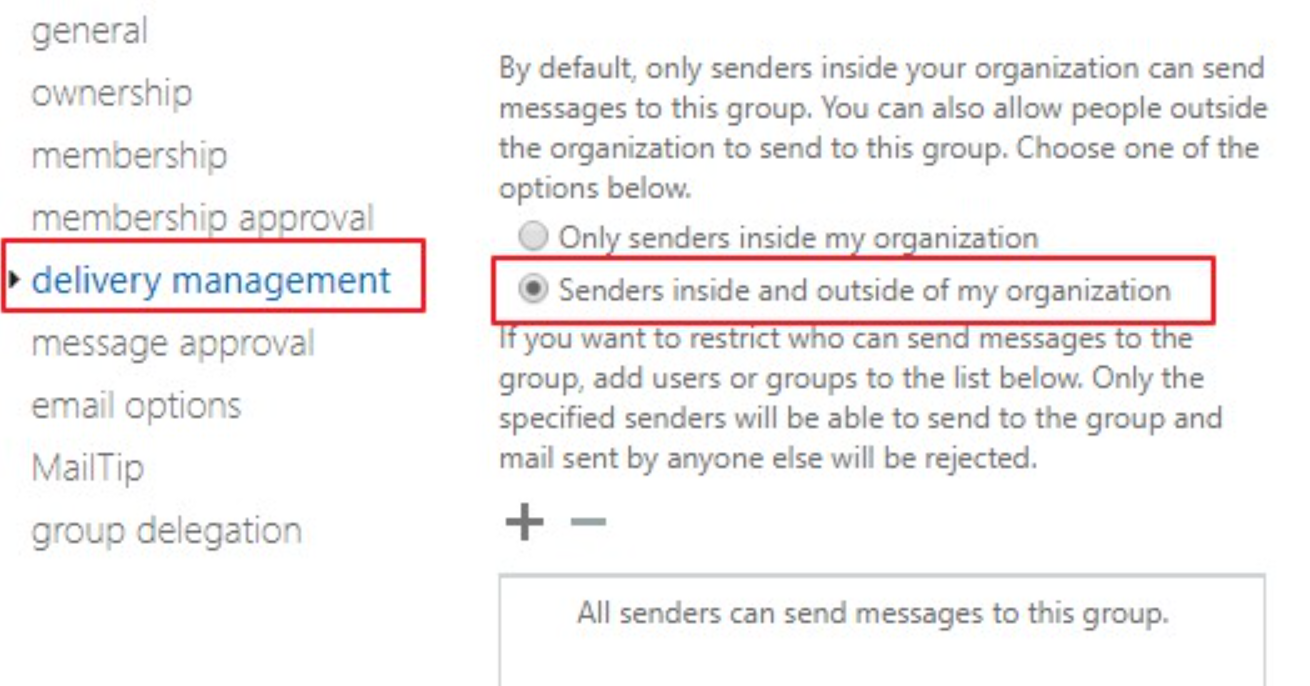
If you use a distribution group for emails in PowerBi.com (eg: Subscriptions to reports or to Dataset refresh issues), you might find that you dont receive the emails if you are using Office365. This is likely because by default Distribution Lists in O365 disable receiving emails from external addresses and this has to be enabled.

To receive emails from PowerBi, you have to enable receiving emails from external senders. You need to enable the option: "Senders inside and outside of my organization". This can be done by following the instruction here: https://docs.microsoft.com/en-us/Exchange/recipients/distribution-groups?view=exchserver-2019#delivery-management. 


PowerBi REST API - A binary operator with incompatible types was detected. Found operand types 'Edm.String' and 'Edm.Guid' for operator kind 'Equal'.

 I was trying to query to get workspace with a certain ID.

Using this as the filter (id eq 9c02ab25-0e94-4835-92e6-62ac6460acd0): https://api.powerbi.com/v1.0/myorg/groups?%24filter=id%20eq%209c02ab25-0e94-4835-92e6-62ac6460acd0, causes it fail with the error

{
  "error": {
    "code": "InvalidRequest",
    "message": "A binary operator with incompatible types was detected. Found operand types 'Edm.String' and 'Edm.Guid' for operator kind 'Equal'."
  }
}


The fix is to put your GUID within single quotes: id eq '9c02ab25-0e94-4835-92e6-62ac6460acd0'

https://api.powerbi.com/v1.0/myorg/groups?%24filter=id%20eq%20'9c02ab25-0e94-4835-92e6-62ac6460acd0'


Sunday, January 09, 2022

Creating/Documenting your Lego designs

I recently needed to create a lego build instruction for the Lego team that I coach. I have used Lego Digital Designer, but that tool has been discontinued.

I found that the new tool the community uses is called:  Bricklink Studio and it can be downloaded from: Studio Download [BrickLink]

When you need to add parts, you can do it via the Palette Config:


The sets I imported are:

  1. 51515 - Robot Inventor Mindstorm
  2. 45678 - Spike Prime Set
  3. 45680 - Spike Prime Expansion Set
  4. 45300 - Wedo 2.0

And here are some links to additional parts you might need:

LEGO MINDSTORMS Robot Inventor Set 51515 part list and Studio part files (antonsmindstorms.com)

Studio Spike Prime CustomParts.zip - Google Drive (via CAD.pdf (primelessons.org))

CustomParts-51515 Mindstorms.zip - Google Drive (via CAD.pdf (primelessons.org))


Friday, November 12, 2021

Android 2021 - scrolling capture not working with Chrome browser

 Looks like the scrolling capture functionality is application dependent. With Chrome, you can enable this functionality by visiting chrome://flags/#scroll-capture

Once you enable and restart, you should I'll be able to scroll capture web pages in chrome.