A good article on the marshaling of data from managed to unmanaged code and vice versa.
Marshaling between Managed and Unmanaged Code from CLR Inside Out:-- MSDN Magazine, January 2008

A good article on the marshaling of data from managed to unmanaged code and vice versa.
Marshaling between Managed and Unmanaged Code from CLR Inside Out:-- MSDN Magazine, January 2008
Any intelligent fool can make things bigger, more complex, and more violent. It takes a touch of genius — and a lot of courage — to move in the opposite direction.
The secret to creativity is knowing how to hide your sources.
The only thing that interferes with my learning is my education.
Education is what remains after one has forgotten everything he learned in school.
Two things are infinite: the universe and human stupidity; and I’m not sure about the universe.
Not everything that counts can be counted, and not everything that can be counted counts. (Sign hanging in Einstein’s office at Princeton)
Imagination is more important than knowledge.
Reality is merely an illusion, albeit a very persistent one.
Great spirits have often encountered violent opposition from weak minds.
The whole of science is nothing more than a refinement of everyday thinking.
Technological progress is like an axe in the hands of a pathological criminal.
We can’t solve problems by using the same kind of thinking we used when we created them.
According to a friend of mine (Josh Morey) - many of them are either un-sourced or missattributed. So quote these at your own peril!
from: Drinking Across America: A Look at the 25 Best Microbreweries in the Country | Travelhacker
The following page has the best bookmarklet for downloading YouTube videos in a format that makes it compatible for loading on to an IPOD.
Download YouTube Videos as MP4 Files
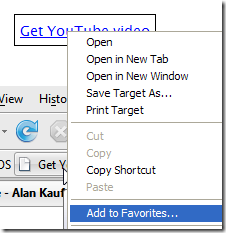
or just right click on the following link %20Download%20as%20MP4%20'+%20%20((navigator.userAgent.indexOf('Safari')!=-1)?'(control-click%20and%20select%20Download%20linked%20file%20as)':('(right-click%20and%20select%20Save%20'+%20(navigator.appName=='Microsoft%20Internet%20Explorer'?'target':'link')%20+'%20as)'))+'';}void(0);">Get YouTube video and select "Add to favorites...". (And if you choose Links as the create in folder - the short-cut will appear on the links toolbar).
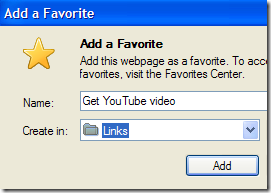

Now if you are not familiar with bookmarklets - they are URL bookmarks that contain code within them that allow them to do some amount of processing.
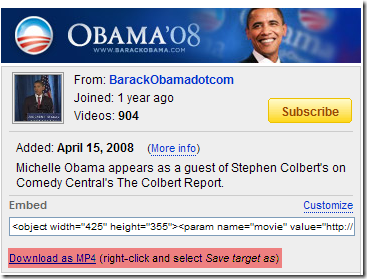
Once you have added the above bookmark-let, if you click on the bookmark while viewing a YouTube video - you will get a link in the Video's author box, which will allow you to download the video as an MP4. (And this occurs without refreshing the page - so you can decide to download the video in the middle of watching a video without having to worry about restarting the video)
I also found that the format of the video as downloaded - works great on the IPOD nano. I had to make no changes to the video, nor convert it (size or encoding) using a tool like SUPER(c). It just works - and works great!
Makes it so much easier to take PodCasts with you on the iPod.
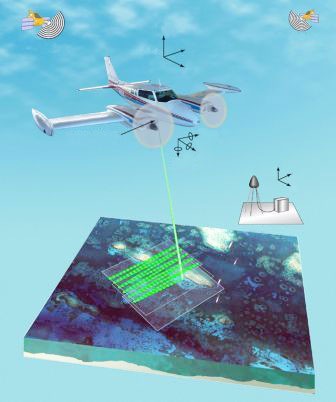
Here is a recent news article on how India plans to use LIDAR technology in The Telegraph - Calcutta (Laser Light on Terror)
Airborne Altimetric LiDAR Where does India stand?
The Indian Institute of Technology at Kanpur (IIT-K), seems to be at the fore-front of LIDAR research in India. Here are some links from that organization.
IIT Kanpur page on LIDAR: http://home.iitk.ac.in/~blohani/: Dr. Bharat Lohani is part of the Civil Engineering department at IIT-K and does most of the research into LIDAR.
International School on LiDAR Technology: http://home.iitk.ac.in/~blohani/LiDARSchool2008/index.html : A workshop on LIDAR that is currently in progress at IIT-K. This is the workshop that the news article from "The Telegraph - Calcutta" references.
LAS Convertor : A convertor utility that allows you to move between LAS formats as well as to ASCII.
Limulator : LIDAR data capture simulator. The simulator generates LiDAR data similar to a real LiDAR sensor for further display and analysis
Shameless self-plug:
LIDAR Analyst : The LIDAR tool created by my group at VLS for automated feature extraction from LIDAR data. www.LidarAnalyst.com
Hopefully the following video will show you why:
And here is more information if you are interested:
PBS Podcast: http://www.npr.org/templates/story/story.php?storyId=1298536
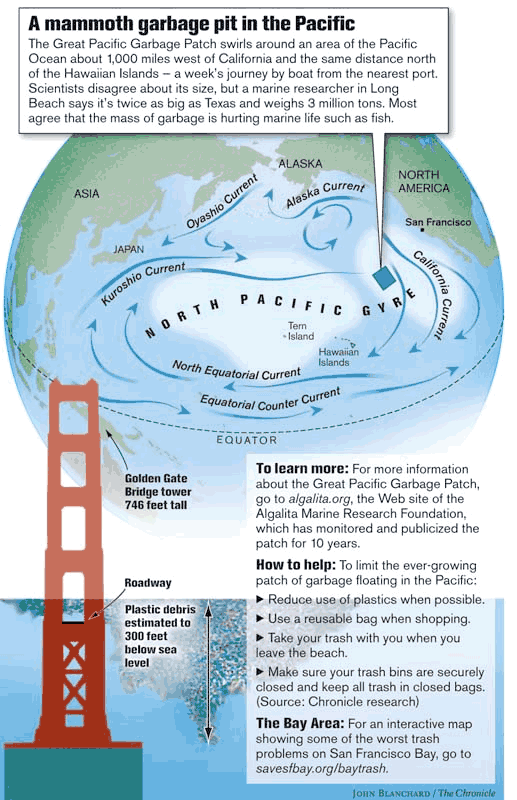
The cause of the plastic cloud is a natural phenomenon called the Gyre - a swirling vortex of ocean currents - and here is more information on how it causes the plastic cloud:
http://science.howstuffworks.com/great-pacific-garbage-patch.htm
http://en.wikipedia.org/wiki/North_Pacific_Gyre
The natural currents combined with the fact that plastics do not bio-degrade - they disintegrate in the presence of sun-light. This results in the plastic pieces that slowly keep disintegrating into smaller and smaller pieces until they are plastic molecules. At this point they just float around as nothing can degrade them further. And unless we find a solution - these molecules are going to keep floating around making the oceans one large plastic cloud. This causes further problems - as it contaminates the fish as well as pollutes beaches.
Finally, this is not a new phenomenon:
http://www.mindfully.org/Plastic/Ocean/Pacific-Garbage-Patch27oct02.htm
Bottom line: Its a problem caused by humans - and an easy solution exists - recycle - at least your plastics!
Coz like diamonds - plastics are FOREVER!
Recently I was looking for a tool that I could use to mock up UIs. Prototyping of UIs and getting user feedback is an exercise that developers often overlook - but is extremely important - because the interface is the "application" as far as the user is concerned.
Typically - I have used a paper and pencil for UI design prototyping.
Why is prototyping using a simple tool important? If you expend a lot of energy developing a UI - especially via code - then it becomes very hard to let it go. A simple form of prototyping - allows you to get a feel for the interface with the least amount of energy. In addition - it allows you to gather feedback and constantly rearrange and add UI elements to get an interface that you users want - and allows for a productive workflow.
So what is important during prototyping?
The following video - a presentation by Manuel Clement - shows how one can use PowerPoint for prototyping. (He calls it wireframe prototyping)
I like the idea of using PowerPoint - because you get a softcopy that you can save, email and use as a tracking tool of your project's design history. Paper is still useful - especially as a first step. (I remember using PowerPoint 2000 when I took a UI class for the purpose of designing a touch-screen ticket kiosk for a public transportation system - and the results were pretty good - allowing for non-linear progression through screens).
As a follow-up I found this website - that provides a download of a power-point file from which you can copy and past commonly used design controls like buttons, scroll bars and window elements.
link:http://www.istartedsomething.com/20071018/powerpoint-prototype-toolkit-01/
The following article has some useful steps on configuring the master slide which will make prototyping multiple dialogs/screens quicker - by creating the basic canvas on the master slide.
http://www.jansfreeware.com/articles/misc-prototyping.html
Recently I had to create a 3D model in OpenFlight. The model was made up of a mesh - a list of points and a list of triangles that reference the points in the list by index.
Writing out the mesh just as it is - leads to a flat colored object.
The reason for this is that without normals - the viewer doesn't know how light is reflected off the faces of the model. This is why we need to provide information about the normals for the model. Normals are used in Gouraud shading, Phong shading and other lighting models.
From all my experience with 3D graphics - there was one normal assigned to each face in the model. In other examples I have worked with - this surface normal is then applied to each vertex that makes up the face - a simplified vertex normal.
The only issue with one normal being assigned to all vertices connected to a face - is that the model will have sharp edges - even though it might be a smooth surface. This can look especially terrible when you try and model cylinders, domes or any surface that has a curve on it.
To alleviate this problem - vertices are assigned normals based on the average of all the normals of the faces that, that vertex is a part of.
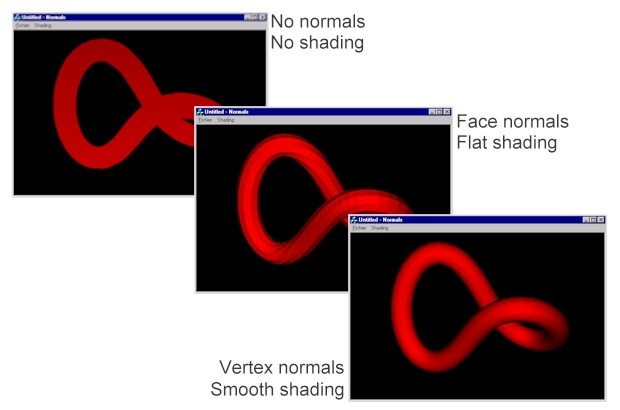
The above example shows an example of shading based on different types of normals.
From left to right:
What you need for vertex normal calculations:
As pseudo-code
An optimization:
If you look at the above pseudo-code - you will notice that the algorithm runs in will take (n x m) loops to complete, where n is number of vertices and m is the number of triangles. Typically m can approach and even exceed the number of vertices n. Thus the above algorithm has a complexity close to O(n2).
A useful optimization that one can use is instead of looping over the vertices - you loop over the triangles.
This reduces the complexity of the algorithm to O(m) and runs much faster than the original algorithm.
Finally - if you look at the paper Generating Vertex Normals, you will see that there are some useful heuristics that you can apply for more realistic effects based on the application. (such as weighting the average of the normal based on the area of the triangle - vectors make it easy to compute the area of a triangle too).
Useful articles on vertex normal computation:
A Comparison of Algorithms for Vertex Normal Computation (pdf)
Face and Vertex Normal Vectors (Direct3D 9)
A Vector Type for C# - a vector class with useful methods for performing vector arithmetic.
Nothing much to report about the last 2 weeks.
The dryness is slowly reducing and I need less and less of the artificial tears. My vision has been improving too. Overall my eyes seem to be doing great.
As for problems: Blurred vision as soon as I wake up - maybe occurred a couple of times over the last two weeks. Sometimes I do get a head-ache when I am working on the computer for extended periods (10+ hours). Night time vision still has halos around really bright lights - but it does feel like it is reducing as time goes by.
The main thing at this point is to take regular breaks - especially while I am working on the computer.
